50 / 134 ECO Gold 09/2021
7.4.2 Setting the temperature set-point value
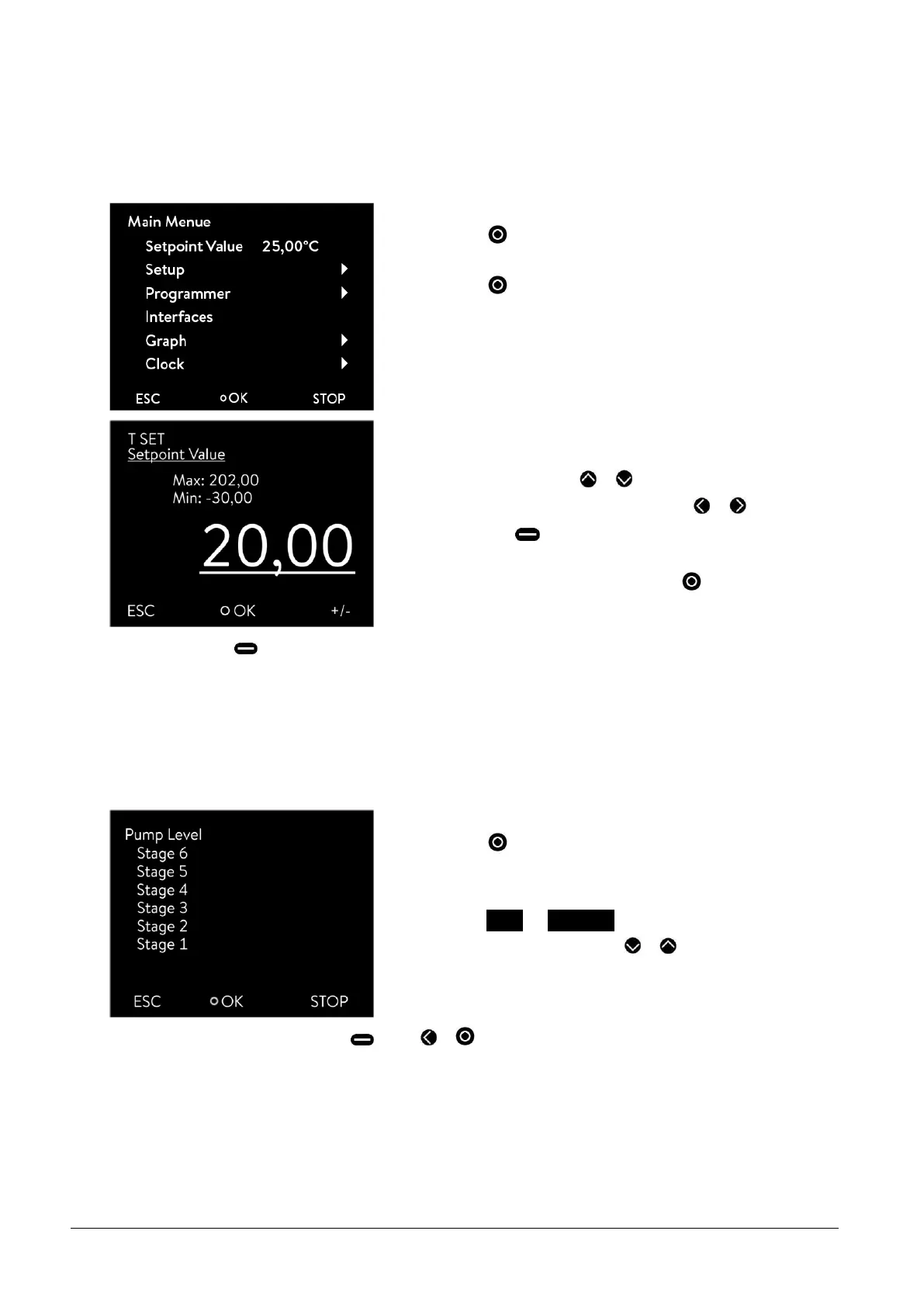
- Access to the main menu level is obtained by pressing the en-
ter key .
- Select the menu point "Set-point temperature" using the en-
ter key .
The entry window appears. The cursor below the temperature value
flashes and can be changed within the displayed limits.
- Change the value with or .
- Single figures can be selected by pressing or .
- By pressing (+/-), with appropriate equipment, the arith-
metic sign can be changed.
- Confirm your choice with the enter key .
-
By pressing (ESC) you are returned to the menu level without any change.
7.4.3 Setting the pump level
With the ECO Vario pump you have six pump levels available with which you can optimize the bath circulation, flow
rate and pressure, the noise generated and the mechanical heat input. With small thermostats (e.g. E 4 G, RE 415 G,
RE 420 G) without an external consumer power levels 1 to 3 are practicable and sufficient.
- Access to the main menu level is obtained by pressing the en-
ter key .
- The adjacent menu window appears by selecting and confirm-
ing Setup Pump level.
- The level can be selected with or . The selected level is
immediately active without confirmation.
-
You quit the menu by pressing (ESC) or .



 To Next Page