90 / 134 ECO Gold 09/2021
Access to the main menu level is obtained by pressing the enter key
.
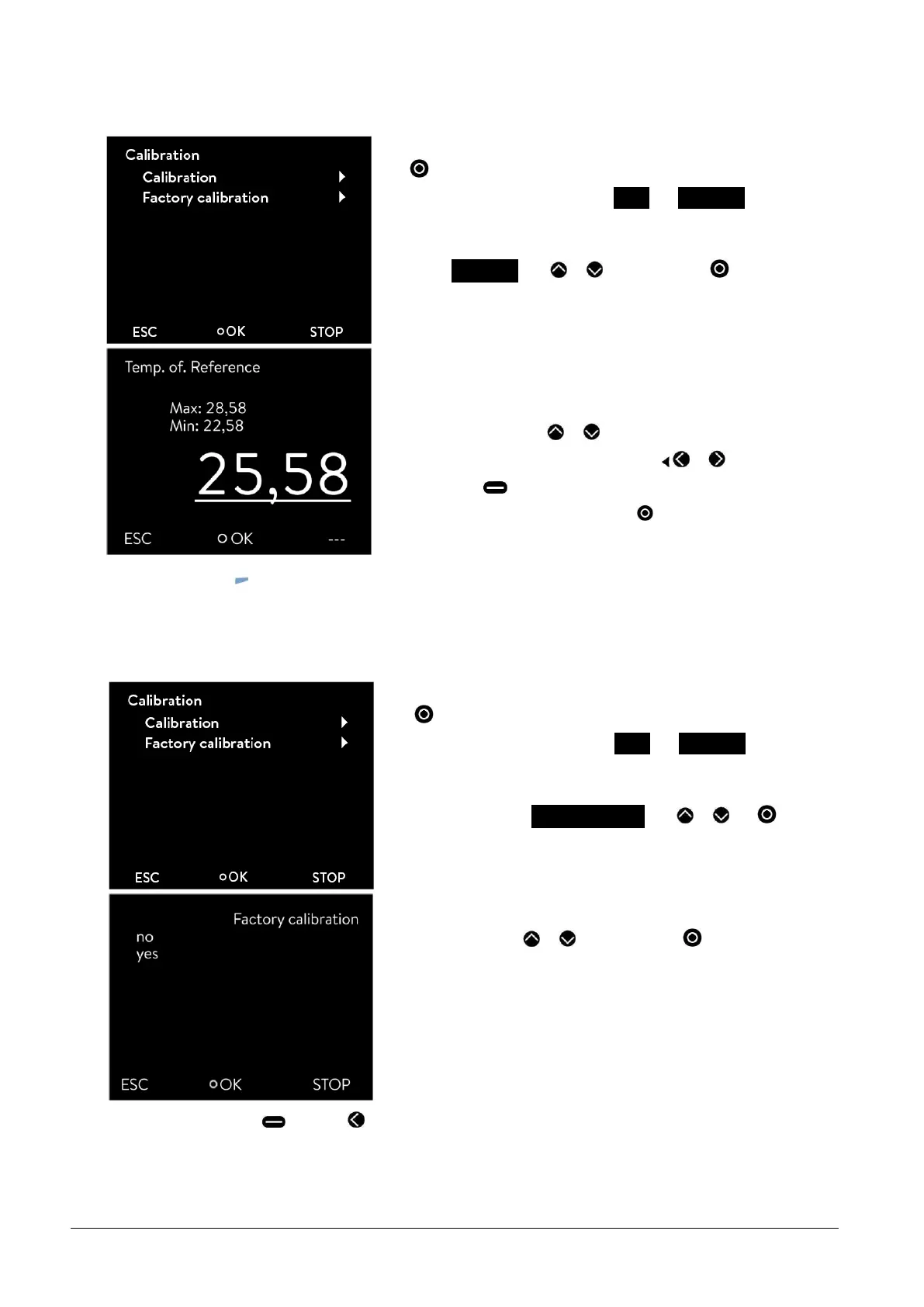
Selection and confirmation of Setup Calibration.
The adjacent menu window appears.
Select Calibration with or and confirm with .
The entry window appears. The value indicated on the reference ther-
mometer must be entered as the value.
Change the value with or .
Single figures can be selected by pressing or .
By pressing (+/-) the arithmetic sign can be changed.
You confirm the set value by pressing .
-
By pressing (ESC) you are returned to the menu level without any change.
13.8 Restoring the factory setting of the internal temperature sensor
If the offset has been adjusted, the factory setting can be restored again.
Access to the main menu level is obtained by pressing the enter key
.
Selection and confirmation of Setup Calibration.
The adjacent menu window appears.
Select and confirm Factory calibration with or and .
The adjacent menu window appears.
Select "yes" using or and confirm with to restore the
factory settings.
-
By pressing "no" (ESC) or you are returned to the menu level without any change.



 To Next Page