A
A
C
C
S
S
6
6
0
0
6
6
D
D
i
i
g
g
i
i
t
t
a
a
l
l
A
A
C
C
S
S
e
e
r
r
v
v
o
o
d
d
r
r
i
i
v
v
e
e
M
M
a
a
n
n
u
u
a
a
l
l
R
R
e
e
v
v
1
1
.
.
0
0
Tel: (86)755-26434369 24 Website: www.leadshine.com
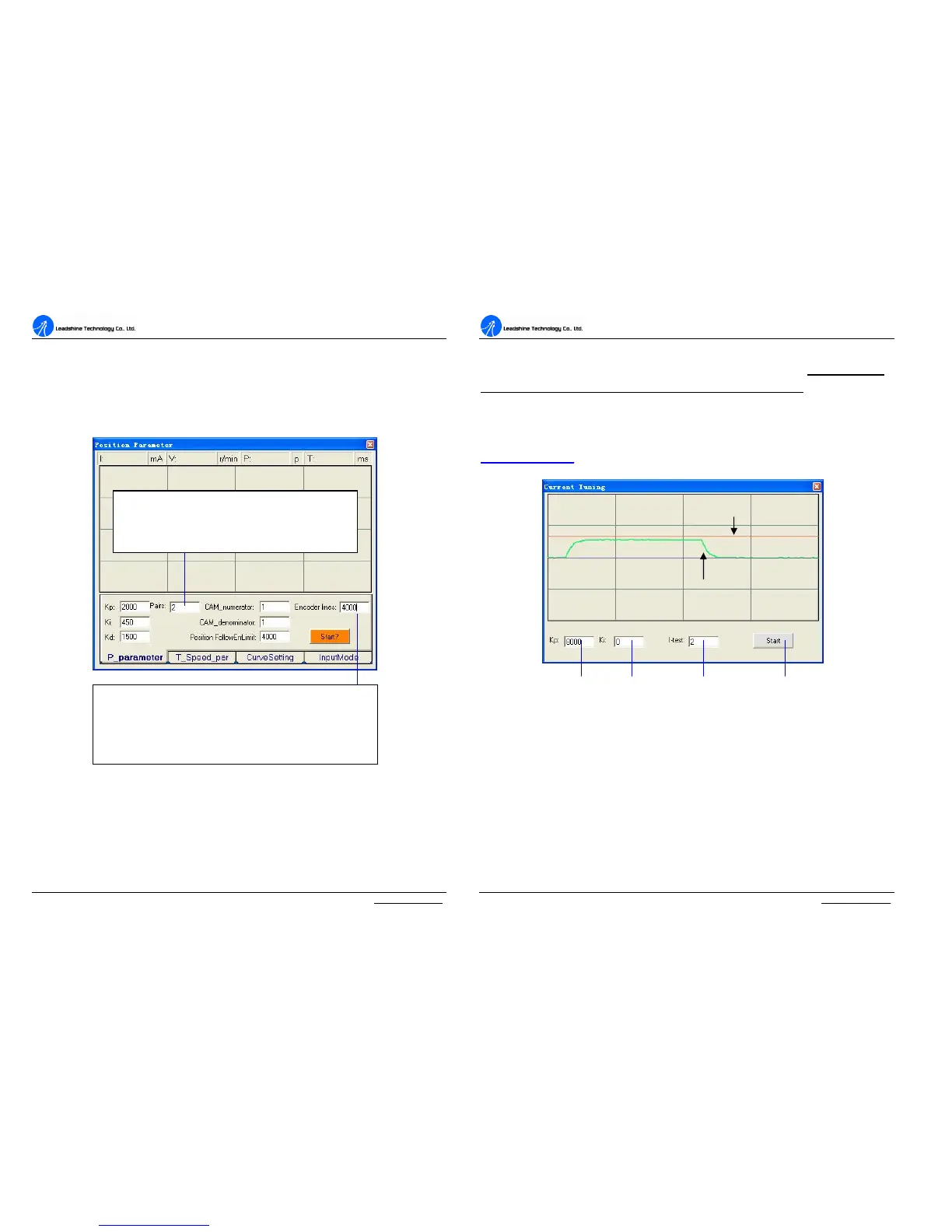
Software Configuration before Tuning
Some parameters must be configured before tuning the drive and the motor. Select
Tuning ->PositionLoop to open the position-loop window. Set the parameters as
according to the description in figure 25.
Figure 25: Software configuration before Tuning
Current Loop Tuning
For most of the ACS606 drives have been being sold to the customers with
Leadshine’s ACM series servo motors, Leadshine will tune the current loop before
sending drives&motors out of the factory. Current Loop tuning is a reserved
Set the Encoder Lines according to encoder specification. The
input number should be 4 times of the actual encoder
lines/resolution since the ACS606 decodes the encoder signals in
X4 mode.(Ie.4000 for 1000 lines Encoder)
Set number of pole pairs of the servo motor according
to the motor manual.(For LeadShine BLM series DC
brushless servo motor,this value is 2.)
A
A
C
C
S
S
6
6
0
0
6
6
D
D
i
i
g
g
i
i
t
t
a
a
l
l
A
A
C
C
S
S
e
e
r
r
v
v
o
o
d
d
r
r
i
i
v
v
e
e
M
M
a
a
n
n
u
u
a
a
l
l
R
R
e
e
v
v
1
1
.
.
0
0
Tel: (86)755-26434369 25 Website: www.leadshine.com
function, and when open the current tuning window by selecting
Tuning->CurrentLoop, a password input window will appear. Leadshine just
offers password to some customers for tuning current loop, while most of
customers just need to tune the position loop parameters if they use the drives with
Leadshine’s ACM series servo motors. If you use the ACS606 with AC servo motors
from other manufacturers, the current loop tuning may be needed. Please contact
tech@leashine.com for the password to tune the current loop.
Figure 26 Current-loop tuning window(Kp=10000)
To start the current-loop tuning, please enter a command value in the I-test textbox
(unit: A). Then take following steps to get optimization step response.
1. Enter a value in the Kp textbox and set Ki to zero. Click the ‘Start’ button and
observe the green curve in the window.
2. If the response is an over-damped response as shown in figure 26, increase Kp
until get an under-damped response as figure 27.
3. If get a large overshoot response as shown in figure 28, decrease Kp to get a
Command Curve
Actual Curve
Proportional Gain



 To Next Page