A
A
C
C
S
S
6
6
0
0
6
6
D
D
i
i
g
g
i
i
t
t
a
a
l
l
A
A
C
C
S
S
e
e
r
r
v
v
o
o
d
d
r
r
i
i
v
v
e
e
M
M
a
a
n
n
u
u
a
a
l
l
R
R
e
e
v
v
1
1
.
.
0
0
Tel: (86)755-26434369 40 Website: www.leadshine.com
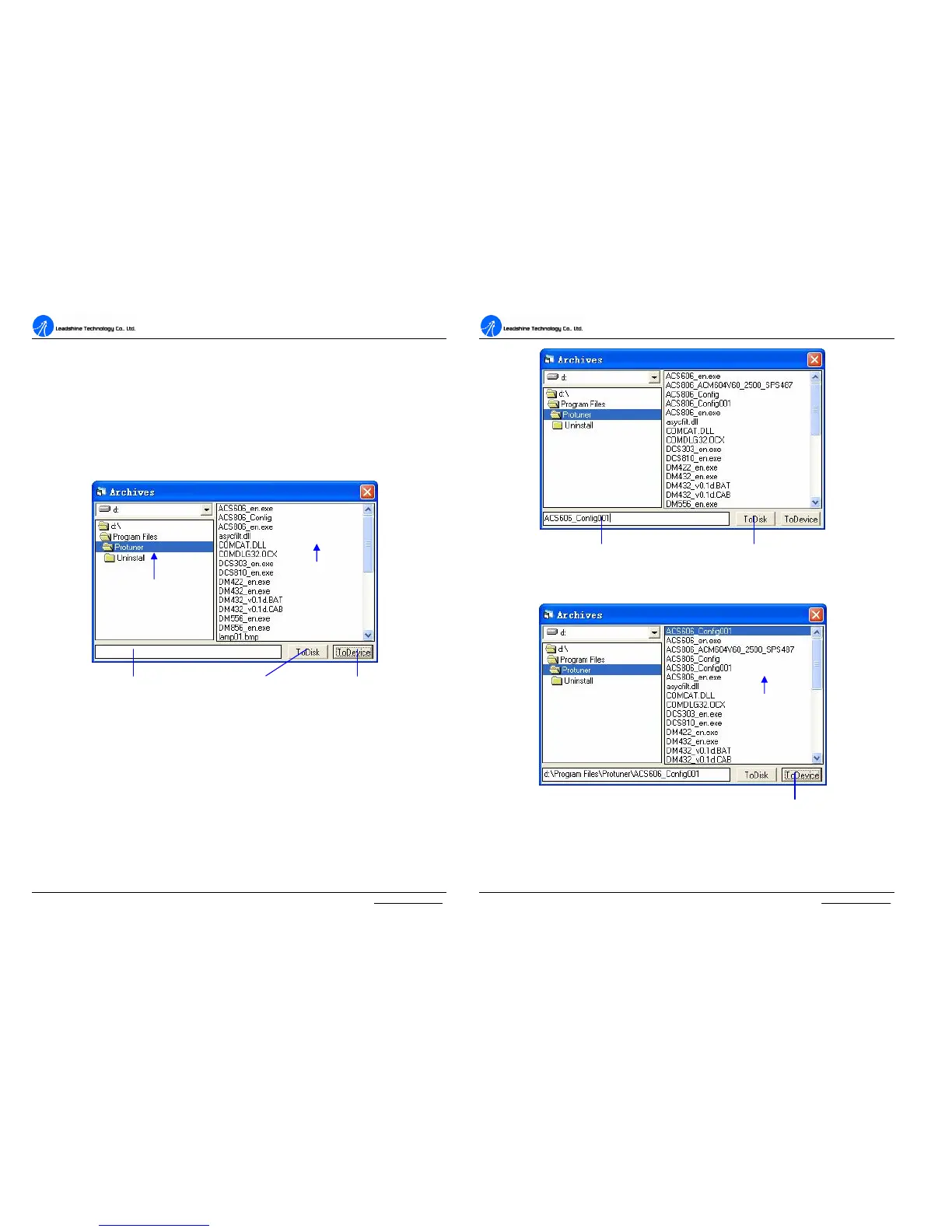
Save Data on Harddisk
ProTuner offers a tool to save all the configuration data on harddisk. This tool is
very useful when building machines with same motors and other components. Select
Option->Archives, the upload and download window will appear as figure 45. To
Save the current data on hardisk, enter a file name in the edit box and then click
‘ToDisk’ button. See figure 46 for more detail.
Figure 45: Upload and download window
Download Data to Device
When communication between ProTuner and the ACS606 is established, you can
open a configuration file and download the data from the file to the drive. See figure
47 for more details.
Select folder
Files list in folder
File name and path Save on harddisk Download to EEPROM
A
A
C
C
S
S
6
6
0
0
6
6
D
D
i
i
g
g
i
i
t
t
a
a
l
l
A
A
C
C
S
S
e
e
r
r
v
v
o
o
d
d
r
r
i
i
v
v
e
e
M
M
a
a
n
n
u
u
a
a
l
l
R
R
e
e
v
v
1
1
.
.
0
0
Tel: (86)755-26434369 41 Website: www.leadshine.com
Figure 46: Save data to harddisk
Figure 47: Download data to the drive
Type the file name here Click to save data to file
Select a config
file in the list
Click to download the data to the Drive



 To Next Page