A
A
C
C
S
S
6
6
0
0
6
6
D
D
i
i
g
g
i
i
t
t
a
a
l
l
A
A
C
C
S
S
e
e
r
r
v
v
o
o
d
d
r
r
i
i
v
v
e
e
M
M
a
a
n
n
u
u
a
a
l
l
R
R
e
e
v
v
1
1
.
.
0
0
Tel: (86)755-26434369 46 Website: www.leadshine.com
Erase All!: Erase All! button. The user can clear all error(s) including error
history by clicking this button.
7.Using Tips
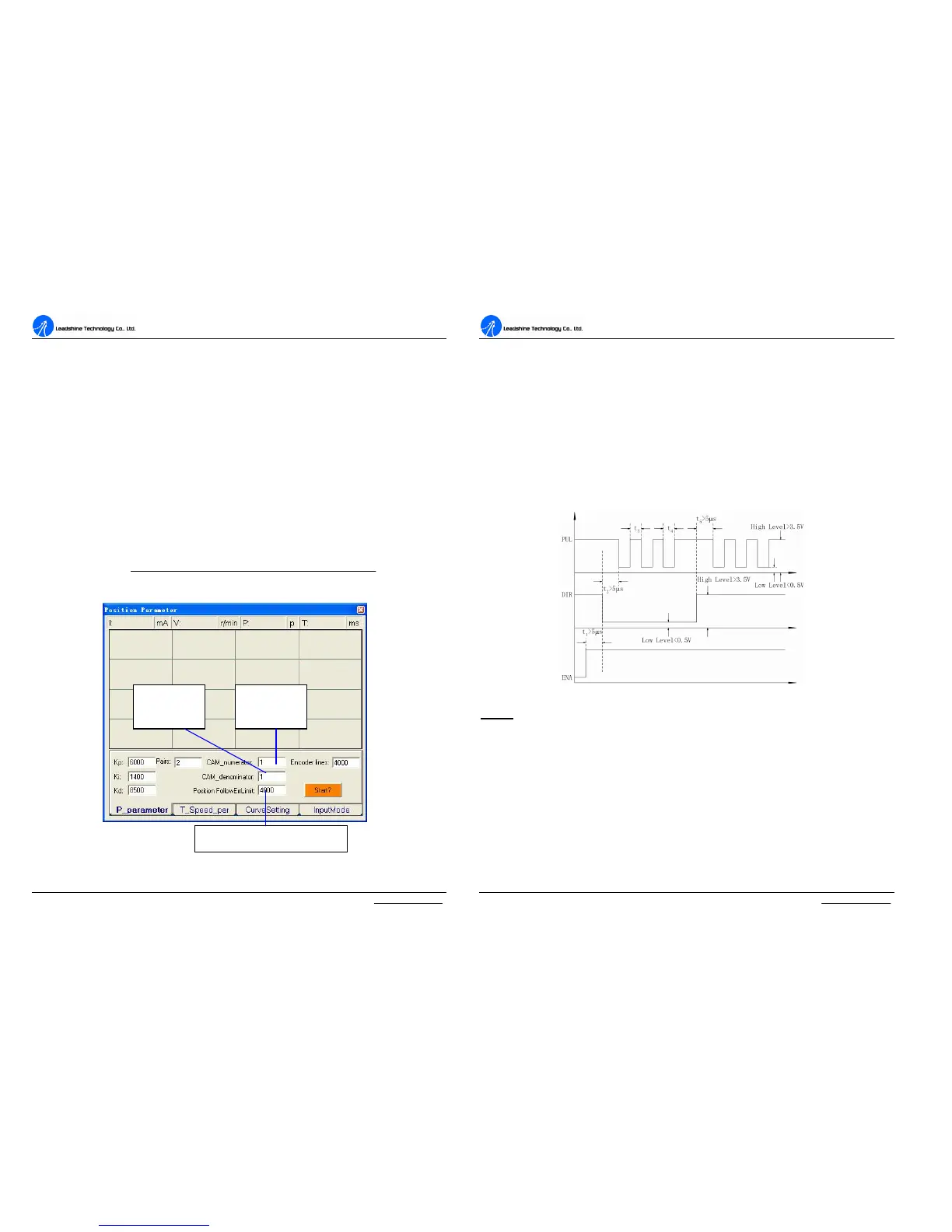
Change PPR by Electronic Gear
PPR(pulses per revolution) is the counts/pulses to make motor move one turn. If the
default PPR can not satisfy your application, a way to change it is setting electronic
gear in ProTuner as shown in figure 50. You can set this parameter in the position
tuning window by select Tuning->PositionLoop->P_parameter. For ACS606, the
actual PPR can be calculated by the following formula:
numeratorCAM
atordenoCAMresolutionEncoder
PPR
_
min__4
=
Figure 50: Electronic gear and position following error setting
Numerator
of Electronic
Denominator
of Electronic
Position following error limit
A
A
C
C
S
S
6
6
0
0
6
6
D
D
i
i
g
g
i
i
t
t
a
a
l
l
A
A
C
C
S
S
e
e
r
r
v
v
o
o
d
d
r
r
i
i
v
v
e
e
M
M
a
a
n
n
u
u
a
a
l
l
R
R
e
e
v
v
1
1
.
.
0
0
Tel: (86)755-26434369 47 Website: www.leadshine.com
Position following Error Limit
The ACS606 will activate a position following error if position error between
command and encoder feedback exceeds the setting limit value. To set the limit
value, please select Tuning->PositionLoop->P_parameter and find the Position
FollowingErrLimit edit box. See figure 50.
Sequence Chart of Control Signals
In order to avoid some fault operations and deviations, PUL, DIR and EN should
abide by some rules, shown as the following figure:
Figure51: Sequence chart of control signals
Notes:
a) t
1
: EN must be ahead of DIR by at least 5 µs. Usually, ENA is NC (not
connected). See Connections section for more information.
b) t
2
: DIR must be ahead of PUL active edge by at least 5 µs to ensure correct
direction.
c) t
3
: Pulse width not less than 0.85 µs;
d) t
4
: Low level width not less than 0.85 µs.



 To Next Page