A
A
C
C
S
S
6
6
0
0
6
6
D
D
i
i
g
g
i
i
t
t
a
a
l
l
A
A
C
C
S
S
e
e
r
r
v
v
o
o
d
d
r
r
i
i
v
v
e
e
M
M
a
a
n
n
u
u
a
a
l
l
R
R
e
e
v
v
1
1
.
.
0
0
Tel: (86)755-26434369 8 Website: www.leadshine.com
RS232 Interface Connection
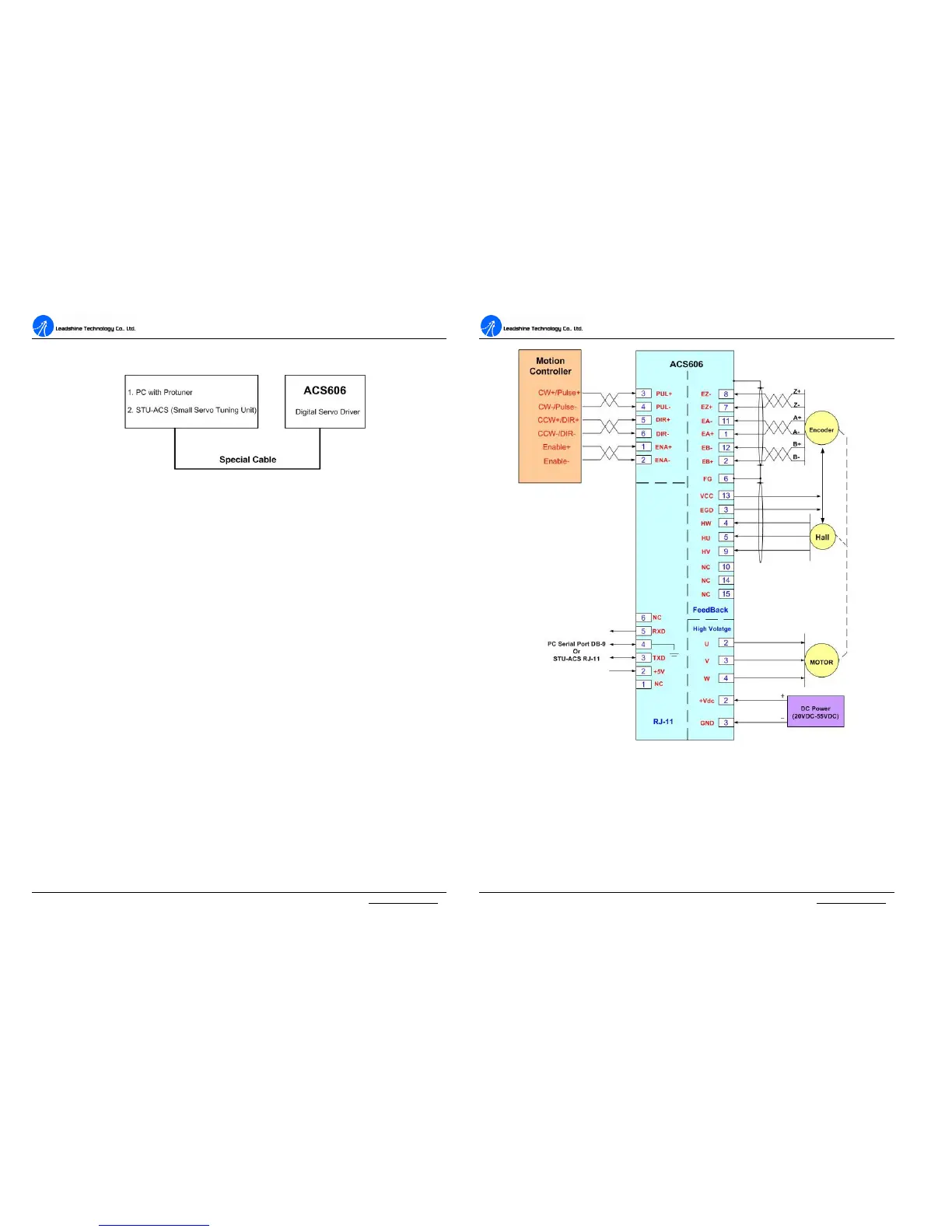
Figure 9: RS232 interface connection
Typical Connections
A typical connection of the ACS606 is shown as Figure 10. Please consult “Control
Signal Connections” and “Encoder and Hall Sensor Connections” for more
information about controller and encoder connections.
A
A
C
C
S
S
6
6
0
0
6
6
D
D
i
i
g
g
i
i
t
t
a
a
l
l
A
A
C
C
S
S
e
e
r
r
v
v
o
o
d
d
r
r
i
i
v
v
e
e
M
M
a
a
n
n
u
u
a
a
l
l
R
R
e
e
v
v
1
1
.
.
0
0
Tel: (86)755-26434369 9 Website: www.leadshine.com
Figure 10: Typical connection of the ACS606
4. Servo Setup
Before you start the servo, you can follow the below steps.



 To Next Page