MPC2810 Motion Controller Hardware Manual
38
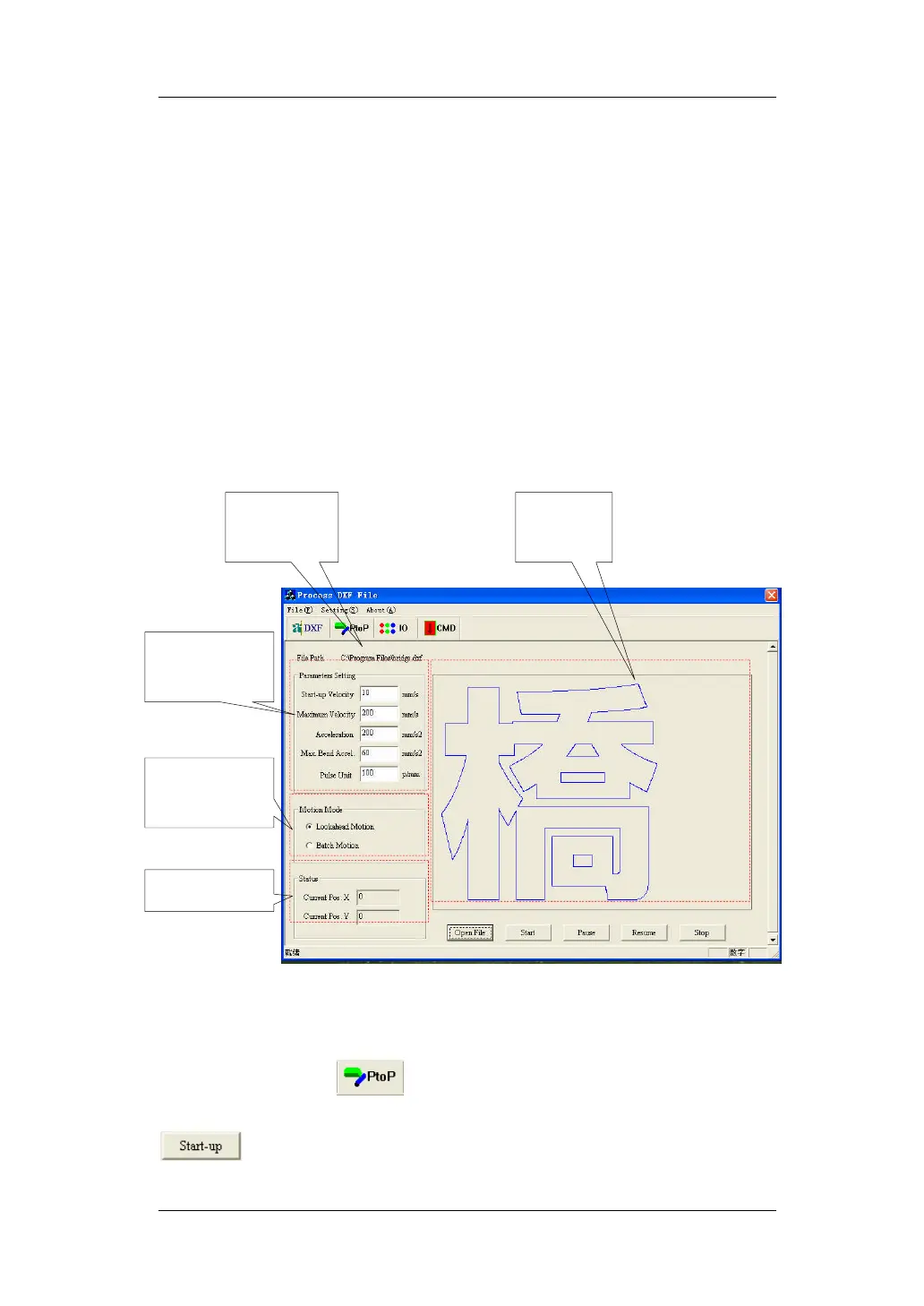
Look-ahead and Batch-processing modes are improved in the motion mode
setting. Look-ahead benefits being higher machining speed and less machining
impact. The controller will set the optimized parameters when user sets the max
acceleration, velocity and others. It makes much better performance in the
micro-segment trajectory motion. Batch-processing will be executed as set
velocity and acceleration.
There are some settings in the parameters, Start-up Velocity, Max Velocity,
Acceleration, Max Bend Acceleration and Pulse Unit.
Fig. 4-3 Continuous Trajectory Module
(2). Test PtoP Module
Click the button, to enter the PTP Control Module. After setting
the Card Number, Axis Number and Motion Parameters, to click the button,
.
Parameters
Setting
Opened DXF
File
Motion Mode
Setting
Motion
Trajectory
Motion Status


 To Next Page