Need help?
Do you have a question about the Leetro MPC2810 and is the answer not in the manual?
Guidelines for safe operation, including power cables, connections, and handling.
Details the duration, terms, and exclusions of the product warranty.
Recommends against using products in life support or aircraft applications.
Highlights the importance of routine maintenance for proper and safe operation.
Describes the MPC2810 as a high-performance motion controller for stepper and servo motors.
Specifies that this manual is for the MPC2810 motion controller.
Details motion modes, interpolation, pulse output, encoder inputs, and I/O capabilities.
Illustrates a typical motion control system configuration using the MPC2810.
Lists the standard and optional accessories included in the MPC2810 package.
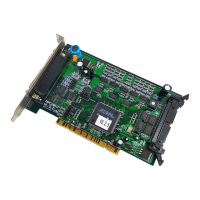
Describes the layout of the MPC2810 motion control card and breakout boards.
Step-by-step instructions for physically installing the motion control card into a PC.
Detailed steps for installing the MPC2810 driver, library, and demo programs.
Provides methods for removing the MPC2810 software from the system.
Details the process for updating the MPC2810 driver and function library.
Explains how to set the local ID for multiple cards using the U55 Dialer.
Details the pin assignments and functions for the P62-01 breakout board.
Describes extending universal I/O ports using the C4037 cable and P37-05 breakout board.
Details the pin assignments and functions for the P62-02 breakout board.
Provides step-by-step instructions for connecting hardware components.
Describes the connection of 2-CH encoder interfaces for A, B, and Z phase signals.
Explains how to connect dedicated switch inputs like limit, homing, and alarm signals.
Details connections for universal inputs and outputs, including loops and output types.
Shows the default directory structure after software installation.
Guide to using the VcDemo3 debugging software with its various modules.
Details the Continuous Trajectory module for processing DXF files and generating motion.
Explains the Point-to-Point (PTP) Control module for setting card, axis, and motion parameters.
Describes the IO Test module for checking standard and specific inputs/outputs status.
Allows testing of all MPC2810 functions and commands by entering parameters.
Enables setting Pulse Out Mode, Feedback, and Home Mode for the motion controller.
Wiring diagram for connecting the MPC2810 to a DMD808 stepper motor drive.
Wiring diagram for connecting the MPC2810 to a Panasonic MINAS A Series servo motor drive.
 General
| Brand | Leetro |
|---|---|
| Model | MPC2810 |
| Category | Controller |
| Language | English |

 To Next Page