Whole House Lighting Controller - LC7001 1308243 REV. F
9
Amazon Alexa Voice Control Integration
Prerequisites
Enabling voice control of the Legrand Lighting Control System through devices with Amazon
Alexa requires the following:
• a device with Amazon Alexa (i.e. Amazon Echo) connected to the home network
• the Legrand Whole House Lighting Control System (LC7001)
• the Amazon Alexa app installed on a mobile device
• an Internet connection
• the Legrand Lighting Control app, version 4.0 or later, installed on a mobile device
• an active Legrand cloud account
NOTES:
• For instruction on creating and integrating a Legrand cloud account with the LC7001, refer
to “Setting up Remote Access” in the Legrand Whole House Lighting Controller User Guide
or go to Settings > Remote Access Info > Remote Access Setup in the Legrand Lighting
Control app.
• If you are transitioning your RF Lighting Control devices from Samsung ARTIK Cloud to
Legrand Cloud, please ensure you have disabled the previous Samsung skill and that you
have deleted all devices from the Alexa app.
Connecting Alexa to the Legrand Lighting Control System
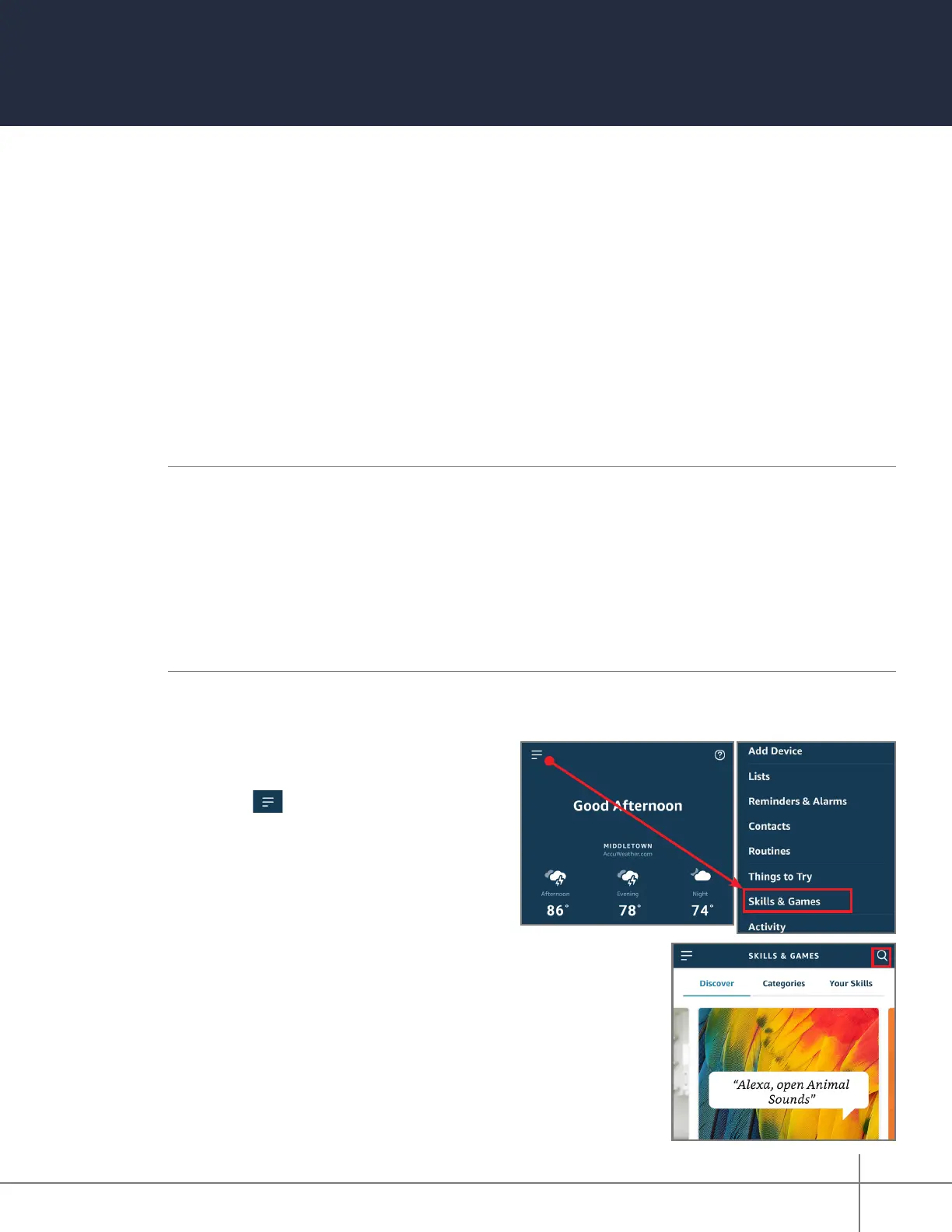
1. Open the Alexa app.
2. Select to open the side menu.
3. Select Skills & Games from the menu.
4. Open the Search option.






 To Next Page