Preparation
12
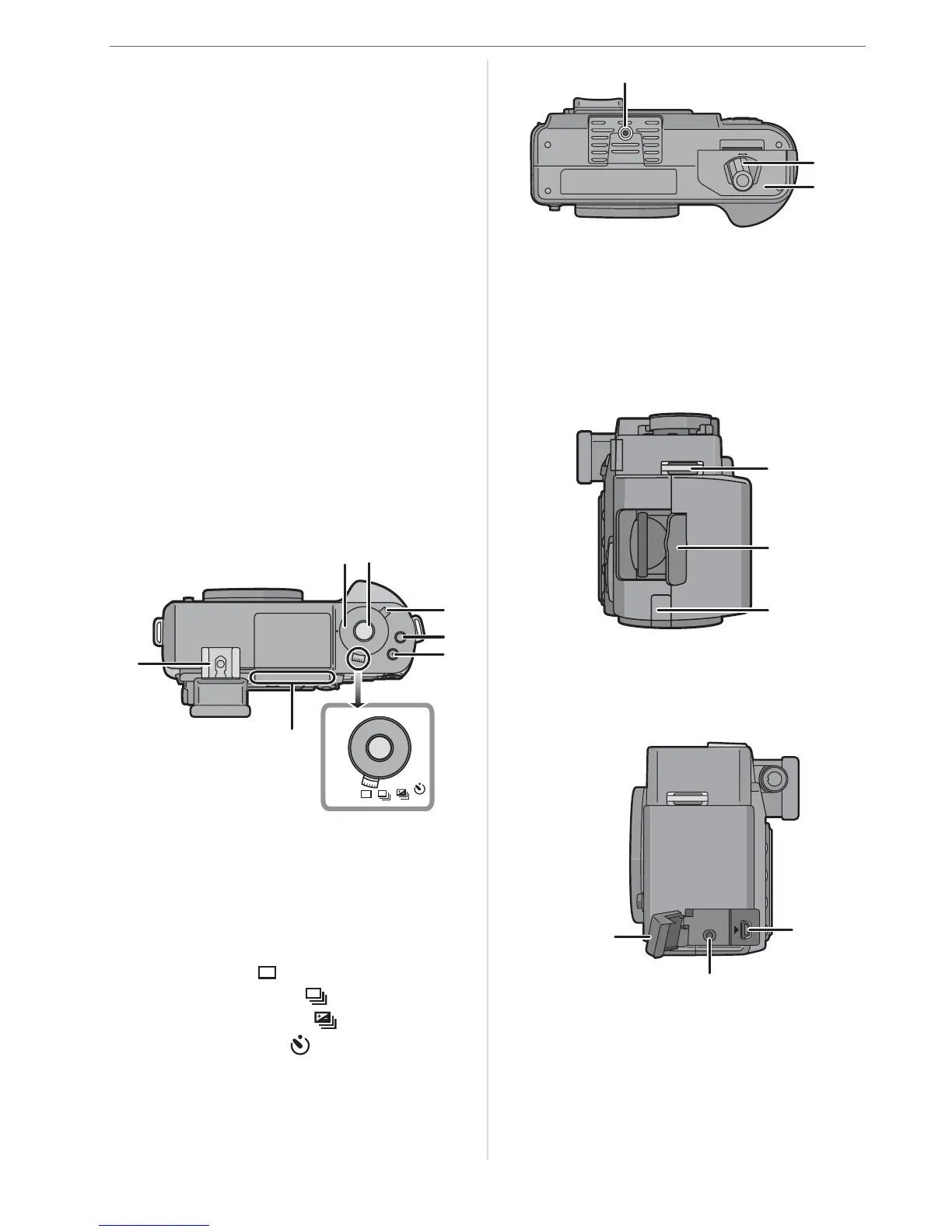
13 Focus mode lever (P32, 35, 42, 54, 55)
14 [AFL/AEL] button (P63)
15 Drive mode lever
16 Camera ON/OFF switch (P25)
17 Command dial (P33, 37, 38, 40, 47 to
49, 56, 58, 61, 68, 71, 73)
18 /// Cursor buttons (P27)
19 [MENU/SET] button (P27)
20 Delete button (P45)
21 Aperture stopping down button (P57)
22 [DISPLAY] button (P31, 45, 51, 53)
23 Playback button (P44, 45, 47 to 49,
104)
24 LCD monitor (P14, 31, 45, 50, 51, 53)
25 Flash output adjustment button (P61)
26 Flash button (P58, 105)
27 [ISO] button (P71)
28 [WB] button (P68)
29 Diopter adjustment dial (P31)
30 Shutter speed dial (P32, 36, 38)
31 Shutter release button (P32)
32 Metering mode lever (P72)
33 [FUNC.1] button (P73)
34 [FUNC.2] button (P40, 73)
35 Drive mode lever
Single (P32):
Continuous (P64):
Auto bracket (P66):
Self-timer (P67):
36 Focus distance reference line (P42)
37 Hot shoe (P105)
38 Tripod thread
• When you use a tripod, make sure it is
stable when the camera is attached to
it.
39 Open/Close lever (P20)
40 Battery door (P20)
41 Strap eyelet (P24)
42 Card door (P21)
43 DC cable cover (P21)
44 [USB] socket (P98, 100)
45 [V OUT/REMOTE] socket (P104, 107)
46 Terminal door
35
30 31
34
33
32
37
36
O
P
E
N
C
L
O
S
E
38
40
39
41
43
42
45
44
46
V OUT /
REMOTE
USB



 To Next Page
 Loading...