Menu Settings
90
• Power save mode is not activated during a
slide show. (However, the setting for
power save mode is fixed to [10 MIN.]
while pausing a slide show or playing back
a [MANUAL] slide show.)
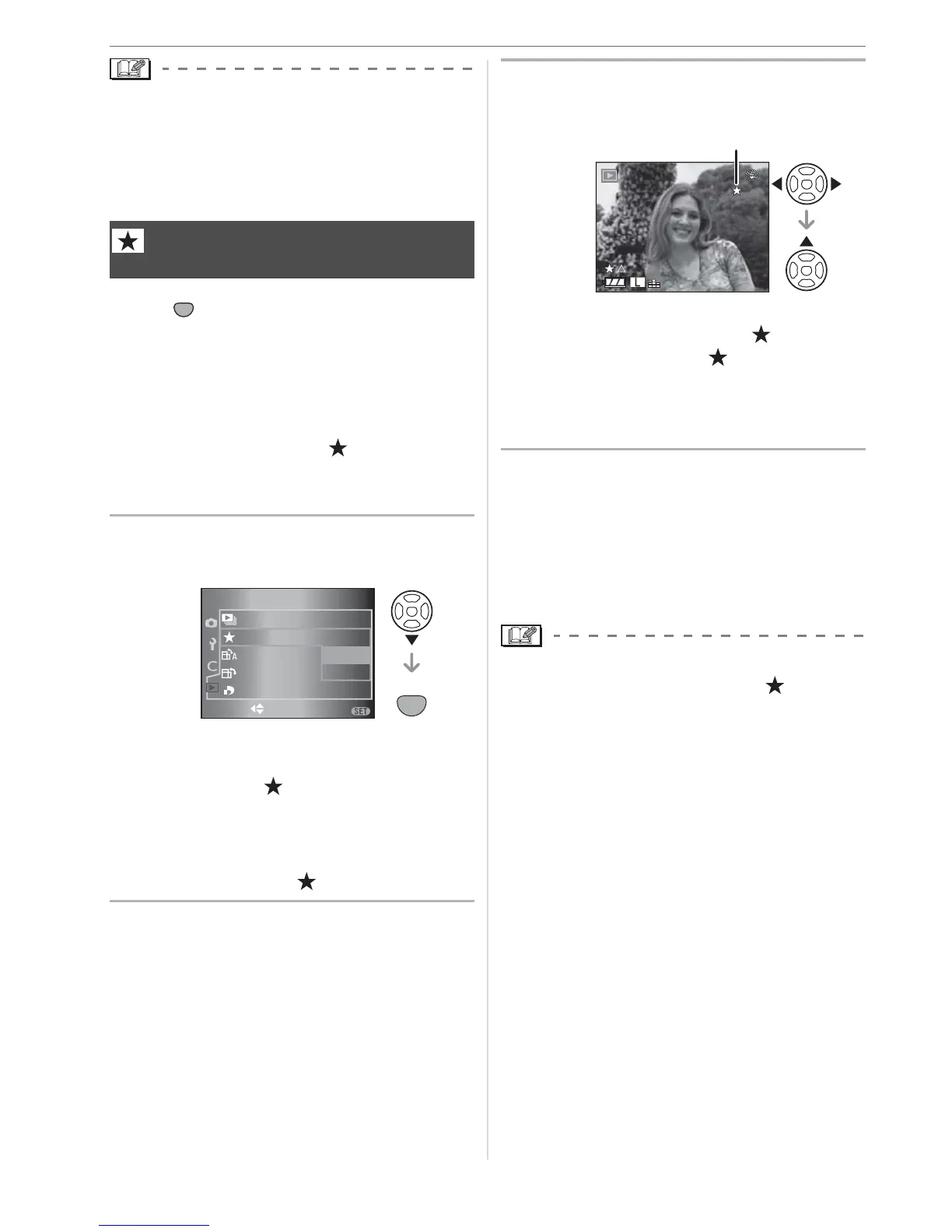
Press [ ] to display the [PLAY] mode
menu and select the item to set. (P88)
You can do the following if a mark has been
added to pictures and they have been set
as favorites.
• Delete all the pictures not set as favorites.
([ALL DELETE EXCEPT ]) (P46)
• Play back the pictures set as favorites only
as a slide show. (P89)
1 Press
to select [ON] and then
press [MENU/SET].
• You cannot set pictures as favorites if
[FAVORITE] is set to [OFF]. Also the
favorites icon [ ] will not appear when
[FAVORITE] is set to [OFF] even if it
was previously set to [ON].
• You cannot select [CANCEL] if none of
the pictures have [ ] displayed.
2 Press [MENU/SET] to close the
menu.
3 Press
/
to select the picture
and then press
.
• Repeat the above procedure.
• If is pressed while the [ ] favorites
icon is displayed, [ ] is cleared, and
the favorites setting is canceled.
• You can set up to 999 pictures as
favorites.
w Deleting all favorites
1 Select [CANCEL] on the screen shown in
step
1 and then press [MENU/SET].
2 Press to select [YES] and then press
[MENU/SET].
3 Press [MENU/SET] to close the menu.
• When printing pictures at a photo printing
store, [ALL DELETE EXCEPT ] (P46) is
useful so only the pictures you want to be
printed remain on the card.
• Use Adobe Photoshop
®
Elements
®
4.0
(Win) / 3.0 (Mac) on the CD-ROM
(supplied) to set, confirm, or delete
favorites.
• You may not be able to set pictures taken
with other equipment as favorites.
[FAVORITE]
Setting your favorite pictures
SET
MENU
SET
MENU
1
/
2
PLAY
ROTAT E
ON
ROTATE DISP.
DPOF PRINT
SLIDE SHOW
SELECT SET
MENU
ON
OFF
CANCEL
FAVORITE
10
0001
1/19
F2.8
2000
ISO
100
A



 To Next Page
 Loading...