Preparation
25
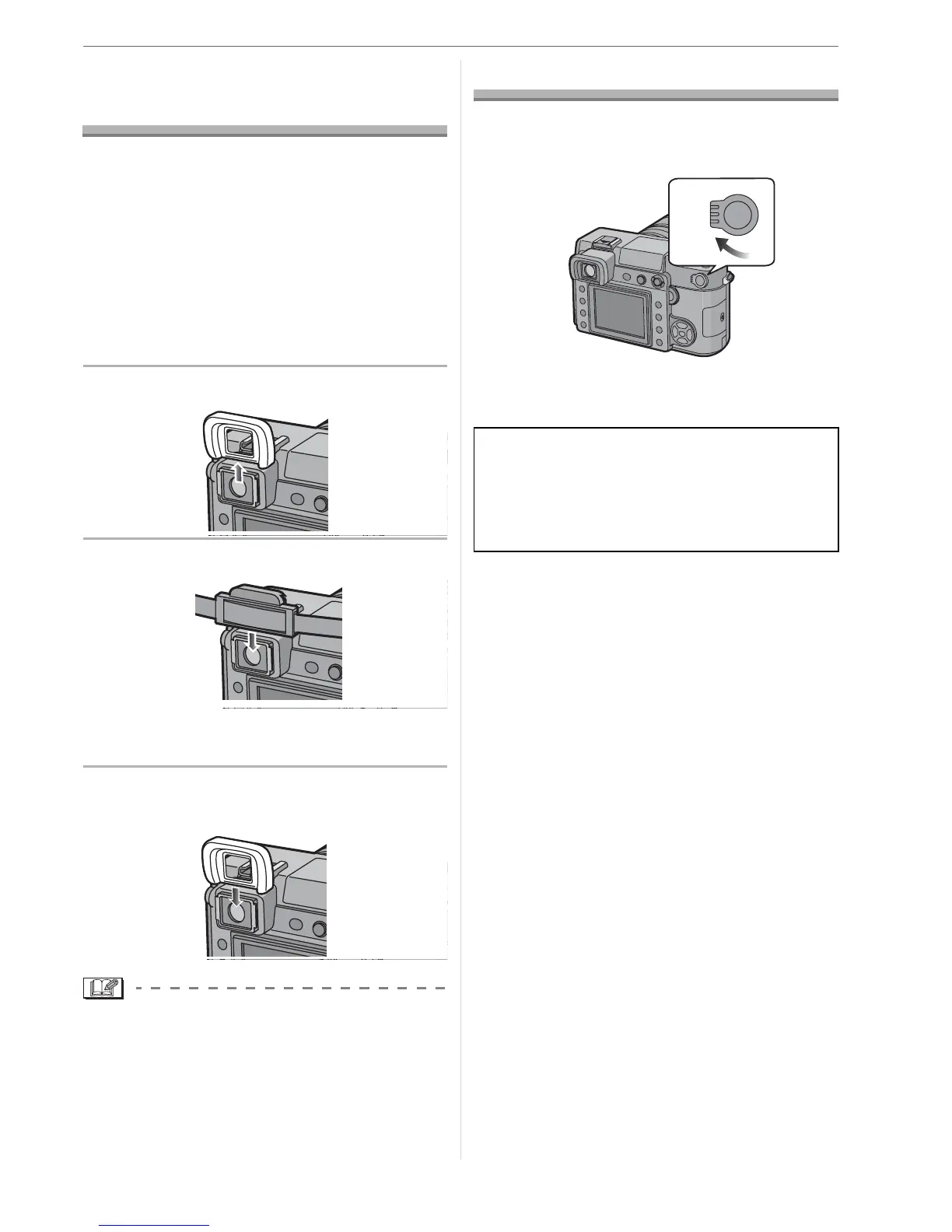
Attaching the Eyepiece
Cap
When taking pictures with your eye removed
from the viewfinder, light may enter the
viewfinder and affect the exposure and focus.
Attach the eyepiece cap so that light does
not enter the viewfinder and prevent
accurate exposure when taking pictures
with Live View (P50) or the Self-timer (P67)
and when using the remote Control Unit.
(CR-DC1; optional) (P107)
1 Slide the eye cup up to detach it.
2 Slide the eyepiece cap down.
• The eyepiece cap is attached to the
strap.
w Attaching the eye cup
Slide the eye cup down.
• Be careful not to lose the eye cup.
Turning the Camera On
Set the camera ON/OFF switch to
[ON].
• The camera turns off when you set the
switch to [OFF].
Dust reduction function
When the camera is turned on, the dust
reduction function is automatically
activated to shake off any dust on the front
part of the image sensor.
ON
OFF



 To Next Page
 Loading...