Menu Settings
88
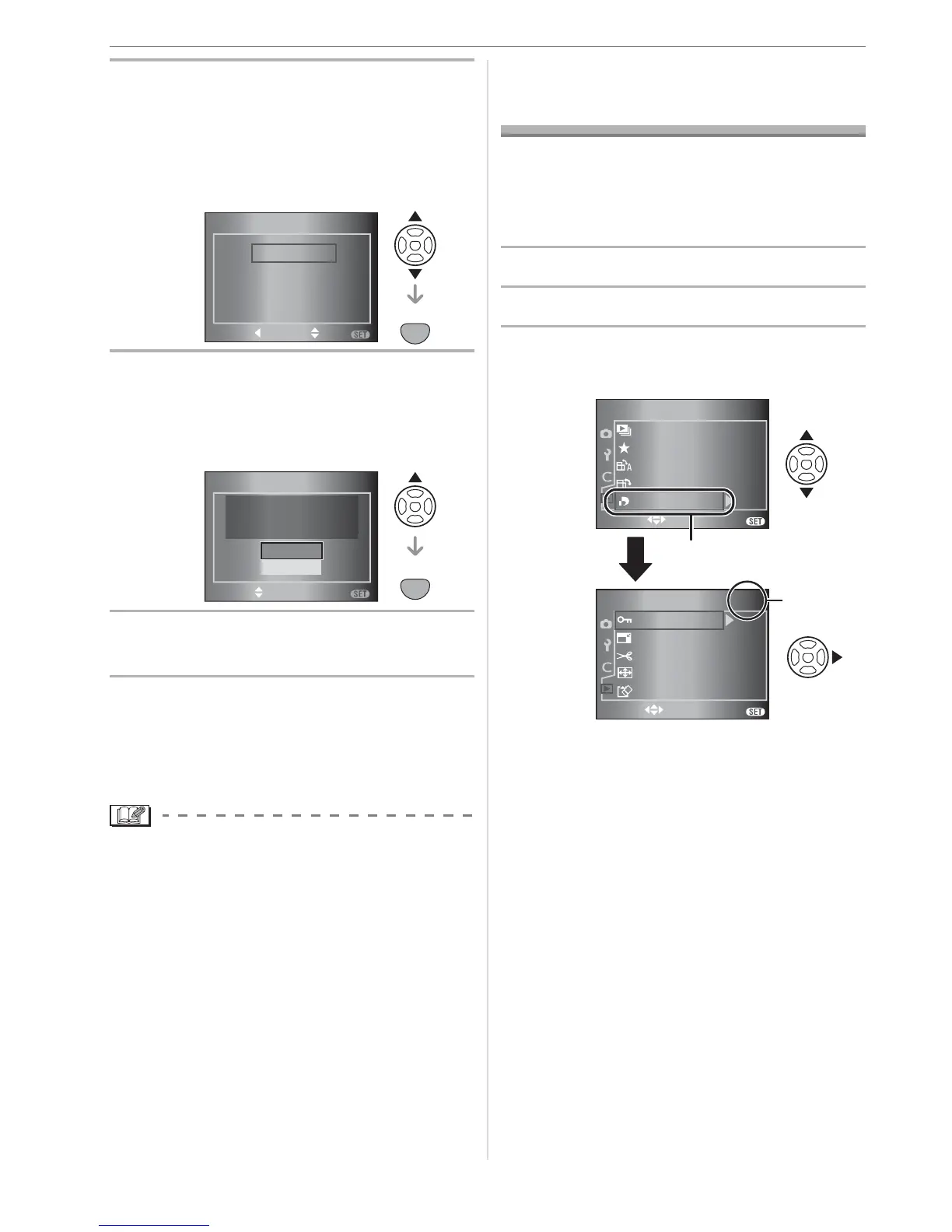
2 Press
/
to select
[CUSTOM SET 1],
[CUSTOM SET 2] or
[CUSTOM SET 3] and then press
[MENU/SET].
3 Press
to select [YES] and then
press [MENU/SET].
(Only when there are previously saved
settings.)
4 Press [MENU/SET] to close the
menu.
w Using settings in [CUSTOM SET]
Select the saved setting from
[CUSTOM SET] in the [CUSTOM] menu.
(P85)
• The settings for each menu item are not
lost when the camera is turned off even if
you do not use custom set to save them.
Using the [PLAY] mode
menu
You can use various functions in playback
mode to rotate pictures, set protection for
them etc.
• Refer to P89 to 97 for each menu item.
1 Press [PLAY] to display a picture.
2 Press [MENU/SET].
3 Press
/
to select the menu
item and then press .
• Press at to switch to the next
menu screen.
• After performing steps
1 and 2, refer
to the description of the menu item
in the operating instructions and
then set it.
CUST.SET MEM.
SET
MENU
SET
MENU
CANSEL SELECT
CUSTOM SET 2
CUSTOM SET 3
CUSTOM SET 1
SET
MENU
CUST.SET MEM.
SELECT
OVER WRITE CURRENT
CAMERA STATUS AS
CUSTOM SET 1 ?
NO
YES
SET
MENU
EXIT
MENU
SELECT
1
/
2
PLAY
ROTAT E
FAVORITE
SLIDE SHOW
ON
OFF
ROTATE DISP.
DPOF PRINT
EXIT
MENU
SELECT
2
/
2
PLAY
FORMAT
RESIZE
TRIMMING
ASPECT CONV.
PROTECT
A
2/2



 To Next Page
 Loading...