EasyManua.ls Logo

Leica SL - Page 33

Leica SL
151 pages
Print Icon
To Next Page IconTo Next Page
To Previous Page IconTo Previous Page
Loading...
EN
178
Camera operation
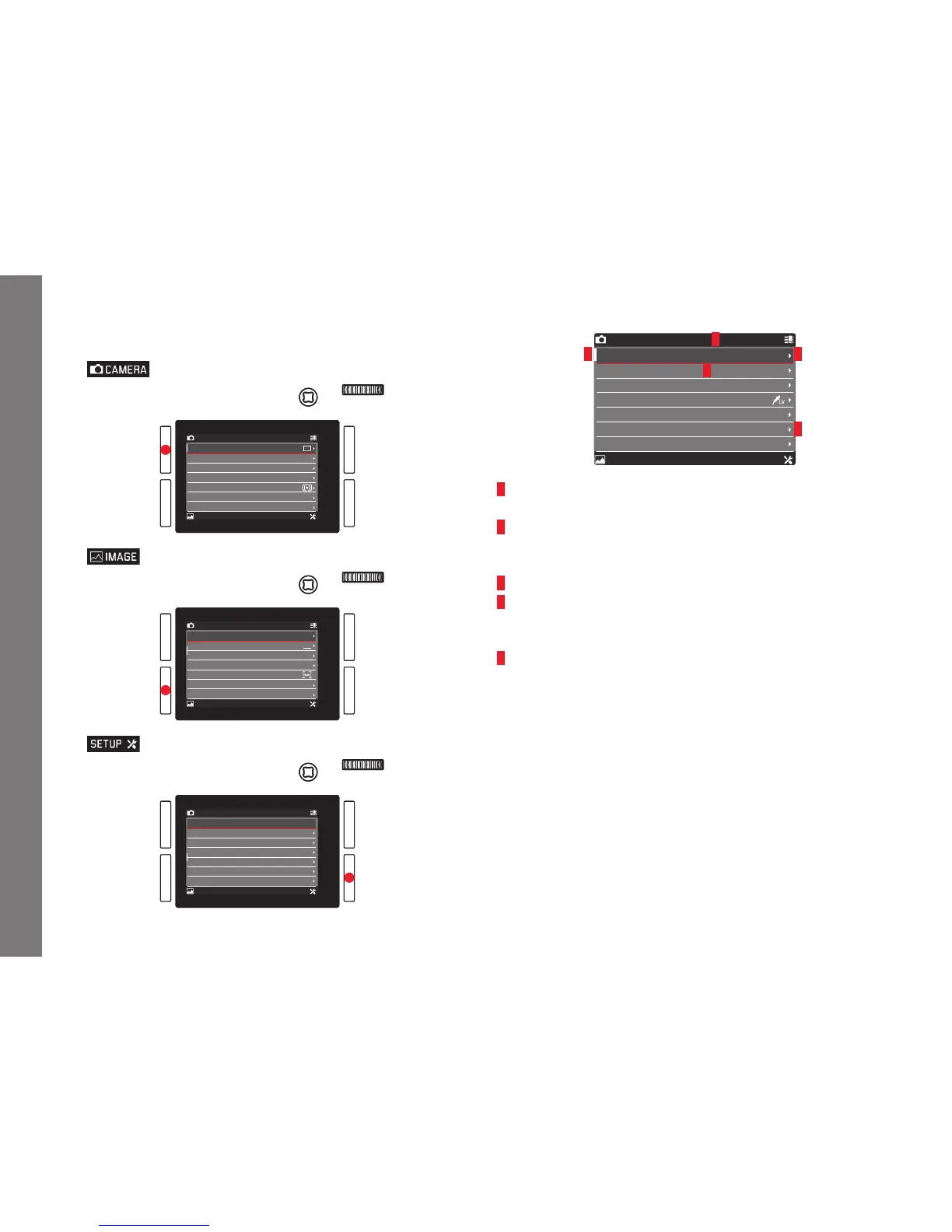
Main menu function sections
The menu list is divided into 3 sections:
CAMERA FAVORITES
IMAGE SETUP
Drive Mode
Focus Mode
AF Mode
AF Field Size
Exposure Metering
Exposure Compensation
Exposure Bracketing
AFs
Static
Field
0
CAMERA FAVORITES
IMAGE SETUP
ISO
White Balance
Photo File Format
Photo Aspect Ratio
Sensor Format
JPEG Resolution
JPEG Settings
Auto ISO
DNG
3:2
L-JPG
AWB
CAMERA FAVORITES
IMAGE SETUP
Storage Backup
Format
Auto Review
Capture Assistants
AF Setup
Live View
Copyright Information
Off
5 s
Menu screen
CAMERA FAVORITES
IMAGE SETUP
AF Mode
Exposure Compensation
Interval
White Balance
Photo File Format
Video Settings
Format
Static
0
DNG
1
4
3
2
5
1
Function section titles, the selected one is indicated by a gray
background
2 Scrollbar, indicates on which of the 8 pages you are within the
main menu item list, the function sections are made up of 2 or 4
pages
3 Menu item name
4 Menu item setting / value, the active menu item is highlighted
(white lettering, dark background, underlined in red), this applies
to all menu levels
5 Triangle, indicates the existence of a submenu
SL_EN.indd 178 16.09.2015 15:04:25


Table of Contents

Other manuals for Leica SL

Related product manuals