•DonotdroptheM.2solid-statedriveorsubjectittophysicalshocks.PuttheM.2solid-statedriveona
material,suchassoftcloth,thatabsorbsanyphysicalshocks.
•DonotapplypressuretothecoveroftheM.2solid-statedrive.
•Donottouchtheconnector.
•BeforeremovingtheM.2solid-statedrive,makeabackupcopyofalltheinformationonit,andthen
turnoffthecomputer.
•NeverremovetheM.2solid-statedrivewhilethecomputerisoperating,insleepmode,orinhibernation
mode.
ToreplacetheM.2solid-statedrive,dothefollowing:
1.Turnoffyourcomputeranddisconnecttheacpoweradapterandallcablesfromthecomputer.
2.Disablethebuilt-inbattery.See“Disablingthebuilt-inbattery”onpage101.
3.Closethecomputerdisplayandturnthecomputerover.
4.Removethebasecoverassembly.See“Replacingthebasecoverassembly”onpage102.
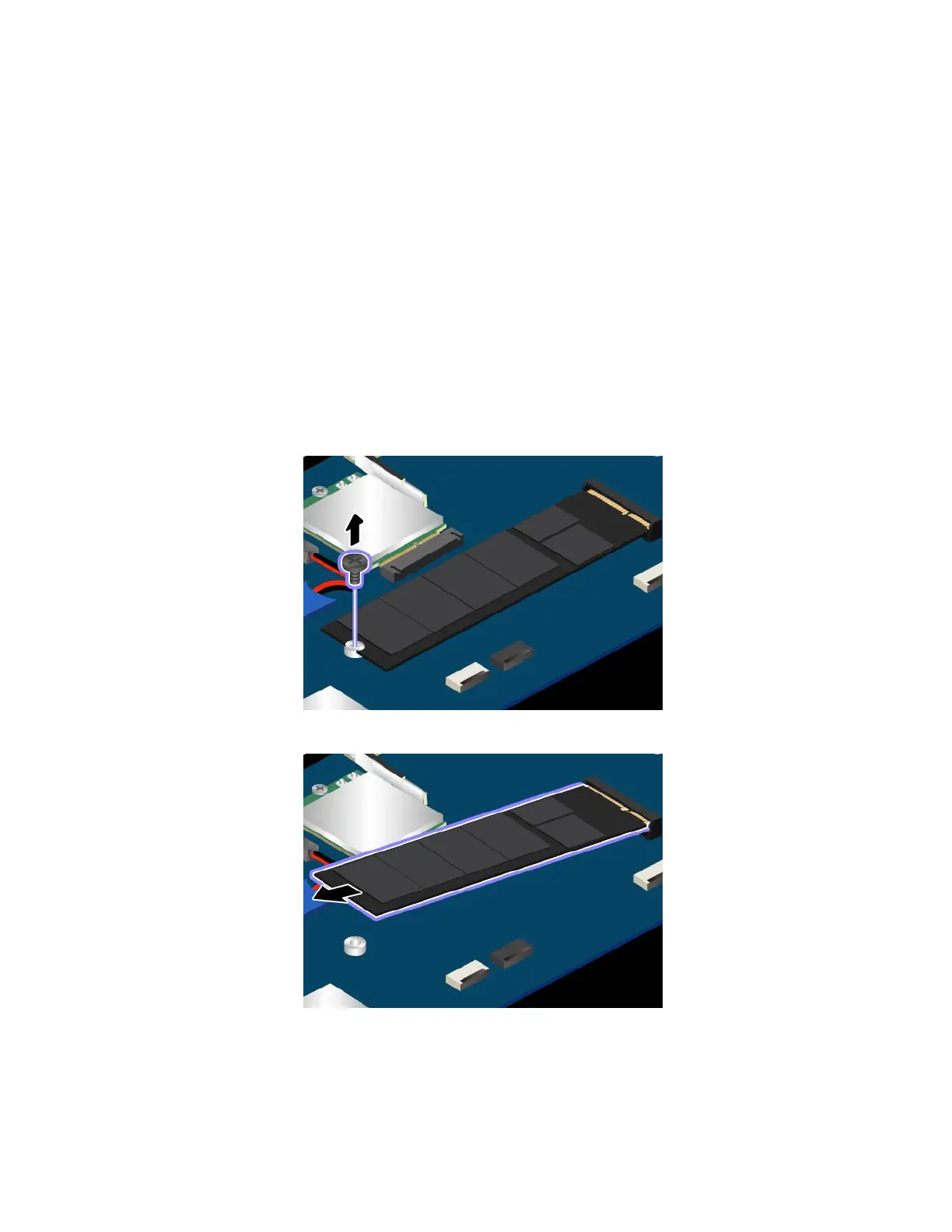
5.RemovethescrewthatsecurestheM.2solid-statedrive.
6.RemovetheM.2solid-statedrive.
7.AlignthecontactedgeofthenewM.2solid-statedrivewiththekeyintheslot.Thencarefullyinsert
theM.2solid-statedriveintotheslotatanangleofabout20degrees.PivottheM.2solid-statedrive
110ThinkPad13UserGuide














 To Next Page