7.Reinstallthebasecoverassembly.See“Replacingthebasecoverassembly”onpage102.
8.Turnthecomputeroveragain.Connecttheacpoweradapterandallcablestothecomputer.
Afteryoureplacethecoin-cellbattery,resetthesystemdateandtimeintheThinkPadSetupprogram.
See“DateandTimemenu”onpage61.
Replacingthespeakerassembly
Beforeyoustart,printtheseinstructions.Readtheimportantsafetyinformationfirst.See“Important
safetyinformation”onpagevi
.
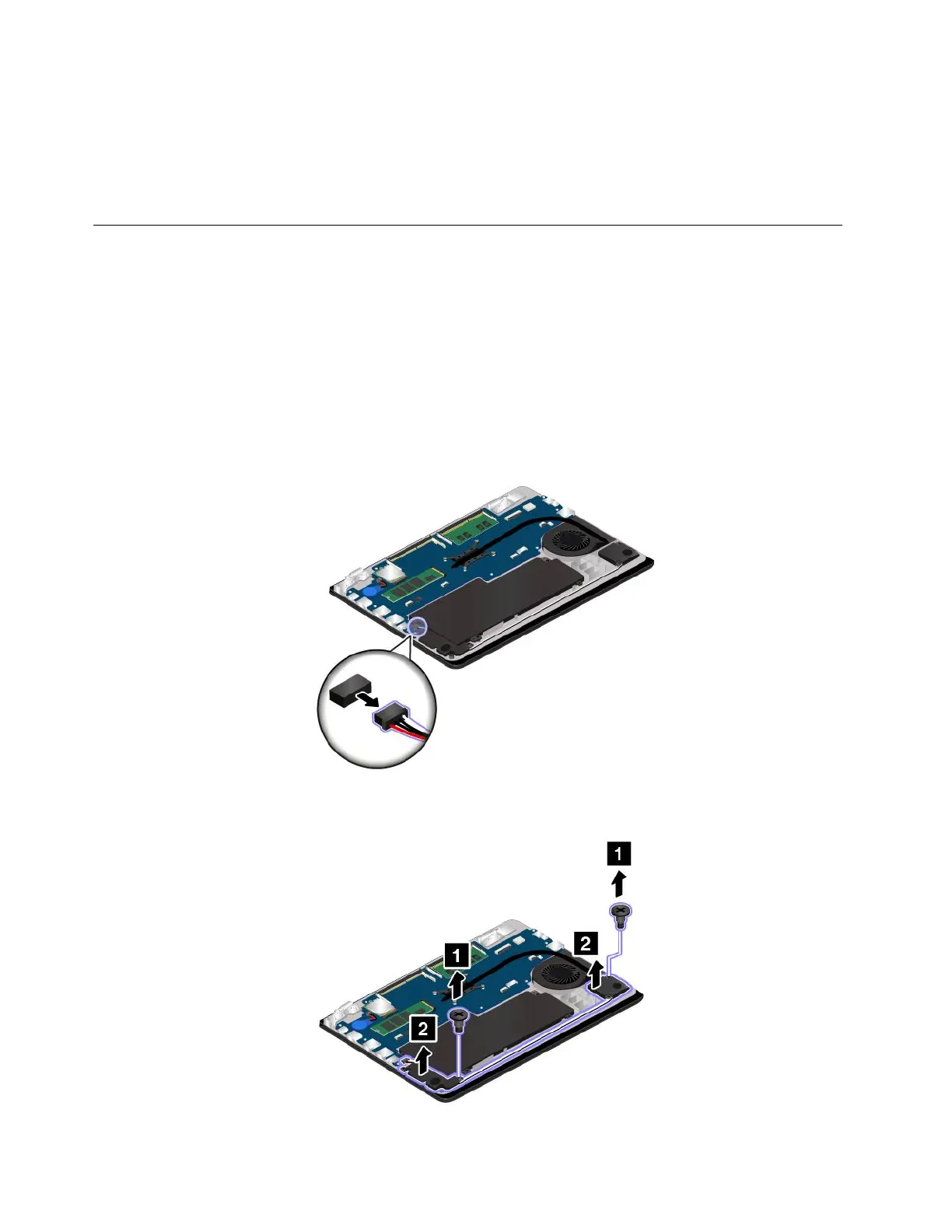
Toreplacethespeakerassembly,dothefollowing:
1.Turnoffyourcomputeranddisconnecttheacpoweradapterandallcablesfromthecomputer.
2.Disablethebuilt-inbattery.See“Disablingthebuilt-inbattery”onpage101.
3.Closethecomputerdisplayandturnthecomputerover.
4.Removethebasecoverassembly.See“Replacingthebasecoverassembly”onpage102.
5.Detachtheconnector.
6.Removethescrews.Thenremovethespeakerassembly.
114ThinkPad13UserGuide














 To Next Page