3.Closethecomputerdisplayandturnthecomputerover.
4.Removethebasecoverassembly.See“Replacingthebasecoverassembly”onpage102.
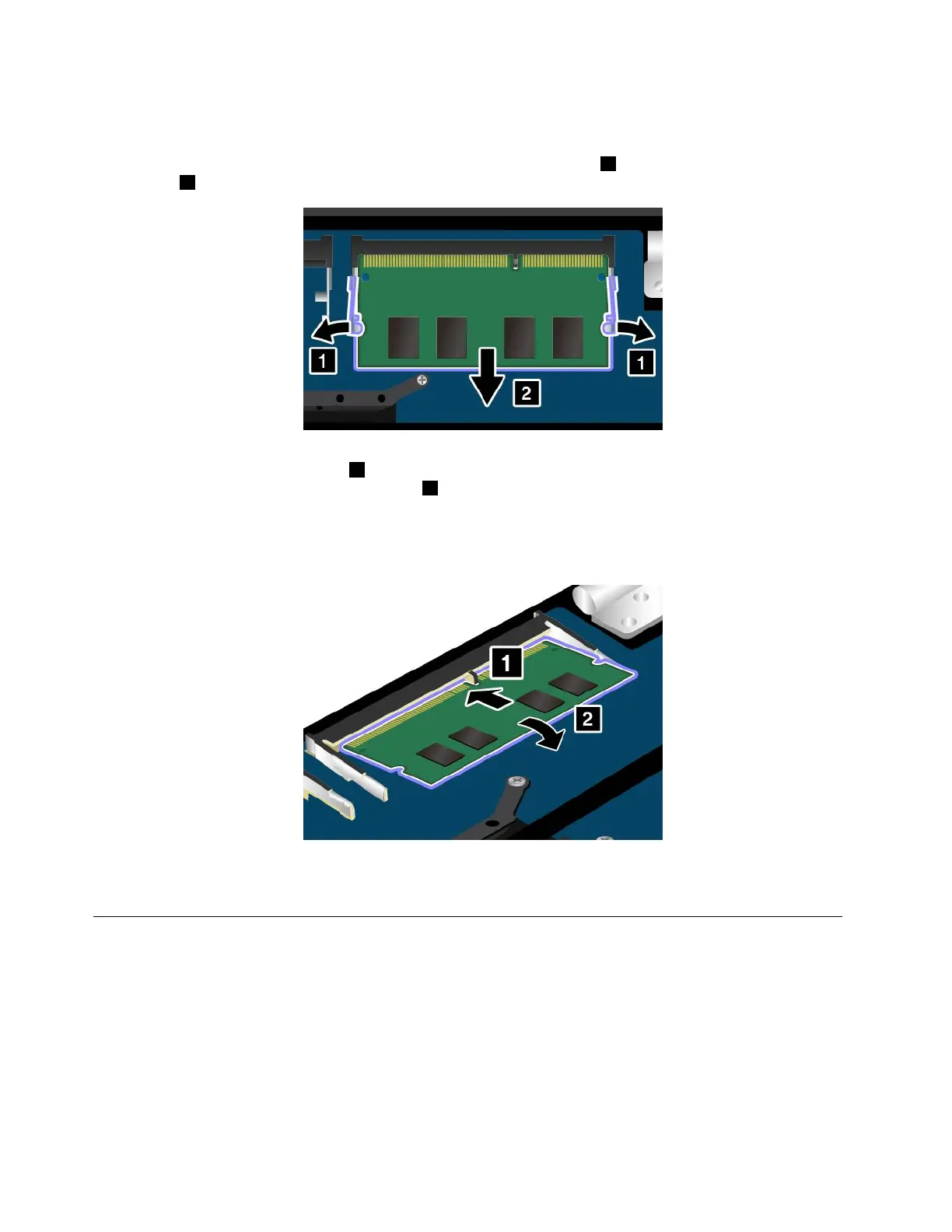
5.Openthelatchesonbothsidesofthememoryslotatthesametime1,andthenremovethememory
module2.Savetheremovedmemorymoduleforfutureuse.
6.Placethenotchedendofthenewmemorymoduletowardthecontactedgesideofthememoryslot.
Theninsertthememorymodule1intotheslotatanangleofabout20degrees.Pivotthememory
moduledownwarduntilitsnapsintoplace2.Ensurethatthememorymoduleisfirmlyinstalledin
theslotandcannotbemovedeasily.
Attention:Donottouchthecontactedgeofthememorymodule.Otherwisethememorymodule
mightgetdamaged.
7.Reinstallthebasecoverassembly.See“Replacingthebasecoverassembly”onpage102.
8.Turnthecomputeroveragain.Connecttheacpoweradapterandallcablestothecomputer.
Replacingthecoin-cellbattery
Beforeyoustart,printtheseinstructions.Readtheimportantsafetyinformationfirst.See“Important
safetyinformation”onpagevi.
112ThinkPad13UserGuide














 To Next Page