DANGER
Ifthecoin-cellbatteryisincorrectlyreplaced,thereisdangerofanexplosion.Thecoin-cellbattery
containsasmallamountofharmfulsubstances.Toavoidpossibleinjury:
•ReplaceonlywithabatteryofthetyperecommendedbyLenovo.
•Keepthebatteryawayfromfire.
•Donotexposeittoexcessiveheat.
•Donotexposeittowaterorrain.
•Donotshort-circuitit.
•Donotdrop,crush,puncturethebattery,ormakeitsubjecttostrongforces.Batteryabuseor
mishandlingcancausethebatterytooverheat,whichcancausegassesorflameto“vent”
fromthecoin-cellbattery.
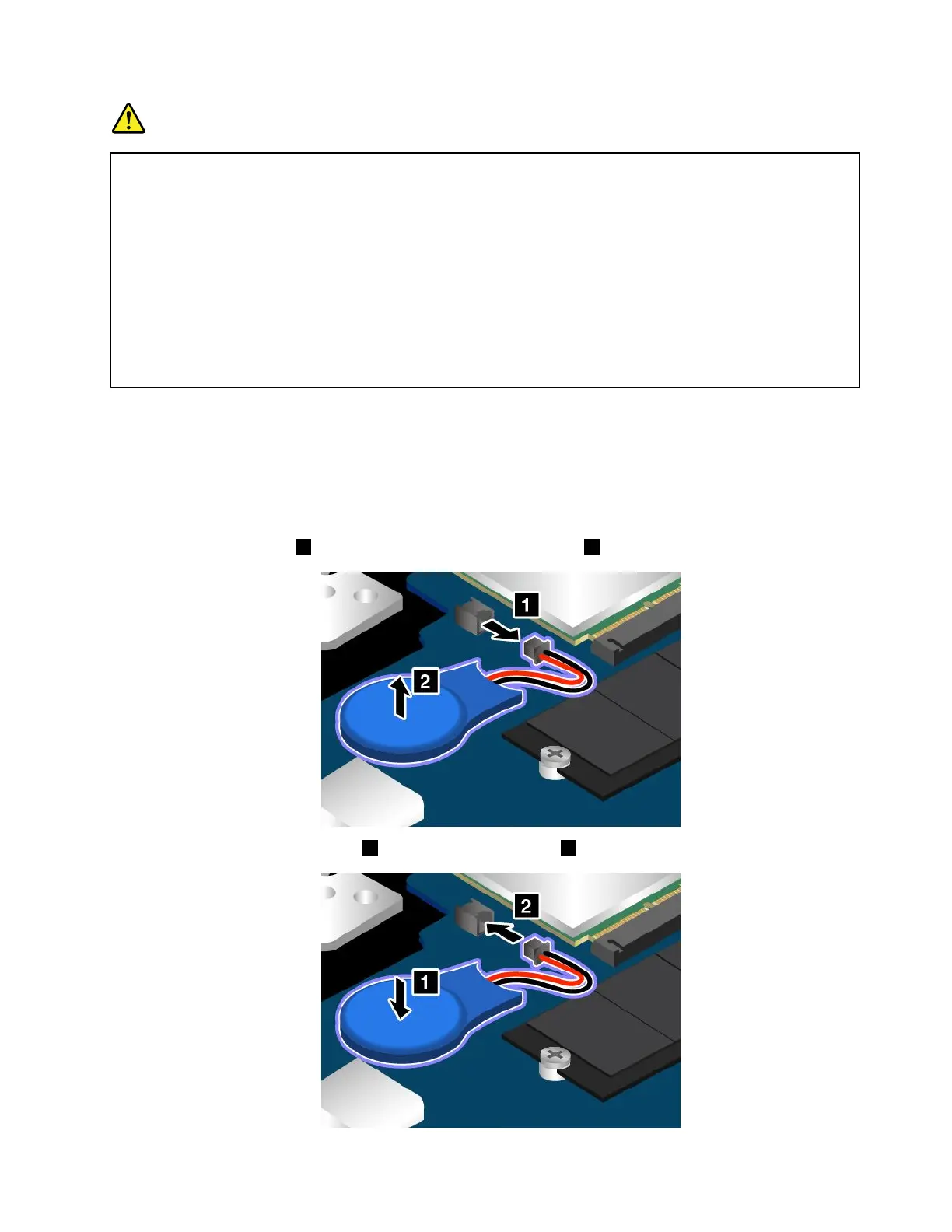
Toreplacethecoin-cellbattery,dothefollowing:
1.Turnoffyourcomputeranddisconnecttheacpoweradapterandallcablesfromthecomputer.
2.Disablethebuilt-inbattery.See“Disablingthebuilt-inbattery”onpage101.
3.Closethecomputerdisplayandturnthecomputerover.
4.Removethebasecoverassembly.See“Replacingthebasecoverassembly”onpage102.
5.Detachtheconnector1,andthenremovethecoin-cellbattery2.
6.Installthenewcoin-cellbattery1andattachtheconnector2.
Chapter10.Replacingdevices113














 To Next Page