•Whenthedockisinsleeporhibernationmode
•Whenthedockisturnedoff
Formoreinformation,refertothedocumentationthatcomeswiththedock.
5Powerbutton:Thepowerbuttononthedockfunctionsthesameastheoneonthecomputer.
6System-statusindicator:TheindicatorontheilluminatedThinkPadlogofunctionsthesameastheones
onthecomputer.Fordetails,see“Statusindicators”onpage6.
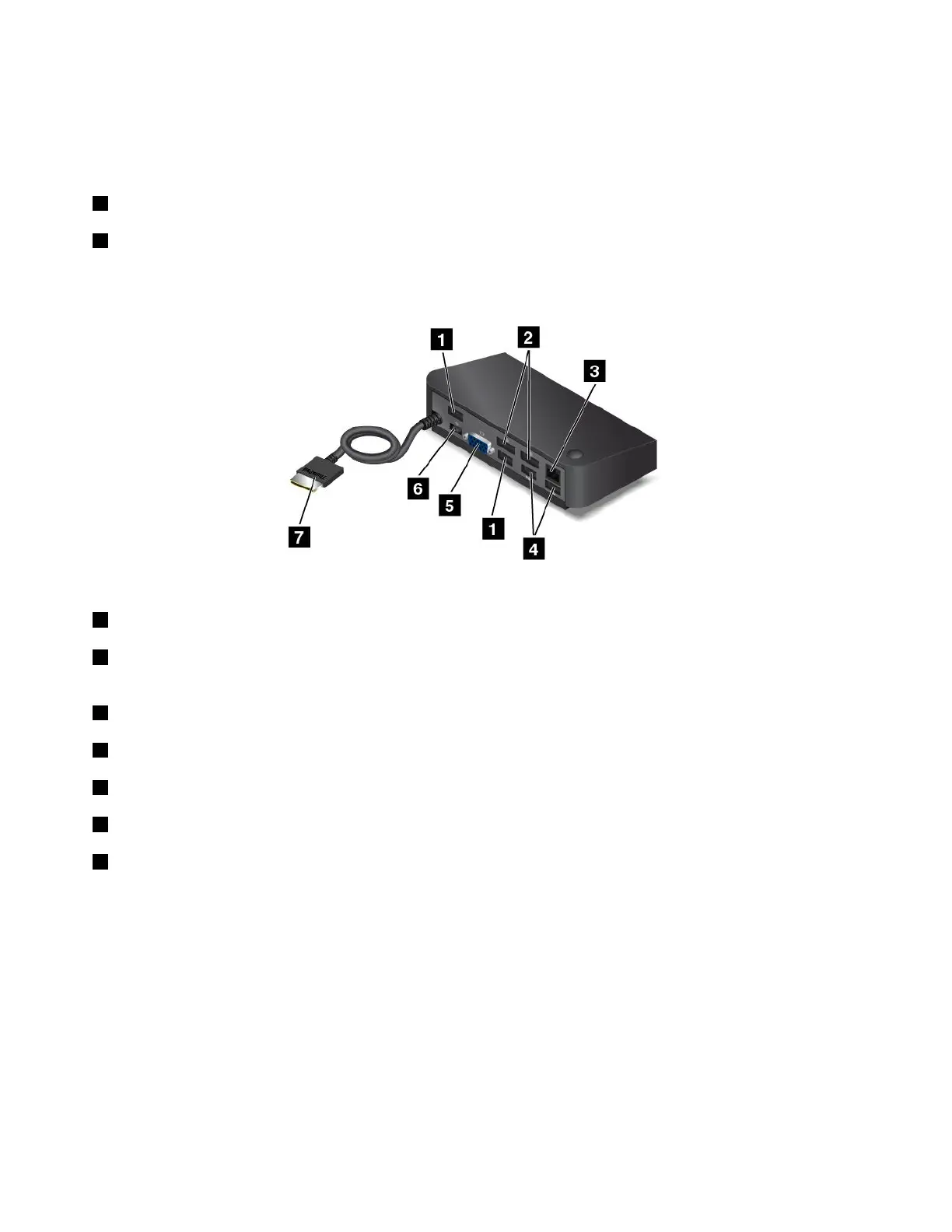
Rearview
1USB2.0connectors:UsedtoconnectdevicesthatarecompatiblewithUSB2.0.
2DisplayPortconnectors:Usedtoattachahigh-performancemonitor,adirect-drivemonitor,orother
devicesthatuseaDisplayPortconnector.
3Ethernetconnector:UsedtoconnectthedocktoanEthernetLAN.
4USB3.0connectors:UsedtoconnectdevicesthatarecompatiblewithUSB3.0andUSB2.0.
5VGAconnector:UsedtoconnecttoaVGA-compatiblevideodevice,suchasaVGAmonitor.
6Powerconnector:Usedtoconnecttheacpoweradapter.
7OneLink+connector:ConnecttheOneLink+connectortothecomputer.Tolocatethecorresponding
OneLink+connectoronthecomputer,see“Locatingcomputercontrols,connectors,andindicators”on
page1.
36ThinkPad13UserGuide














 To Next Page