The new base cover FRU is shipped with a kit containing labels of several kinds. Apply those labels when you
replace the base cover. For the labels that are not shipped with the new base cover, peel them from the old
base cover, and adhere them to the new one.
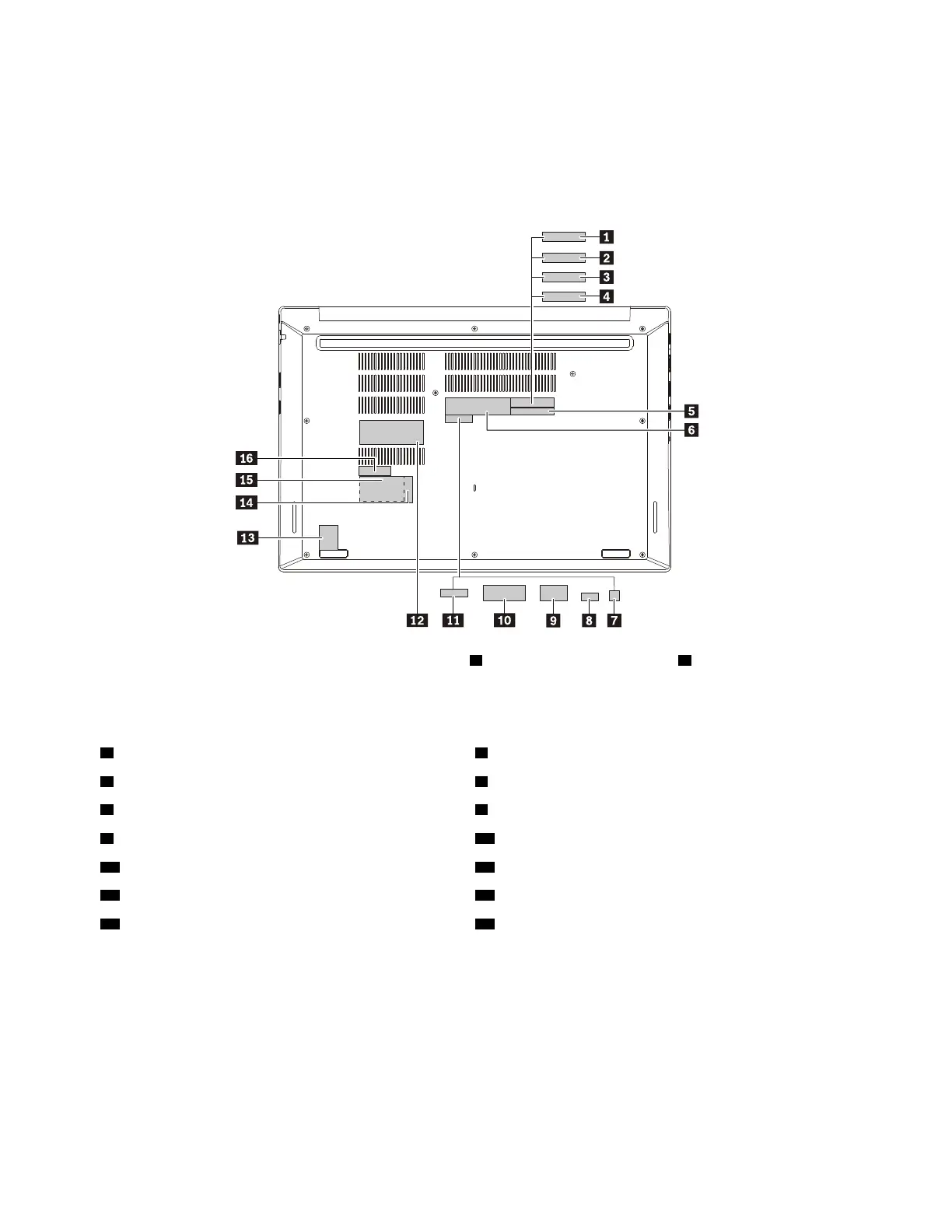
The following illustration shows the location of each label for Windows 7 and Windows 10 based computer
models.
When you replace the base cover, apply the FCC label 1 and the Serial number label 5 .
For the labels listed in the following table, peel them off from the old base cover, and adhere them to the new
base cover.
2 Israel Homologation label 3 Indonesia Rating and Postel label
4 Argentina CNC label 6 GEO label
7 Malaysian SLP label 8 ICASA system label
9 Brazil Anatel label 10 Argentina adapter label
11 CECP label 12 System label
13 Win10 GML label
14 Asset tag label
15 SVT label
16 IMEI label
If the removed cover has two FCC labels, apply both to the new base cover.
70
ThinkPad E580 and E585 Hardware Maintenance Manual














 To Next Page