Attention: The M.2 solid-state drive is sensitive. Inappropriate handling might cause damage and
permanent loss of data.
When handling the M.2 solid-state drive, observe the following guidelines:
• Replace the M.2 solid-state drive only for upgrade or repair. The M.2 solid-state drive is not designed for
frequent changes or replacement.
• Before replacing the M.2 solid-state drive, make a backup copy of all the data that you want to keep.
• Do not apply pressure to the M.2 solid-state drive.
• Do not touch the contact edge of the M.2 solid-state drive. Otherwise the M.2 solid-state drive might get
damaged.
• Do not make the M.2 solid-state drive subject to physical shocks or vibration. Put the M.2 solid-state drive
on a soft material, such as cloth, to absorb physical shocks.
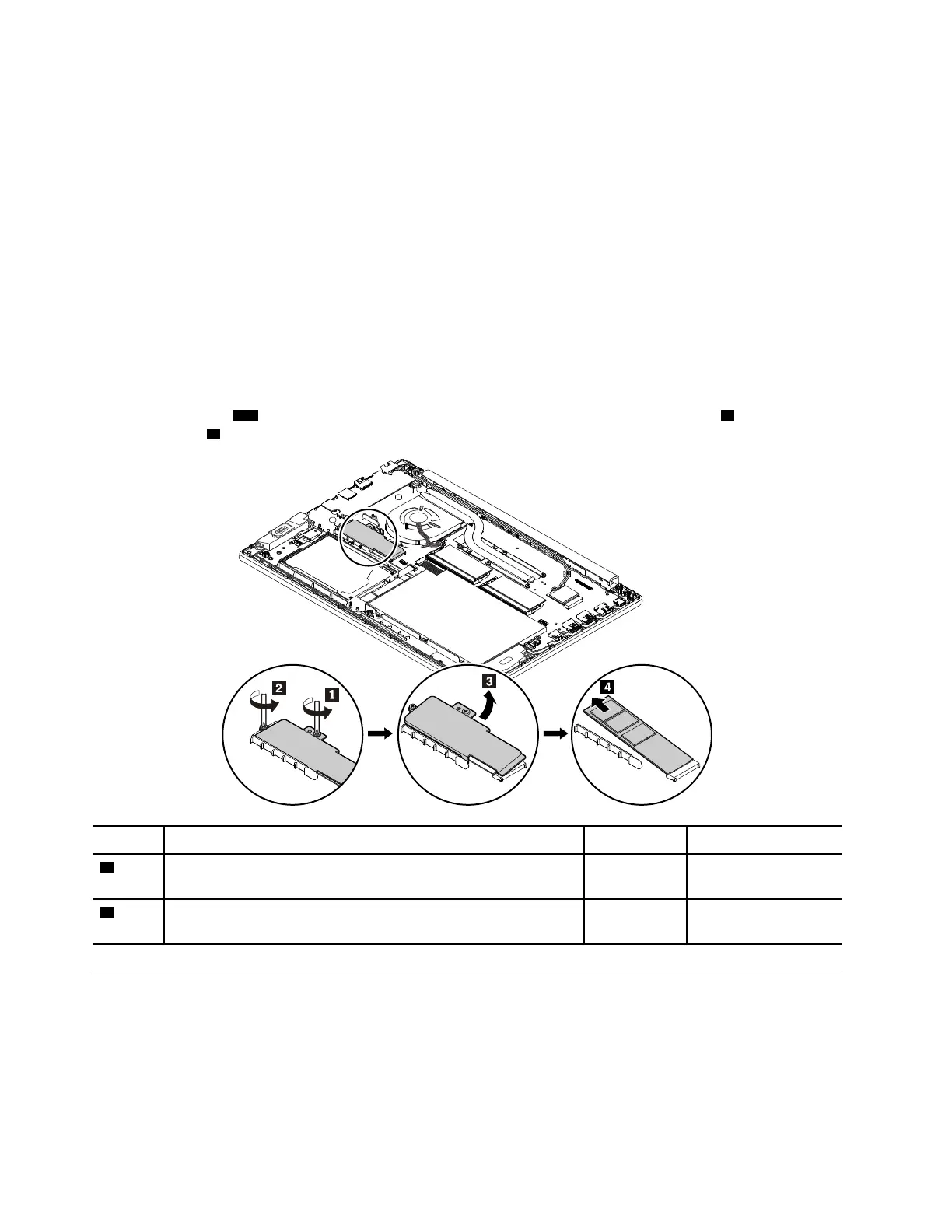
Removal steps of the M.2 solid-state drive
Remove the screws
1 2 that secure the M.2 solid-state drive. Then remove the metal sheet 3 and the M.2
solid-state drive
4 from the slot.
Step Screw (quantity) Color
Torque
1
M2 × 3 mm, wafer-head, nylon-coated (1)
Black 0.294 Nm
(3 kgf-cm)
2
M2 × 4 mm, wafer-head, nylon-coated (1) Silver
0.294 Nm
(3 kgf-cm)
1040 Thermal fan assembly
For access, remove these FRUs in order:
• “1010 Base cover assembly” on page 69
72
ThinkPad E580 and E585 Hardware Maintenance Manual














 To Next Page