1020 Internal battery
Important notice for replacing a battery pack
Attention: Lenovo has no responsibility for the performance or safety of unauthorized batteries, and provides no
warranties for failures or damage arising out of their use.
The Lenovo Companion program provides an automatic battery diagnostic test that determines if the battery pack is
defective. A battery pack FRU should not be replaced unless this diagnostic test shows that the battery is defective.
The only exception to this is if the battery pack is physically damaged or a customer is reporting a possible safety
issue. Note that a physically damaged battery pack is a non-warranty replacement part.
For access, remove these FRUs in order:
• “1010 Base cover assembly” on page 69
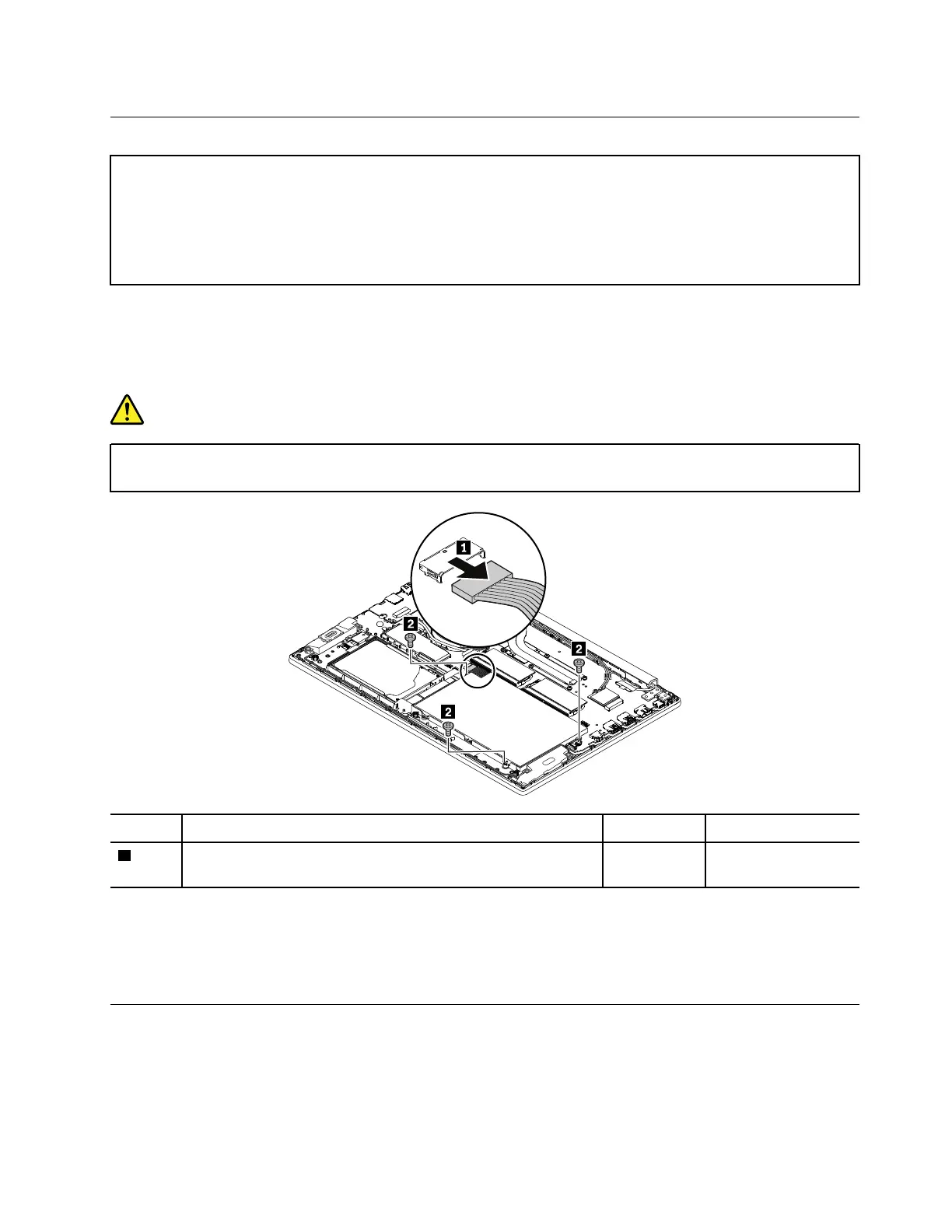
Removal steps of the internal battery
DANGER
Use only the authorized battery specified for your computer. Any other battery could ignite or
explode.
Step Screw (quantity) Color
Torque
2
M2 × 4 mm, small-head, nylon-coated (3)
Black 0.181 Nm
(1.85 kgf-cm)
When installing:
• Ensure that the battery connector is attached firmly.
• Ensure that the base cover assembly is attached firmly; otherwise, battery connection may fail.
1030 M.2 solid-state drive
For access, remove this FRU:
• “1010 Base cover assembly” on page 69
• “1020 Internal battery” on page 71
Chapter 9. Removing or replacing a FRU 71














 To Next Page