Home
Lenovo
Laptop
ThinkPad E585
Page 87 (1110 Speaker Assembly)
Lenovo ThinkPad E585 - 1110 Speaker Assembly
106 pages
Manual
Save Page as PDF
To Next Page
To Next Page
To Previous Page
To Previous Page
Loading...
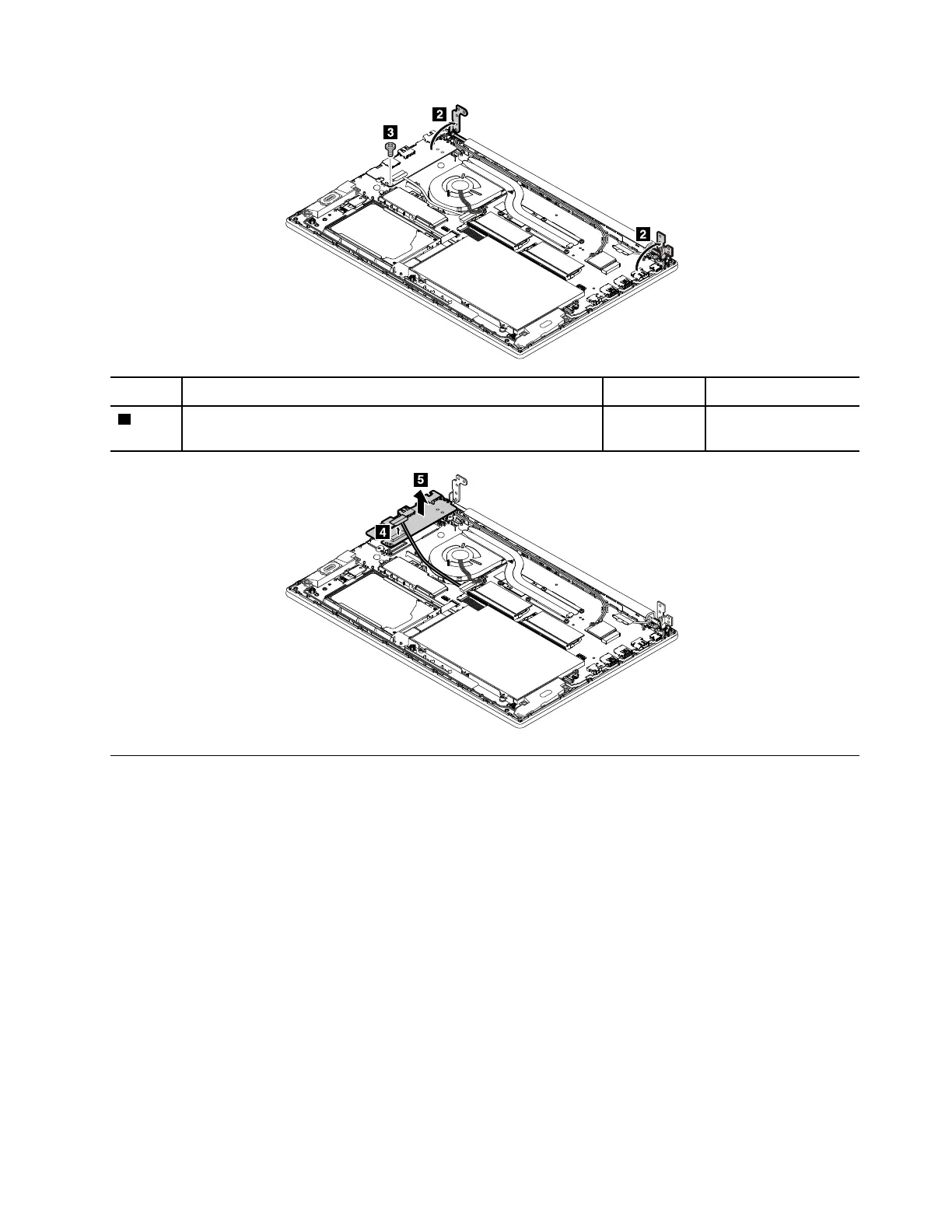
Step
Screw
(quantity)
Color
Torque
3
M2 ×
3 mm,
wafer-head, nylon-coated
(1)
Silver
0.294 Nm
(3 kgf-cm)
1110
Speaker
assembly
For
access,
remove these
FRUs in
order:
•
“1010 Base
cover
assembly”
on
page
69
Chapter 9
.
Removing or
replacing a
FRU
81
86
88
Table of Contents
Main Page
Default Chapter
3
Table of Contents
3
About this Manual
5
Chapter 1. Safety Information
7
General Safety
7
Electrical Safety
8
Safety Inspection Guide
9
Handling Devices that Are Sensitive to Electrostatic Discharge
9
Grounding Requirements
10
Safety Notices (Multilingual Translations)
10
Insert the Ends of Your Necktie or Scarf Inside Clothing or Fasten It with a Nonconductive Clip, about
14
Laser Compliance Statement (Multilingual Translations)
25
Chapter 2. Important Service Information
31
Strategy for Replacing Frus
31
Strategy for Replacing a Hard Disk Drive or a Solid-State Drive
31
Important Notice for Replacing a System Board
32
How to Use Error Codes
32
Strategy for Replacing Frus for CTO, Special-Bid, and Standard Models
32
Product Definition
32
FRU Identification
33
Chapter 3. General Checkout
35
What to Do First
35
Checkout Guide
36
Quick Test Programs
36
UEFI Diagnostic Program
37
Bootable Diagnostic Programs
37
Power System Checkout
38
Checking the Ac Power Adapter
38
Checking Operational Charging
39
Checking the Built-In Battery and Operational Charging
39
Checking the Coin-Cell Battery
40
Chapter 4. Related Service Information
41
Recovery Overview for the Windows 10 Operating System
41
Resetting Your Computer
41
Using Advanced Startup Options
41
Recovering Your Operating System if Windows 10 Fails to Start
42
Creating and Using a Recovery USB Drive
42
Passwords
43
Power-On Password
43
Hard Disk Password
43
Supervisor Password
43
How to Remove the Power-On Password
44
How to Remove the Hard Disk Password
44
Power Management
45
Sleep Mode
45
Hibernation Mode
45
Symptom-To-FRU Index
46
Numeric Error Codes
46
Error Messages
48
Beep Errors
48
No-Beep Symptoms
50
LCD-Related Symptoms
50
Intermittent Problems
50
Undetermined Problems
51
Chapter 5. Status Indicators
53
Chapter 6. Special Keys
55
Chapter 7. Locations
57
Locating Computer Controls, Connectors, and Indicators
57
Front View
57
Left-Side View
57
Right-Side View
58
Bottom View
58
Locating Frus and Crus
58
Major Frus and Crus
60
LCD Frus and Crus
62
Connector and Cable Guide
63
Looking up FRU Information
67
Chapter 8. FRU Replacement Notices
69
Screw Notices
69
Retaining Serial Numbers
70
Restoring the Serial Number of the System Unit
70
Retaining the UUID
71
Chapter 9. Removing or Replacing a FRU
73
General Guidelines
73
Before Servicing the Computer
74
Disabling the Built-In Battery
74
Remove the Microsd Card
74
1010 Base Cover Assembly
75
1020 Internal Battery
77
1030 M.2 Solid-State Drive
77
1040 Thermal Fan Assembly
78
1050 Memory Module
80
1060 Internal Storage Drive
80
1070 Wireless LAN Card
81
1080 Coin-Cell Battery
82
1090 Keyboard
83
1100 USB Card with Cable
86
1110 Speaker Assembly
87
1120 Fingerprint Reader
88
1130 Touch Pad
90
1140 System Board and Keyboard Bezel
91
1150 LCD Unit
94
2010 LCD Bezel
95
2020 LCD Panel
96
2030 LCD Hinges
97
2040 Camera/Microphone Module and the LCD Cable
98
2050 Wireless LAN Assembly and LCD Cover Assembly
98
Appendix A. Notices
101
Electronic Emission Notices
102
Trademarks
102
Appendix B. Abbreviation and Acronym Table
103
Other manuals for Lenovo ThinkPad E585
Setup Guide
8 pages
Related product manuals
Lenovo ThinkPad E580
142 pages
Lenovo ThinkPad E560
168 pages
Lenovo ThinkPad E595
10 pages
Lenovo ThinkPad E540
12 pages
Lenovo ThinkPad E570
134 pages
Lenovo ThinkPad E550
174 pages
Lenovo ThinkPad Edge E530
158 pages
Lenovo ThinkPad Edge E520
194 pages
Lenovo ThinkPad Edge E540
186 pages
Lenovo ThinkPad Edge E525
168 pages
Lenovo ThinkPad Edge E535
180 pages
Lenovo ThinkPad Edge E545
116 pages














 To Next Page