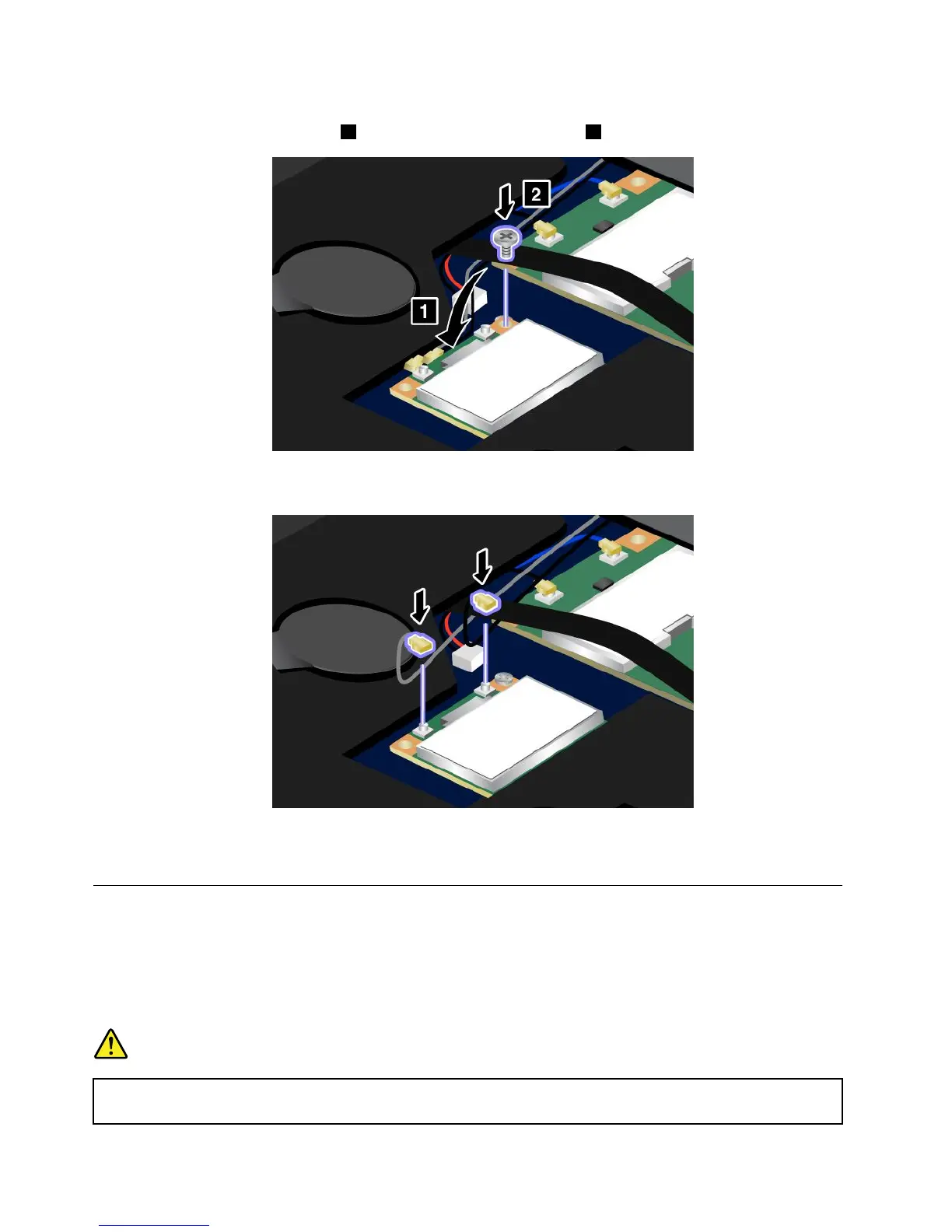
7.AlignthecontactedgeofthenewPCIExpressMiniCardwiththecorrespondingsocket.Pivotthecard
untilyoucansnapitintoplace1.Securethecardwiththescrew2.
8.ConnectthecablestothenewPCIExpressMiniCard.Besuretoattachthegraycabletotheconnector
marked“MAIN”or“M”onthecard,andtheblackcabletotheconnectormarked“AUX”or“A.”
9.Reinstallthekeyboard.Formoredetails,referto“Replacingthekeyboard”onpage81.
10.Turnthecomputeroveragain.Connecttheacpoweradapterandcablestothecomputer;thenturniton.
InstallingandreplacingthePCIExpressMiniCardforwirelessWAN
connection
SomeThinkPadmodelshaveaPCIExpressMiniCardslotforconnectiontoawirelessWAN.Toreplacethe
PCIExpressMiniCardwithanewone,readthefollowingprerequisites.
Prerequisitesfortheprocedure
DANGER
Duringelectricalstorms,donotconnectthecabletoordisconnectitfromthetelephoneoutlet
onthewall.
90UserGuide












 To Next Page