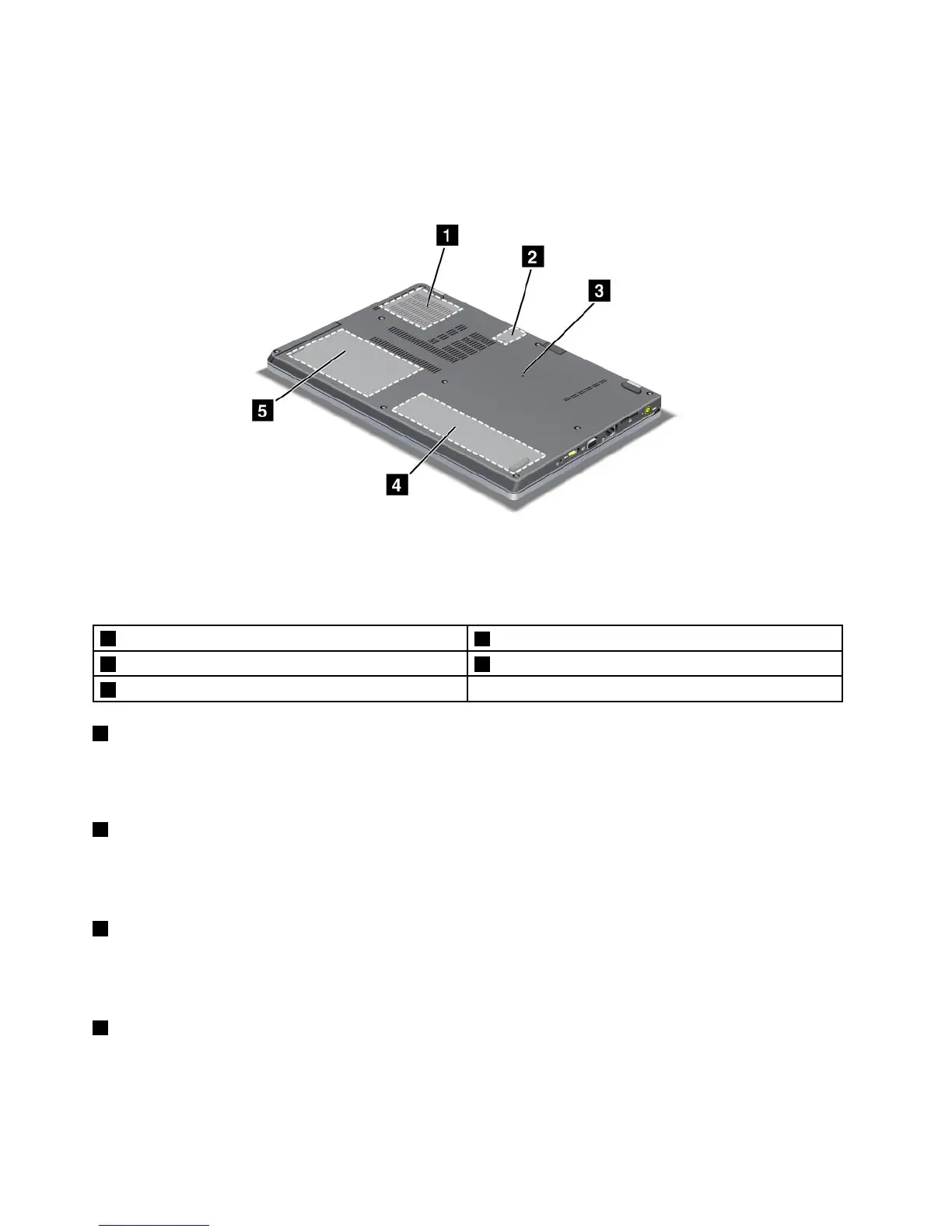
Bottomview
Figure4.ThinkPadEdgeE220sbottomview
1Fan
2SIMcardslot
3Emergencyresethole4Battery
5Harddiskdrive(HDD)orsolidstatedrive
1Fan
Theinternalfanandlouversenableairtocirculateinthecomputerandcoolthecentralprocessor.
Note:Toavoidimpedingairow,donotplaceanyobstacleinfrontofthefan.
2SIMcardslot
IfyourcomputerhasawirelessWANfeature,itmayrequireaSIM(SubscriberIdenticationModule)cardto
establishawirelessWAN(WideAreaNetwork)connections.Dependingonthecountryofdelivery,theSIM
cardmaybealreadyinstalledintheSIMcardslot.
3Emergencyresethole
Ifyourcomputerstopsresponding,andyoucannotturnitoff,pressandholdthepowerswitchfor4-6
seconds.Ifthecomputerstilldoesnotrespond,removetheacpoweradapterandresetthecomputerby
insertingastraightenedpaperclipintotheemergencyresetholetoturnoffthecomputer.
4Battery
Useyourcomputerwithbatterypowerwheneveracpowerisunavailable.
YoucanusePowerManagertoadjustyourpowersettingasneeded.Fordetails,refertotheinstructionsin
“PowerManager”onpage20.
8UserGuide













 To Next Page