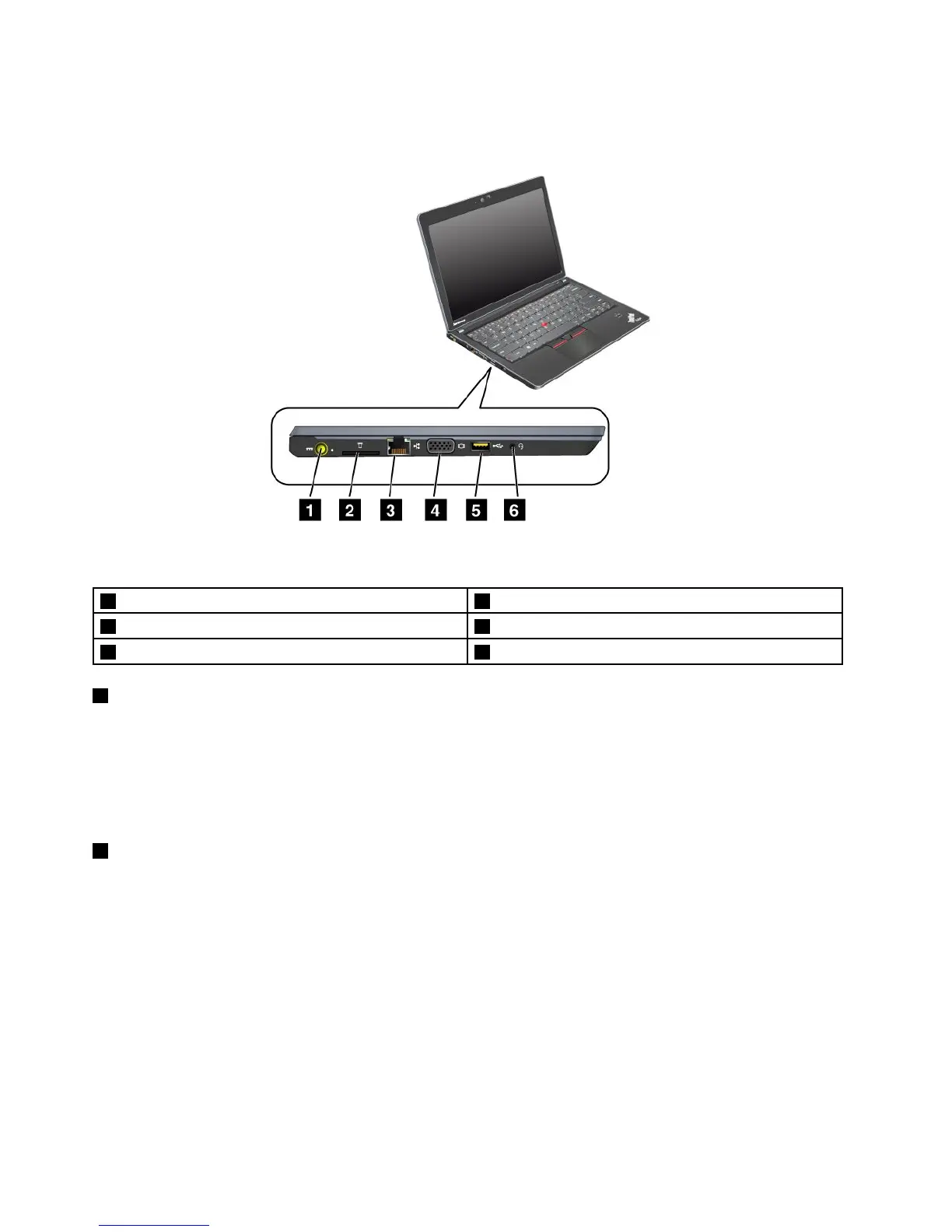
Left-sideview
Figure3.ThinkPadEdgeE220sleft-sideview
1Powerjack2Mediacardreaderslot
3Ethernetconnector4Monitorconnector
5AlwaysOnUSBconnector6Comboaudiojack
1Powerjack
Theacpoweradaptercableconnectstothecomputerpowerjacktoprovidepowertothecomputerand
chargethebattery.
Anindicatortotheleftoftheconnectorshowsthestatusofacpower.Whentheacpoweradapteris
connectedtheindicatorislit.Ifabatteryisinstalledonthecomputer,whenthisindicatorisgreen,it
ischarged.
2Mediacardreaderslot
Dependingonthemodel,yourcomputermayhaveaMediaCardReaderslot.TheMediaCardReader
supportsthefollowingcards:
•SDcard
•SDHCcard
•SDXCcard
•MultiMediaCard
Note:YourcomputerdoesnotsupporttheCPRMfeatureforSDcard.
Fordetails,refertotheinstructionsin“Usingthemediacardreader”onpage51
.
6UserGuide













 To Next Page