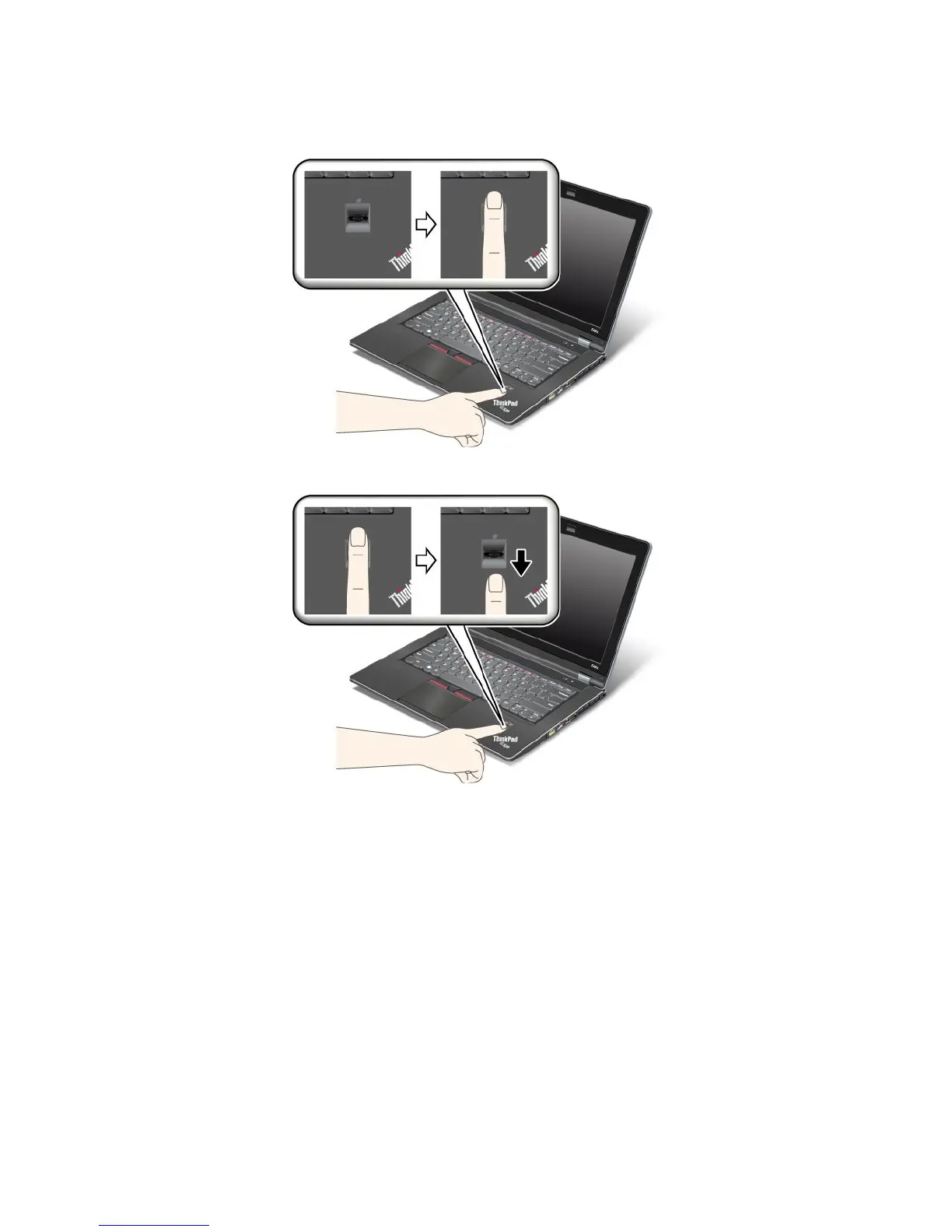
1.Placetheballofyournger,thatis,thecentralpartofthengerprint,onthesmallcircleabovethe
reader.Makesurethattheentiretopjointofthengerisonthereader.
2.Applylightpressureandswipeyourngeracrossthereaderinonesmoothmotion.
Settingthengerprintreader
Ifyouwanttochangethesettingsofthengerprintreader,followtheprocedurebelow.
ThengerprintsubmenuundertheSecuritymenuoftheThinkPadSetupoffersthefollowingchoices:
•ReaderPriority:Denethepriorityforngerprintreadersifanexternalngerprintreaderisattached.
•SecurityMode:Specifythesettingsofthesecuritymode.
•PasswordAuthentication:Enableordisablepasswordauthentication.
Note:ThisitemappearsifHighsecuritymodeisselected.
•ResetFingerprintData:Bychoosingthisitem,youeraseallofthengerprintdatastoredineitherthe
internalorexternalngerprintreader.
Tosetaniteminthengerprintsubmenu:
1.Printtheseinstructions.Tocongurethengerprintreader,youmustturnyourcomputeroffand
thenonagain.
64UserGuide













 To Next Page