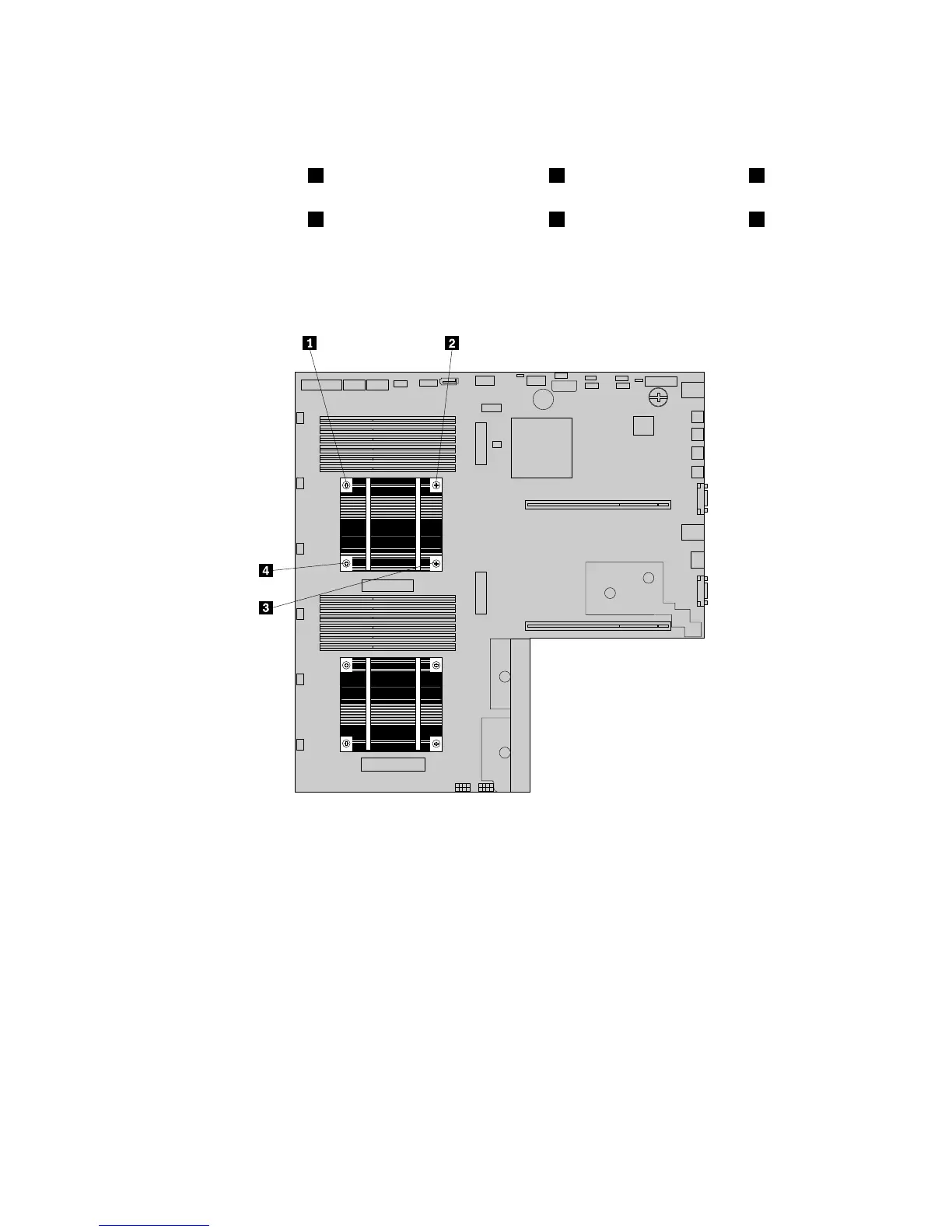
6.Ifyouarereplacingaheatsink,removethefourscrewsthatsecuretheheatsinktothesystemboard.It
isrecommendedthatyoucarefullyremovethefourscrewsfromthesystemboardusingthefollowing
methodtoavoidanypossibledamagetothesystemboard.
a.Partiallyremovescrew1,thencompletelyremovescrew3,andthenreturntoscrew1and
completelyremoveit.
b.Partiallyremovescrew2,thencompletelyremovescrew4,andthenreturntoscrew2and
completelyremoveit.
Note:Thefourscrewsareintegratedpartsoftheheatsink.Donottrytoremovethefourscrews
fromtheheatsink.
Figure88.Removingthescrewsthatsecuretheheatsink
7.Gentlytwisttheheatsinktofreeitfromthemicroprocessorandthenlifttheheatsinkoffthesystem
board.
8.Layasidetheoldheatsink.Touchthestatic-protectivepackagethatcontainsthenewheatsinktoany
unpaintedsurfaceontheoutsideoftheserver.Then,removethenewheatsinkfromthepackage.
Notes:
•Ifyouarereplacingaheatsink,youneedtouseacleaningpadthatmightcomewiththenewheat
sinktowipethethermalgreasefromthetopofthemicroprocessorbeforeinstallingthenewheat
sink.Disposeofthecleaningpadafterallthermalgreaseisremovedfromthemicroprocessor.
•Whenhandlingtheheatsink,donottouchthethermalgreaseonthebottomofit.
9.Removeanyprotectivecoverthatprotectsthethermalgreaseonthebottomofthenewheatsink.Then,
placethenewheatsinkonthesystemboardsothatthefourscrewsonthenewheatsinkarealigned
withthecorrespondingmountingstudsonthesystemboard.
140ThinkServerRD440UserGuideandHardwareMaintenanceManual









 To Next Page