Replacingthebackplaneforservermodelswitheight3.5-inchhard-disk-drivebays
Attention:Donotopenyourserverorattemptanyrepairbeforereadingandunderstanding“Safetyinformation”
onpageiiiand“Guidelines”onpage87.
Thistopicprovidesinstructionsonhowtoreplacethebackplaneforservermodelswitheight3.5-inch
hard-disk-drivebays.
Beforeyoubegin,printalltherelatedinstructionsorensurethatyoucanviewthePDFversiononanother
computerforreference.
Note:Toshowthebackplaneclearly,thesystemfansareomittedfromtheillustrationsinthistopic.
Toreplacethebackplaneforservermodelswitheight3.5-inchhard-disk-drivebays,dothefollowing:
1.Removeallmediafromthedrivesandturnoffallattacheddevicesandtheserver.Then,disconnectall
powercordsfromelectricaloutletsanddisconnectallcablesthatareconnectedtotheserver.
2.Iftheserverisinstalledinarackcabinet,removetheserverfromtherackcabinetandplaceitonaflat,
clean,andstatic-protectivesurface.SeetheRackInstallationInstructionsthatcomeswiththeserver.
3.Removetheservercover.See“Removingtheservercover”onpage89.
4.Locatethebackplane.See“Componentsofservermodelswitheight3.5-inchhard-disk-drivebays”
onpage35.
5.Removealltheinstalled3.5-inchhot-swapharddiskdrivesanddummytrays(ifany)fromthe
hard-disk-drivebays.See“Installingorreplacingahot-swapharddiskdrive”onpage172
.
6.Recordthecableconnectionsonthebackplaneandthendisconnectallcablesfromthebackplane.
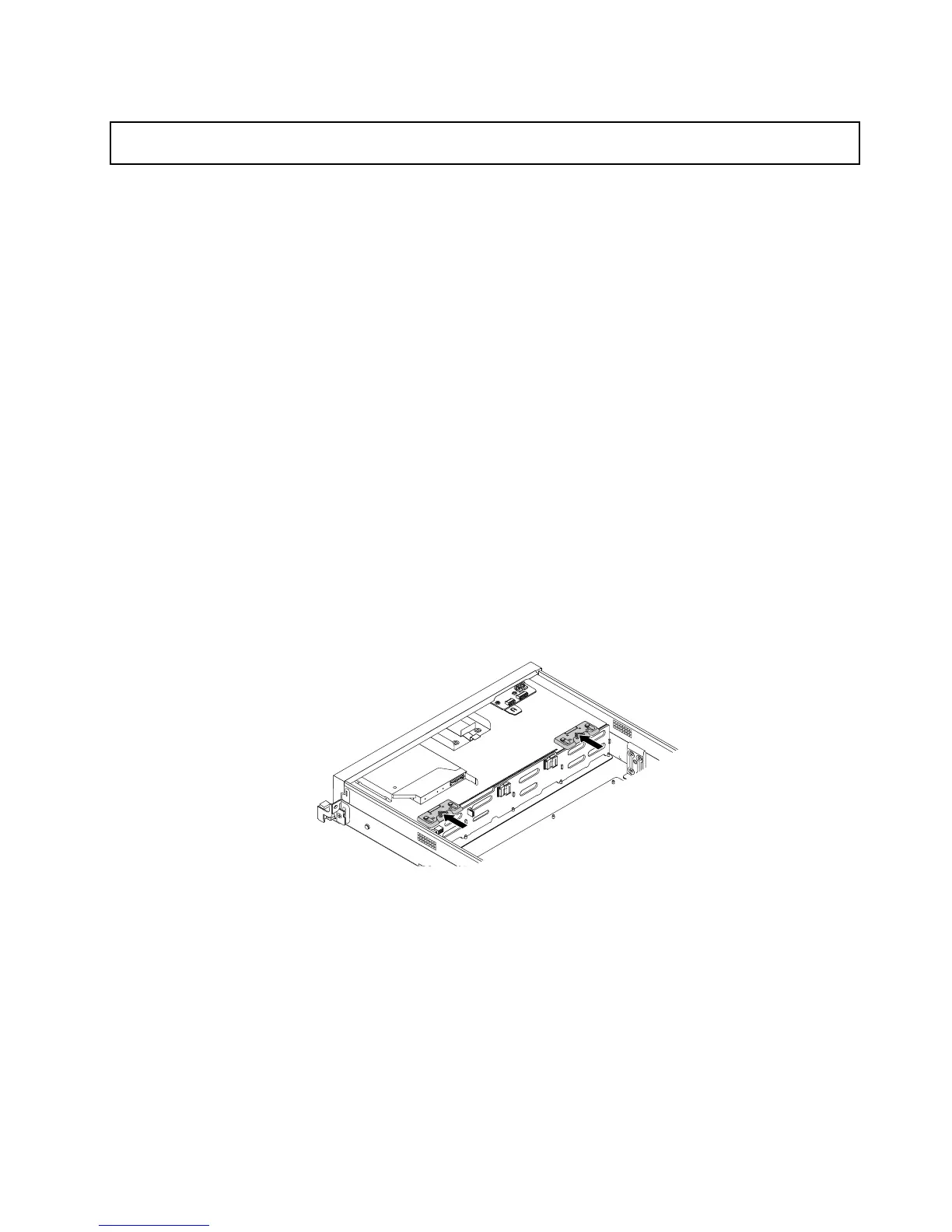
7.Presseachofthetwolatchesonthechassisinthedirectionasshownuntilthelatchsnapsintothe
openpositionandwillnotinterferewithliftingthebackplane.
Figure138.Releasingthebackplaneforservermodelswitheight3.5-inchhard-disk-drivebays
Chapter6.Installing,removing,orreplacinghardware177









 To Next Page