Note:Dependingonthemodel,yourservermightlookslightlydifferentfromtheillustrationsinthistopic.
TheserverisdesignedsothatLEDsremainlitwhentheserverisconnectedtoanacpowersourcebutisnot
turnedon,ifthepowersupplyisoperatingcorrectly.Thishelpsyoutoisolateproblemswhentheserverisnot
turnedon.ManyerrorsarefirstindicatedbyaliterrorLEDonthediagnosticpanelofsomeservermodels.If
anLEDislit,oneormoreLEDselsewhereintheservermightalsobelittodirectyoutothesourceoftheerror.
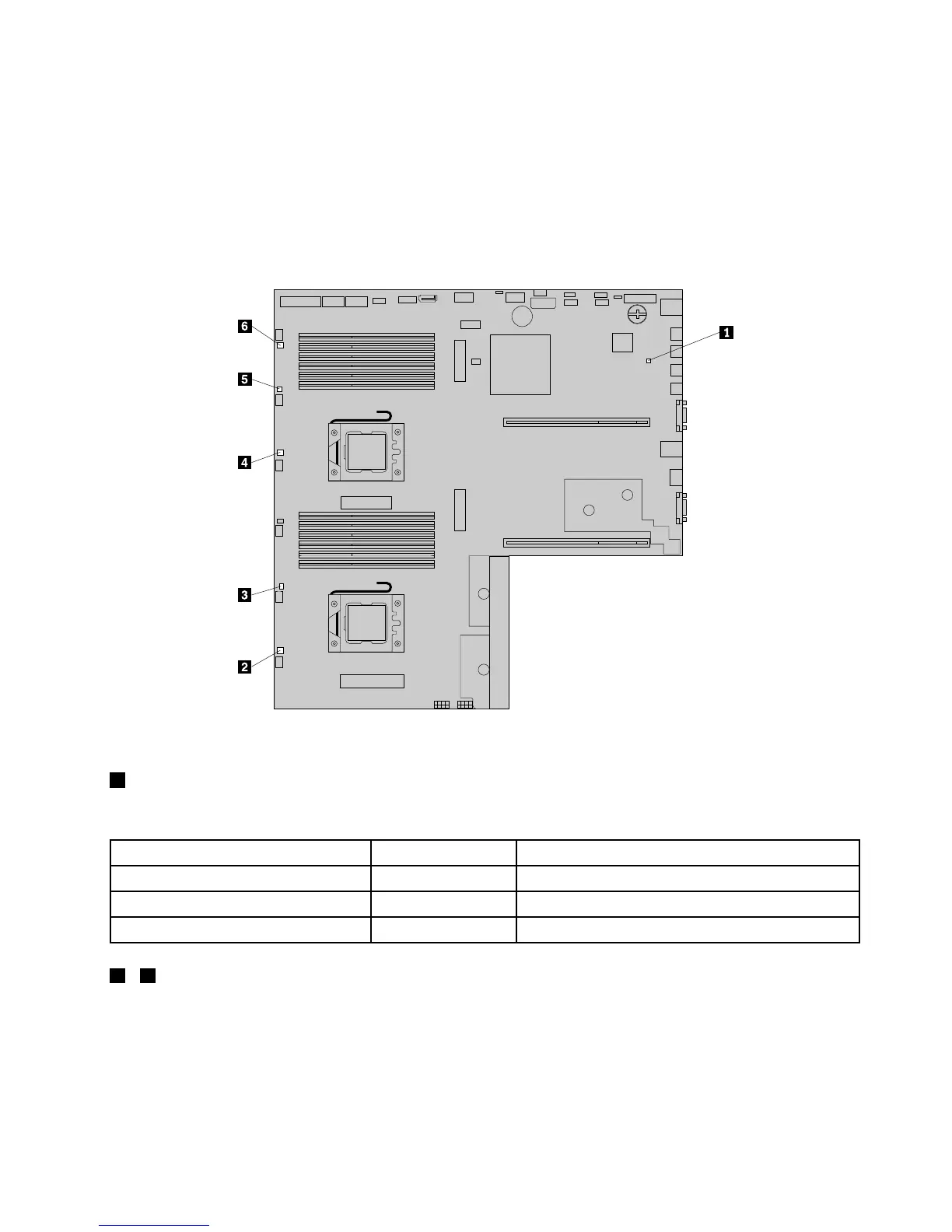
ThefollowingillustrationshowstheTMMstatusLEDandsystemfanerrorLEDsonthesystemboard.
Figure42.SystemboardLEDs
1TMMstatusLED(alsoknownasBMCstatusLED)
ThisLEDindicatesthestatusoftheonboardThinkServerManagementModule(TMM,alsoknownasBMC).
TMMstatusLED
Color
Description
OnGreen
TheTMMisnotready.
Off
None
TheTMMhasnopowerorhasfailed.
Blinking
Green
TheTMMisworking.
2-6SystemfanerrorLEDs
WhenasystemfanerrorLEDonthesystemboardislit,itindicatesthatthecorrespondingsystemfanis
operatingslowlyorhasfailed.Tosolvetheproblem,youmightneedtoreinstallorreplacethesystemfan.
See“Replacingasystemfan”onpage194
.Ifitisasystemboardproblem,contacttheLenovoCustomer
SupportCenter.
Chapter3.Productoverview61









 To Next Page