21
General checkout
Power system checkout
Toverifyasymptom,followthestepsbelow:
1. Turnothecomputer.
2. Removethebatterypack.
3. ConnecttheACadapter.
4. Makesurethatpowerissuppliedwhenyouturnonthecomputer.
5. Turnothecomputer.
6. DisconnecttheACadapterandinstallthechargedbatterypack.
7. Makesure thatthe batterypack suppliespower whenyou turnonthe
computer.
Ifyoususpectapowerproblem,seetheappropriateoneofthefollowingpower
supplycheckouts:
• “CheckingtheACadapter”onpage21
• “Checkingoperationalcharging”onpage21
• “Checkingthebatterypack”onpage22
Checking the AC adapter
YouareherebecausethecomputerfailsonlywhentheACadapterisused.
• Ifthepower-onindicatordoesnotturnon,checkthepowercordoftheAC
adapterforcorrectcontinuityandinstallation.
• Ifthecomputerdoes notcharge duringoperation, goto “Checking
operationalcharging”.
TochecktheACadapter,followthestepsbelow:
1. UnplugtheACadaptercablefromthecomputer.
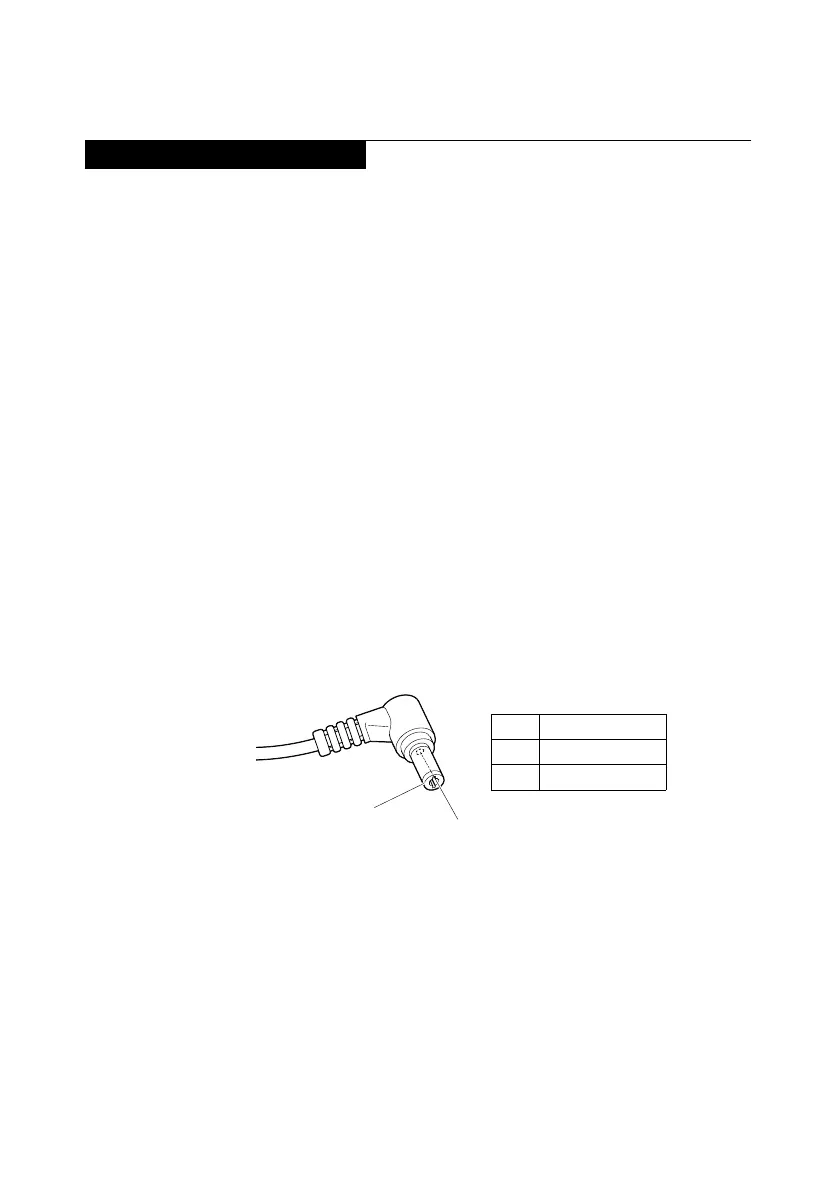
2. Measuretheoutputvoltage attheplugoftheAC adaptercable.Seethe
followinggure:
2
1
Voltage (V DC)
+20
0
Pin
1
2
Note:OutputvoltagefortheACadapterpinNo.2maydierfromtheoneyou
areservicing.
3. Ifthevoltageisnotcorrect,replacetheACadapter.
4. Ifthevoltageisacceptable,dothefollowing:
• Replacethesystemboard.
• Iftheproblempersists,goto“LenovoV340-17IWL”onpage27.
Note:NoisefromtheACadapterdoesnotalwaysindicateadefect.



 To Next Page