39
Lenovo V340-17IWL
1030 Hard disk drive
Foraccess,removetheFRUinfollowingorder:
• “1010Opticaldrive”onpage33
• “1020Basecover”onpage35
Attention:
• Donotdroptheharddiskdriveorapplyanyphysicalshocktoit. The hard
disk drive is sensitive to physical shock. Improper handling can cause damage and
permanent loss of data.
• Before removing the drive, suggest the customer to backup all the information on
it if possible.
• Never remove the drive while the system is operating or in suspend mode.
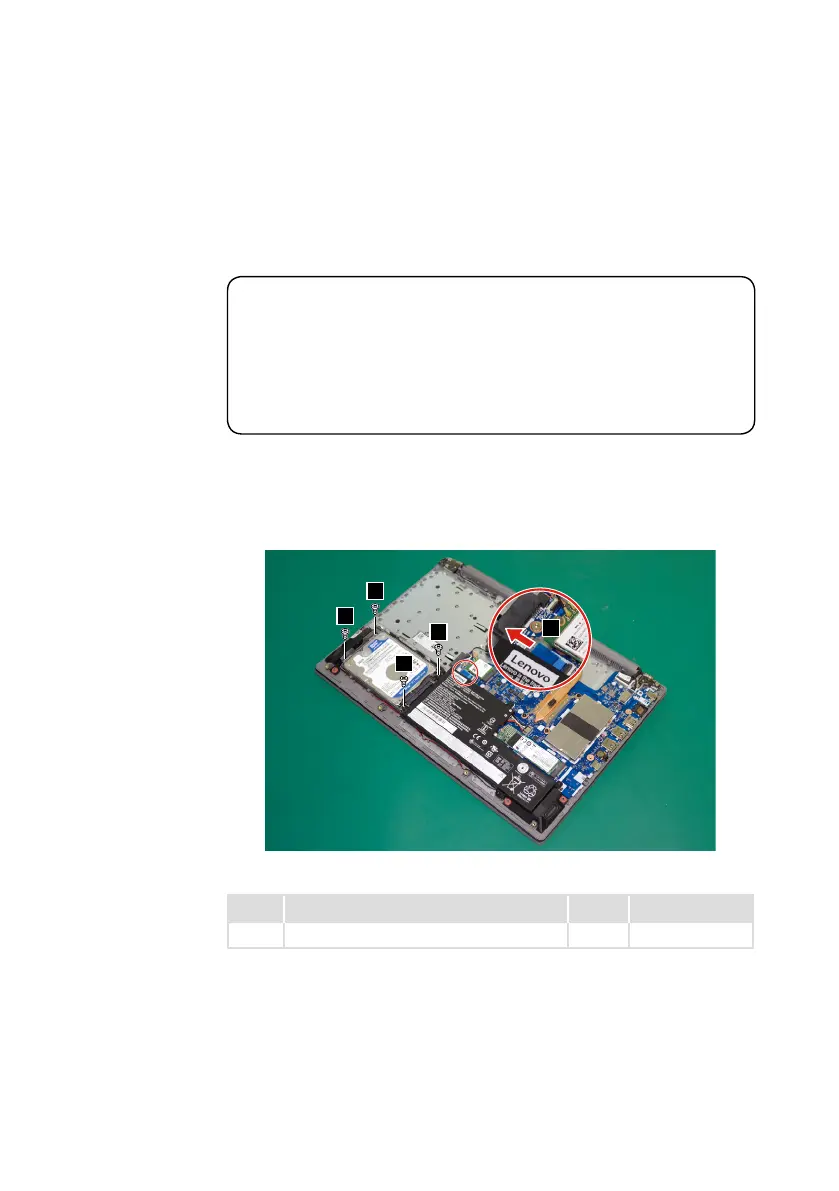
Step1: Removethescrews
1
.
Step2: DetachtheHDDboardconnectorinthedirectionshownbyarrow
2.
1
1
1
1
2
Figure 5. Remove the screws and detach the HDD board connector
Step Screw (quantity) Color Torque
1
M2×6mm,Phillips-head,nylok-coated(4) Black 1.85+/-0.15kgf/cm



 To Next Page