52
V340-17IWL Hardware Maintenance Manual
1090
System board
Important notices for handling the system board:
When handling the system board, bear the following in mind.
• Be careful not to drop the system board on a bench top that has a hard surface,
such as metal, wood, or composite.
• Avoid rough handling of any kind.
• During the whole process, make sure not to drop or stack the system board.
• If you put a system board down, make sure to put it only on a padded surface such
as an ESD mat or conductive corrugated material.
Foraccess,removetheFRUinfollowingorder:
• “1010Opticaldrive”onpage33
• “1020Basecover”onpage35
• “1030Harddiskdrive”onpage39
• “1040Batterypack”onpage41
• “1050SSDcard”onpage43
• “1060DIMM”onpage45
• “1070PCIExpressMiniCardforwirelessLAN”onpage46
• “1080FanassemblyandHeatSinkassembly”onpage48
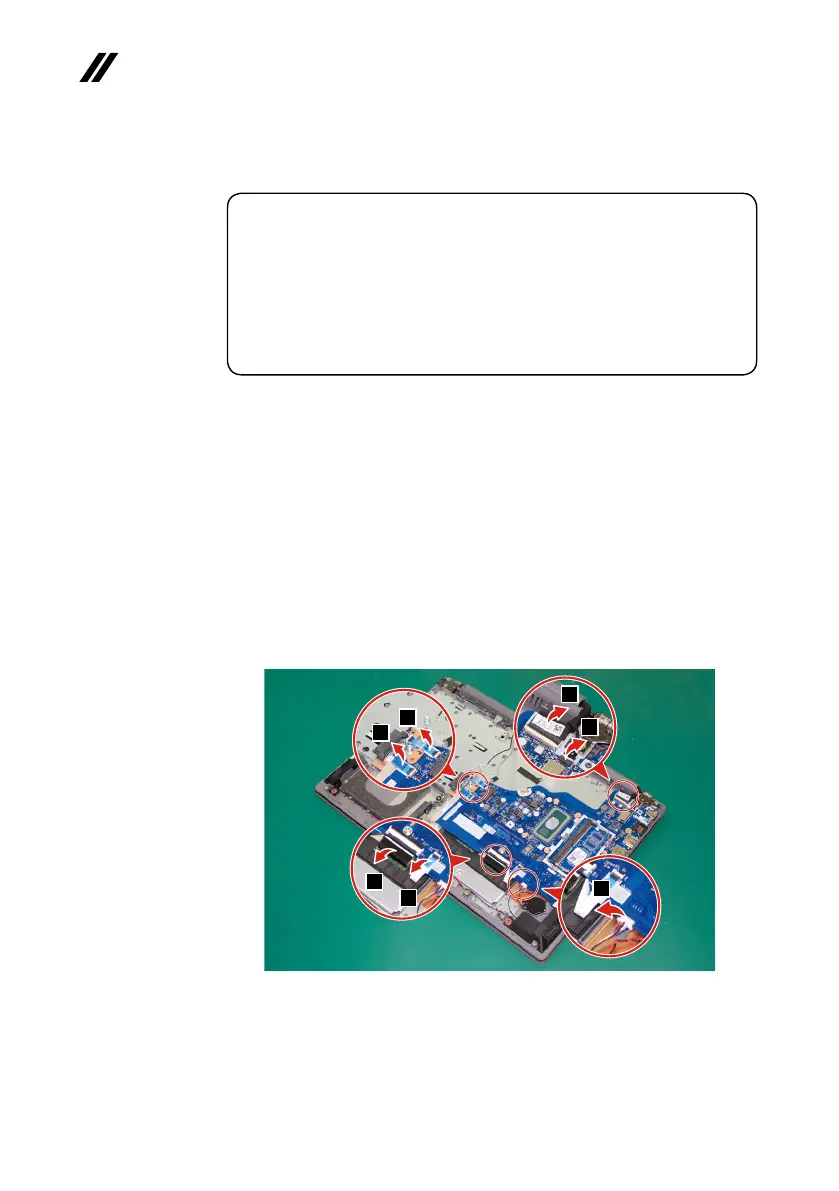
Step1: Disconnecttheconnectorsinthedirectionsshownbyarrows
1
.
1
1
1
1
1
1
1
Figure 21. Disconnect the connectors



 To Next Page