46
V340-17IWL Hardware Maintenance Manual
1070 PCI Express Mini Card for wireless LAN
Foraccess,removetheFRUinfollowingorder::
• “1010Opticaldrive”onpage33
• “1020Basecover”onpage35
• “1040Batterypack”onpage41
Important:
The preinstalled WLAN module may only be replaced with a Lenovo approved
module in order to comply with FCC and IC regulations. Refer to Table 4 “Parts
list—Overall” on page 68 for Lenovo part numbers for the approved modules.
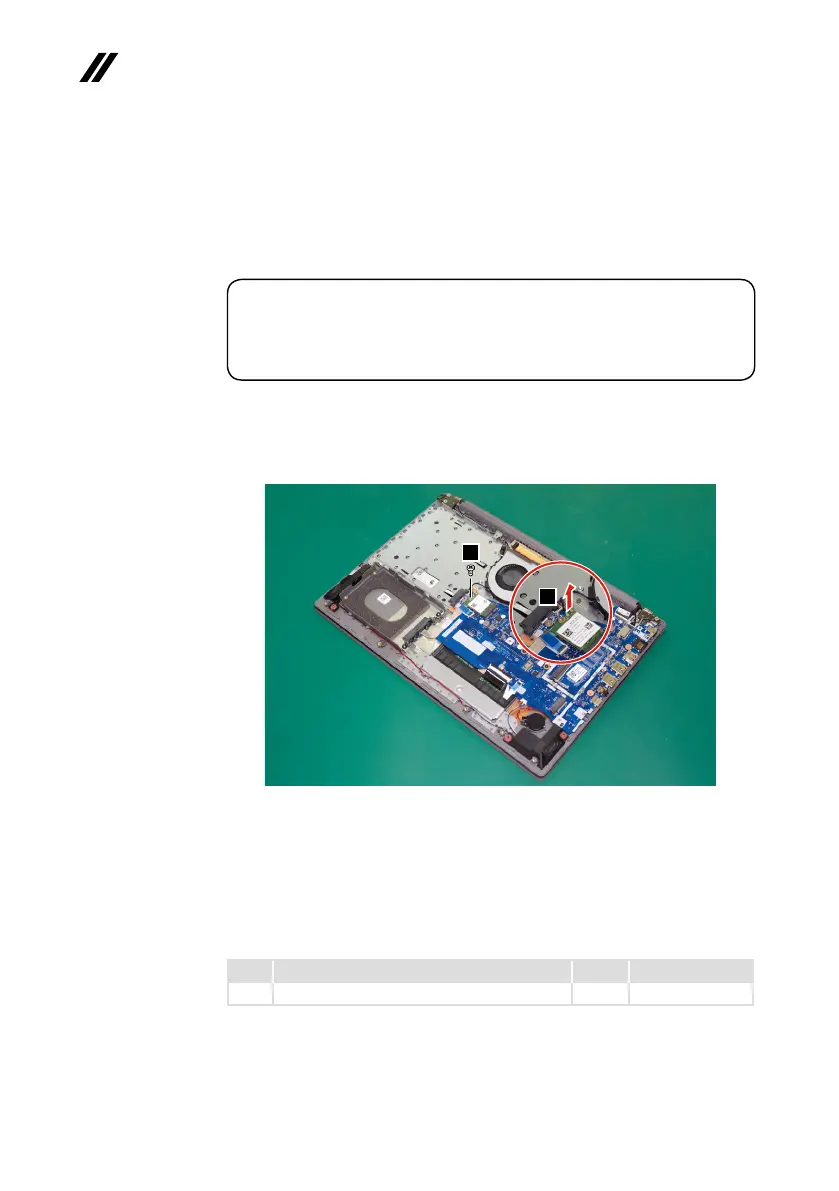
Step1: DisconnectthetwowirelessLANcables(black,gray)
1
.
Step2: Removethescrew
2
.
1
2
Figure 13. Disconnect the two wireless LAN cables and remove the screw
Instep
1
,unplugthejacks byusing theremoval toolantenna RFconnector
(P/N:08K7159),orpickuptheconnectorswithyourngersandgentlyunplug
theminthedirectionshownbythearrows.
Notes:ThewirelessLANcardhas2cablesinstep
1
.
ThewirelessLANcardinsomemodelsmighthave3cablesinstep
1
.
Step Screw (quantity) Color Torque
2
M2×3mm,Phillips-head,nylok-coated(1) Black 1.85+/-0.15kgf/cm



 To Next Page