54
V340-17IWL Hardware Maintenance Manual
1100 ODD transfer board and backup battery
Foraccess,removetheFRUinfollowingorder:
• “1010Opticaldrive”onpage33
• “1020Basecover”onpage35
• “1030Harddiskdrive”onpage39
• “1040Batterypack”onpage41
• “1050SSDcard”onpage43
• “1060DIMM”onpage45
• “1070PCIExpressMiniCardforwirelessLAN”onpage46
• “1080FanassemblyandHeatSinkassembly”onpage48
• “1090Systemboard”onpage52
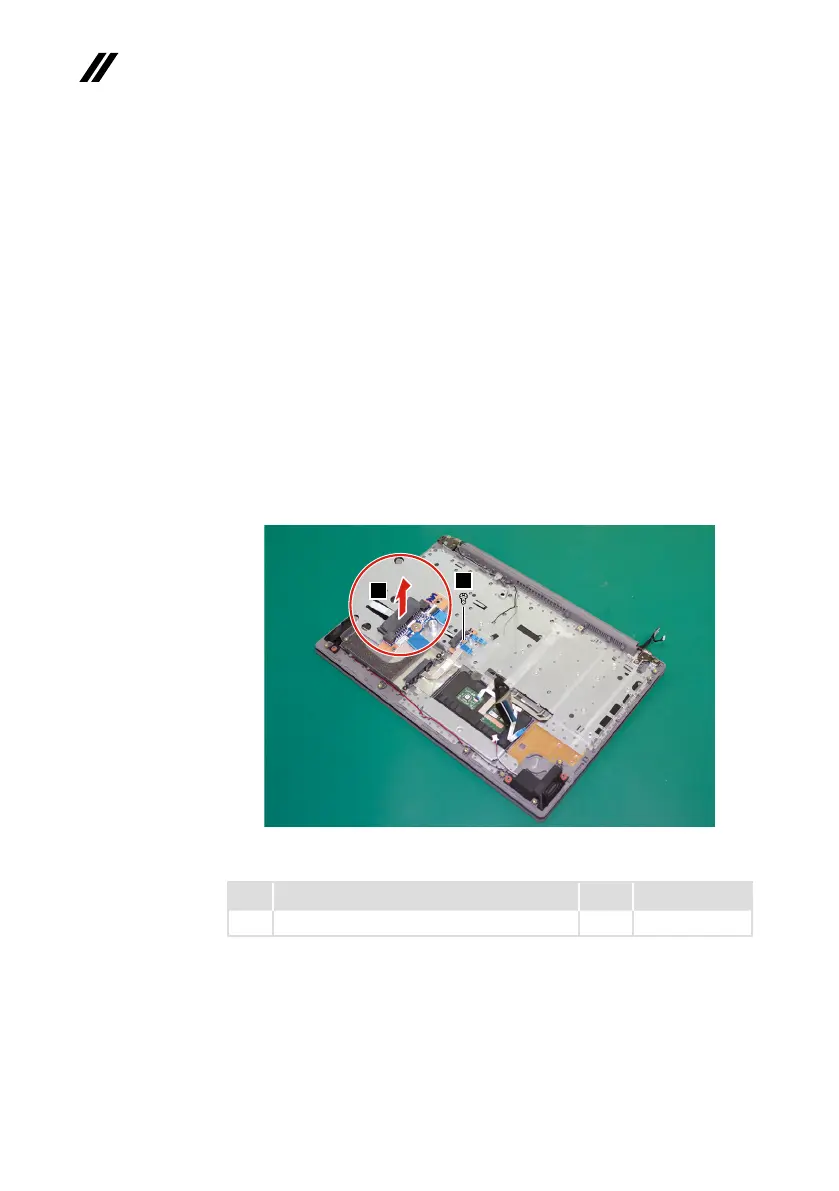
Step1: Removethescrew
1
.
Step2: RemovetheODDtransferboardinthedirectionshownbyarrow
2
.
2
1
Figure 23. Remove the ODD transfer board
Step Screw (quantity) Color Torque
1
M2×3mm,Phillips-head,nylok-coated(1) Black 1.85+/-0.15kgf/cm
When installing:Makesurethattheconnectorsareattachedrmly.



 To Next Page