Testing
Leuze electronic SOLID-2 41
TNT 35/7-24V
Review-Stand, , 8. April 2015
DEUTSCHENGLISHFRANÇAISITALIANOESPAÑOLNEDERLANDS
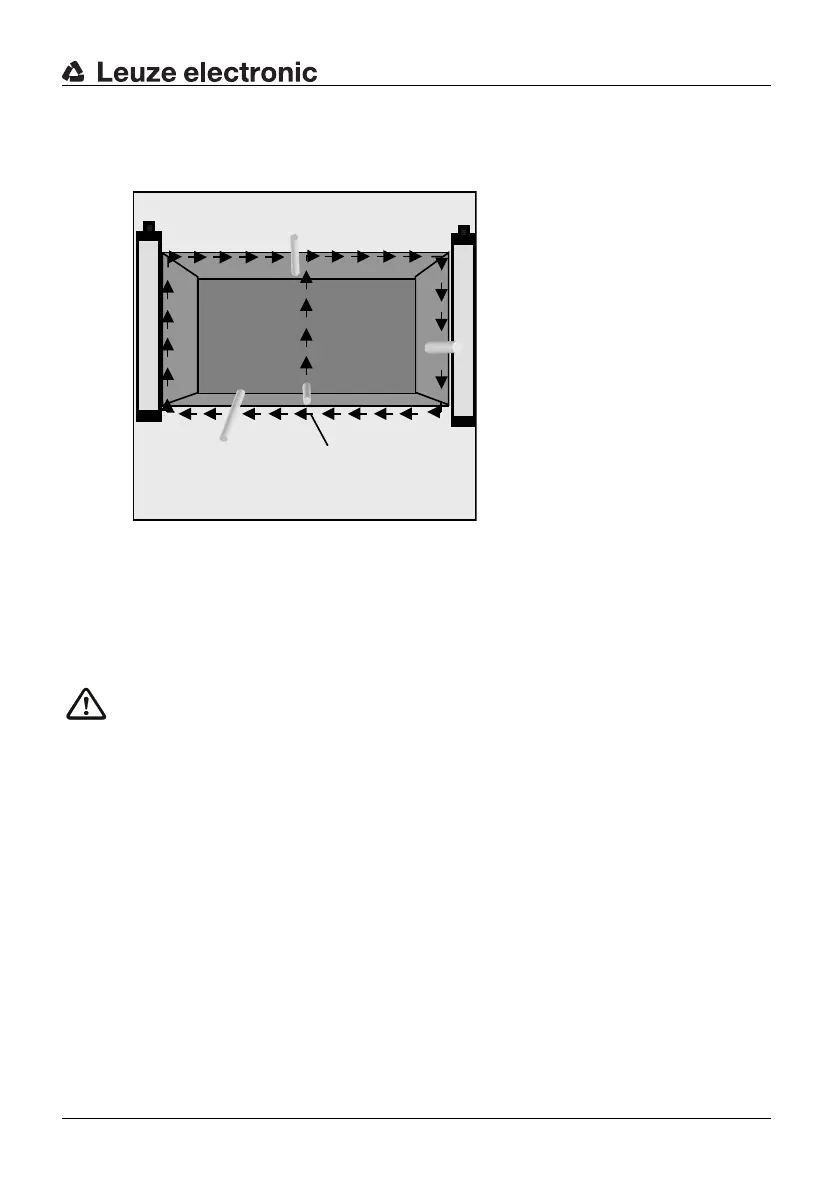
to red and LED2 stays in the OFF state. During the test procedure, the yellow LED2
must not light up at any point. Only after the test rod is removed out of the protective
field, the LED2 is allowed to turn to yellow.
✟ If the AOPD is being operated without the internal start/restart interlock, it is sufficient to
watch LED1 on the receiver during the testing procedure. When the test rod is inserted
into the protective field, this LED1 must switch from “green” to “red” and must not switch
back to “green” at any point during the test procedure.
Warning!
If the test does not yield the desired result, the cause could be a protective field height that
is too low or reflections from reflective metals or tools brought into the area. In this case the
installation of the safety light curtain must be checked by a specialist. If the cause cannot
be clearly defined and remedied, the machine or system must not beoperated any more!
8.4 Cleaning the front screens
The front screens on the transmitters and receivers must be cleaned regularly depending
on how dirty they are. A blinking 7-segment display with the protective field is free (LED1
is green) indicates a “weak signal reception”, cleaning is then required.
If cleaning the screens does not improve this, the detection range and alignment must be
checked.
We recommend using a mild cleanser for cleaning the front screens. The screens are
resistant to thinned acids or alkalis and resistant to organic solvents within limits.
a = Beginning of test
Fig. 8.3-1: Testing the protective field with the test rod



 To Next Page