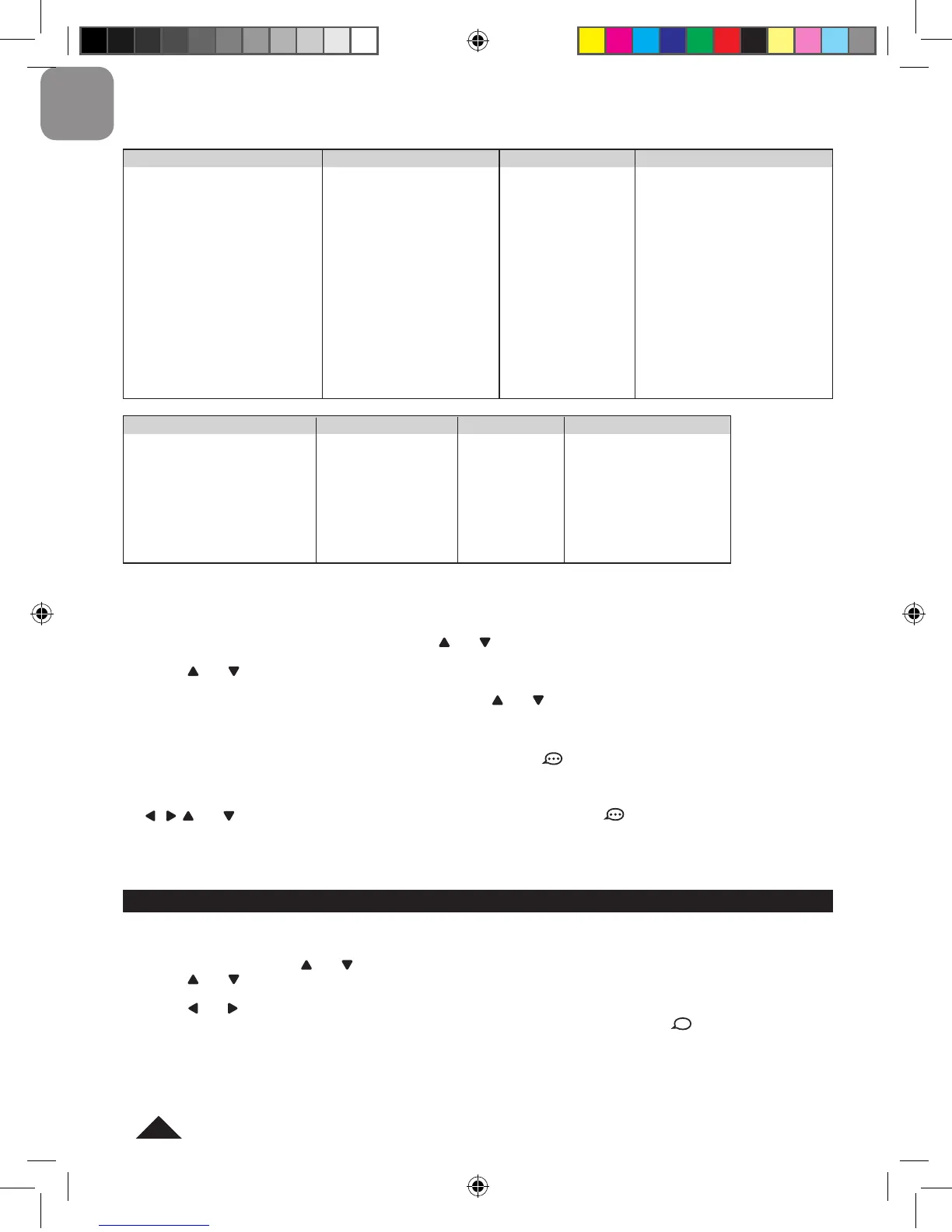
3. Accommodation
• Booking
• Checking-in/out
• Type of Room
• Complaints
• Room service
• Miscellaneous
Using the “Phrases” mode
1. Press the PHRA key to select the “Phrases” mode.
2. The screen displays the list of categories. Use the and keys to select a category, then press ENTER.
3. Use the and keys to select a sub-category then press ENTER.
4. The rst phrase of the sub-category will be shown. Use the and keys to select the desired phrase, then press
ENTER to display it. The HOME language on the top right corner of the screen ashes.
5. When the desired phrase is displayed, press the ENTER key to view its translation in the target language. The
TARGET language on the top right corner of the screen ashes. If the icon is displayed, you can use the TALK
key to listen to the phrase’s pronunciation in the TARGET language.
6. To translate the phrase into another language, press the TARGET key when its translation is displayed. Then use
the , , and keys to select the desired language and press ENTER. If the icon is displayed, you can use
the TALK key to listen to the phrase’s pronunciation in the new target language.
Note: When the translation is displayed, press ESC once to go back to the sub-category list or twice to go back to the
category.
When the “Spoken Entries Only” feature is turned on, only words or phrases that can be spoken by the unit will be
displayed in “Dictionary” and “Phrases” modes.
1. Press MENU, then use the and keys to select “Spoken Entries Only” and press ENTER.
2. Use the and keys to select “Dictionary” (“spoken words only” mode) or “Phrases” (“spoken phrases only” mode),
then press ENTER to conrm.
3. Use the and keys to select “ON” (“Spoken Entries Only” feature turned on) or “OFF” (“Spoken Entries Only”
feature turned off) , then press ENTER to conrm. In “Dictionary” and “Phrases” modes, the icon will be displayed
on screen to indicate that the “Spoken Entries Only” feature is turned on.
Note: To turn on or turn off the “Spoken Entries Only” mode, you can also press and hold the TALK key.
2. Travel
• Asking for directions
• Directions on a map
• Car
• Renting a car
• Tickets
• Taxi
• Bus
• Train
• Plane
• Boat
• Travelling with children
• Travelling with pets
• Passport and Customs
4. Dining and going out
• Restaurants
• Food Items
• Food Allergies
• Nightlife
• Chat up lines
6. Leisure
• Sightseeing
• Sports & activities
• Entertainment
7. Services
• Bank
• Post Ofce
• Telephone
• Internet
• Ofce
8. Emergencies
• Medical
• Help
• At the Police Station
• Lost and Found
• Warnings
5. Shopping
• Supermarket
• General shopping phrases
• Buying groceries
• Buying clothes/shoes
• Buying electronics
• Complaints


 To Next Page
 Loading...