FAVOURITE LIST
Your translator allows you to create lists of your favourite words and phrases.
To add a word or a phrase to the favourite list
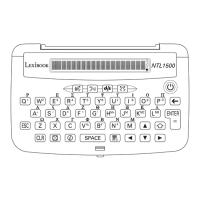
1. In “Dictionary” or in “Phrases” mode, use the and keys to select the word or the phrase you want to add to the
favourite list, then press the FAV key.
2. Use the and keys to select the “Add to favourites” option, then press ENTER to conrm. The screen will display
“Word added” in “Dictionary” mode, or “Phrase added” in “Phrases” mode.
Note:
• If the word or the phrase has already been added to the list, the screen will display “Already in list”.
• If the translator’s memory is full, you won’t be able to add new words or phrases to the list and the screen will display
“Memory full”.
To view your favourite words or phrases
1. In idle mode (date and time display), “Dictionary” or “Phrases” mode, press the FAV key.
2. To view your favourite words’ list, use the and keys to select “My Dictionary”, then press ENTER.
3. To view your favourite phrases’ list, use the and keys to select “My Phrases”, then press ENTER.
4. You can browse through the words and phrases with the and keys. Press ENTER to display their translation in
the selected TARGET language or use the TALK key to listen to their pronunciation (if the is displayed on screen).
To delete favourite words or phrases
1. Select “My Dictionary” or “My Phrases” and press ENTER.
2. Use the and keys to select the word or the phrase you want to delete, and press the BACKSPACE key.
3. The screen will display “DELETE?”. Use the and keys to select “Yes” and press ENTER to conrm and delete
the selected word or phrase (or select “No” and press ENTER to cancel the deletion).
Note:
• To exit the “Favourite list” mode, press the ESC key or any other function key.
• Warning: the entire favourite lists will be deleted when you reset the unit or when you change the batteries.
CALCULATIONS MODE
Calculator
The MT1500 includes a 10-digit calculator with memory and percentage function.
1. Press MENU, then use the and keys to select “Calculations” and press ENTER. OR, press and hold the NUM
key.
2. Use the and keys to select “Calculator” then press ENTER to conrm.
3. Use the calculator keys (please refer to the “Key Guide” section p.3) to perform calculations.
Conversions
1. Press MENU, then use the and keys to select “Calculations” and press ENTER. OR, press and hold the NUM
key.
2. Use the and keys to select “Conversions”, then press ENTER to conrm.
3. Use the and keys to select “Currency”, “Length”, “Weight” or “Temperature”, then press ENTER to conrm.
Currency converter
1. Select “Currency” in the “Conversions” menu, then press ENTER to conrm.
2. Press the BACKSPACE key to enter the setting mode. The left currency is highlighted and the RATE becomes “0”.
3. Use the and keys to select the left currency (please refer to appendix 2, p.14).
4. Press and use the and keys to select the right currency (please refer to appendix 2, p.14).
5. Press and input the rate amount, then press ENTER key to store the setting.
6. To perform a conversion, input the desired amount and the unit will automatically display the result.
7. Press the and keys to change the direction of the conversion.
Length, Weight and Temperature conversion
1. Select “Length”, “Weight” or “Temperature” in the “Conversions” menu, then press ENTER to conrm.
2. Use the and keys to select the desired conversion pair (please refer to appendix 3, p.14).
3. To perform a conversion, input the desired value and the unit will automatically display the result.
4. Press the and keys to change the direction of the conversion.



 To Next Page
 Loading...