9.12Reset the hours counter 1-phase pump
We recommend not to reset the hours counter but leave it running in order
to keep track of the pump history. If a hours counter reset is required the
following steps need to be carried out:
1. Remove power to 1-phase pump and wait two minutes for the residual1.
voltage to discharge; then take the hours counter off the front panel.
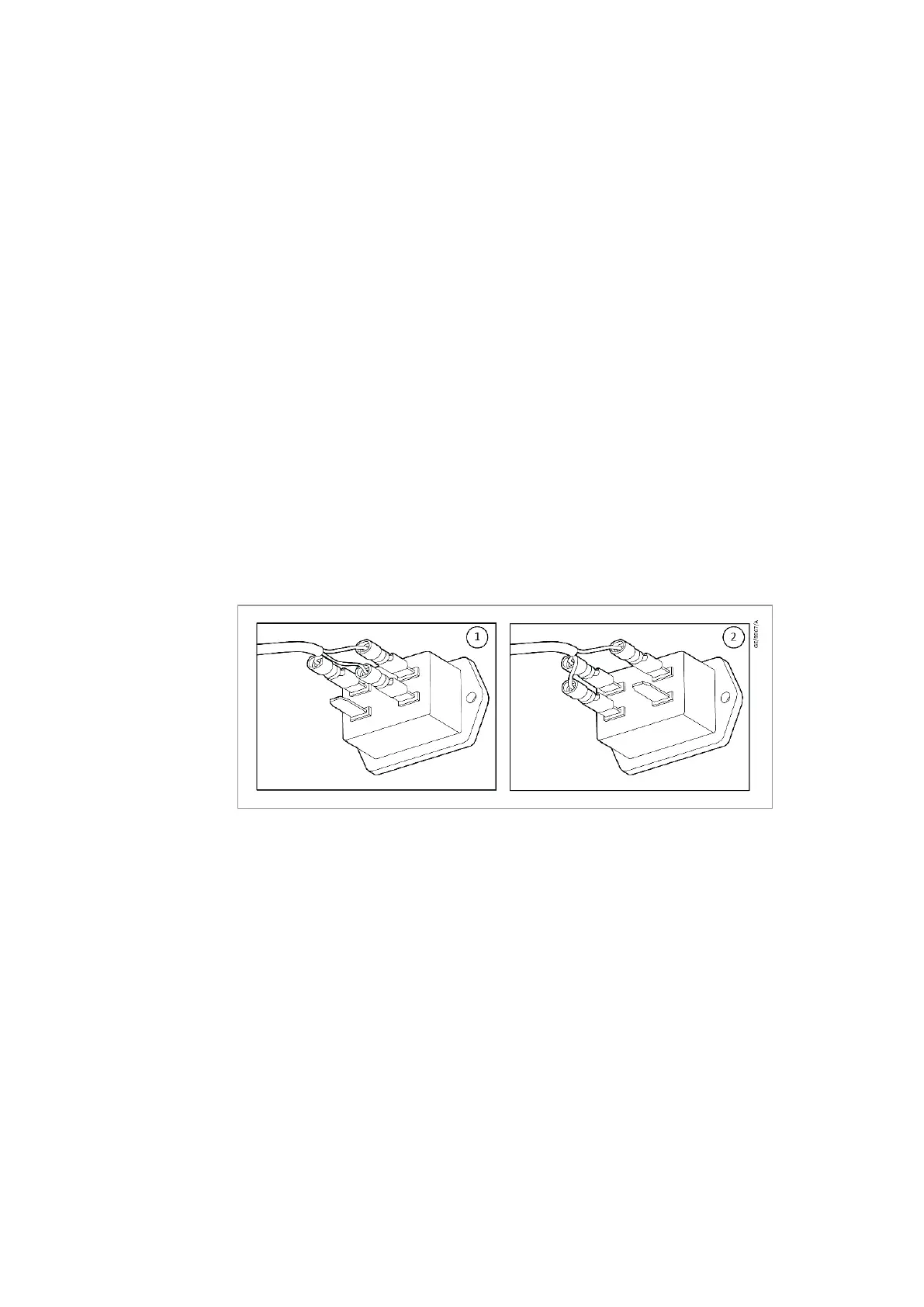
2. Unplug the wire from the enabling signal tab and plug it onto the reset2.
tab, as shown in (view2).
3. Fit the hours counter back onto the front panel.3.
4. Apply power to the 1-phase pump and press the Start button; the hours4.
counter will immediately reset to zero.
5. Remove power to the 1-phase pump and wait two minutes for the5.
residual voltage to discharge; then take the hours counter off the front
panel.
6. Unplug the wire from the reset tab and replace it onto the enabling6.
signal tab, as shown in
(view1).
7. Fit the hours counter back onto the front panel.7.
8. Apply power to the unit and press the Start button; check if the8.
hourglass ickers, which means it is ready to start to counting.
Figure 23. Resetting hours counter 1-phase pump
9.13Reset the hours counter 3-phase pump
1. Remove power to the 3-phase pump and isolate the incoming electrical1.
supply.
2. Remove the electric terminal box using the procedure documented in2.
on page 30
3. With power removed to the 3-phase pump; the hours counter should3.
remain powered as it has an embedded battery – check the display to
make sure the counter is still working.
4. On the printed circuit board of the electric terminal box there is a4.
three pin reset connector/jumper‑ “RESET HOURS COUNTER”, refer
to
. Move the jumper to
the reset pins following the symbol on the board.
5. Wait approximately 5 seconds for the counter to reset.5.
6. After resetting, move the jumper back to its default position.6.
Reassemble the electric terminal box and fan cowl as per
on page 30.
300668736_002_C7 - © Leybold 61
Maintenance



 To Next Page