99
Appendix
3
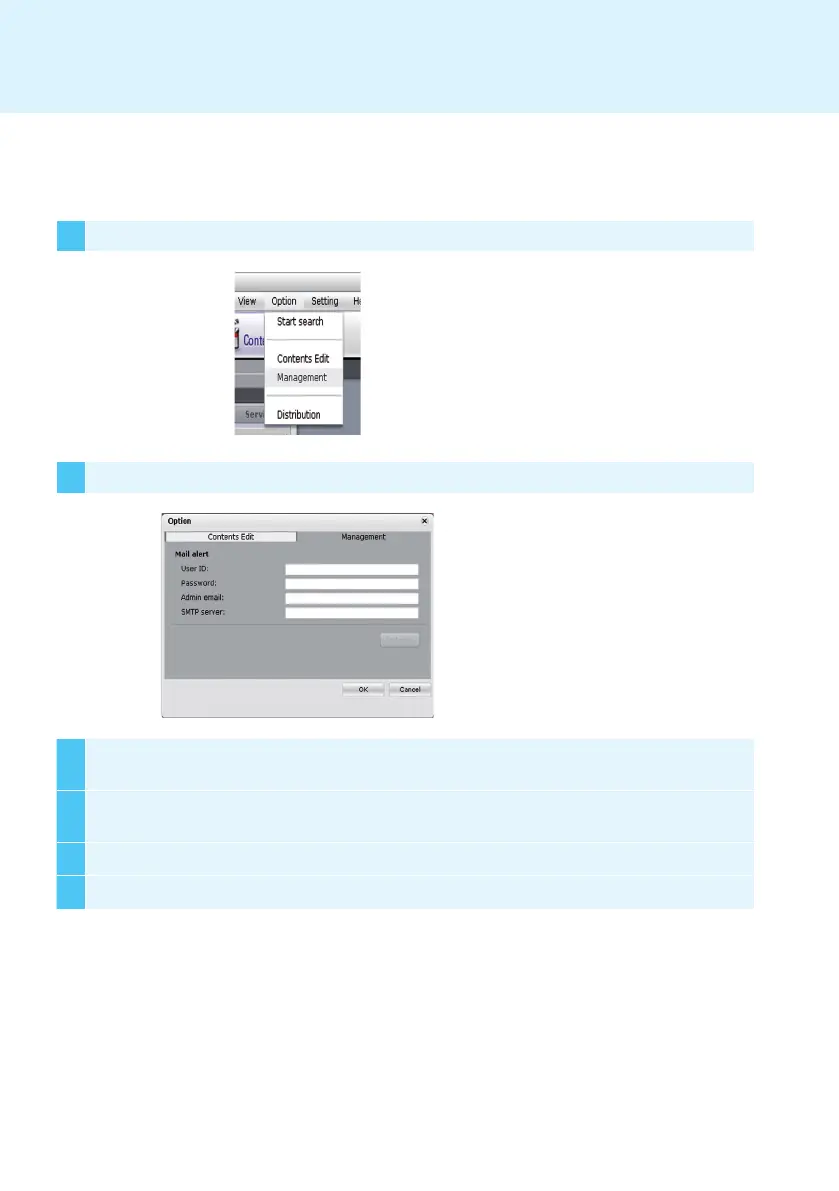
Type an e-mail address in the Administrator E-mail field to receive the report. Type the e-mail server
address in the SMTP Server field.
4
If the SMTP server requires user identification, provide the user ID and password and then click OK.
(Encryption methods such as SPA and SSL are not supported.)
5 When you have filled in the required fields, click Test E-mail.
6 Check whether the test e-mail has arrived at the designated address.
1 Select Menu bar Options > Management to use the e-mail setting menu.
2 The Options window will appear.
SMTP E-mail Settings
Network Port Information
Follow the steps below to set the SMTP e-mail. Log reports can be sent to the e-mail address you designate.
SuperSign Manager and Player use the following ports:
● 6080: Server Open
● 6949: Server Open
● 6950: Server Open
● 6952: Server Open



 To Next Page