19
The schedule function displayed when you select the
Commercial schedule method.
Select the Schedule in the menu screen and move to the
schedule settings screen.
Select the menu to set in the schedule settings screen and
you can move to the details screen.
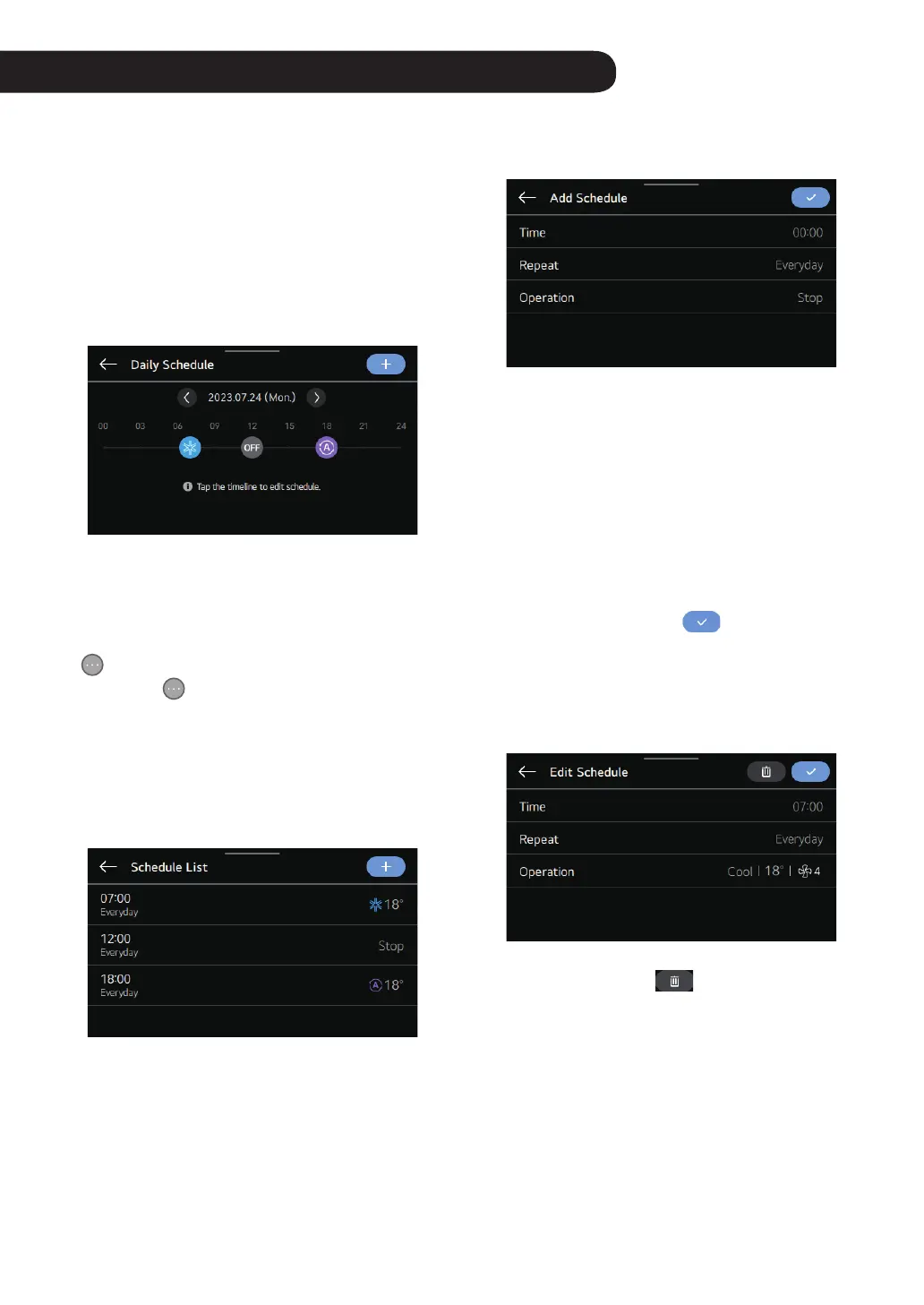
Daily Schedule Status
A function to check the schedule status saved in the remote
controller.
①
If a schedule is programmed, the operation mode icon is
displayed on the time line at the scheduled time.
②
An inactivated schedule is not displayed on the time
line.
③
If various schedules are programmed within one hour,
is displayed instead of the operation mode icon.
④
If you select
, you can check the all the schedules
within the hour by selecting the left or the right button in
the booking details on a lower end of the screen.
View and Edit Schedule
A function to check the schedule status saved in the remote
controller.
Youw can check the operation information (operation ON
/ OFF, operation mode, desired temperature) of the set
schedule, the schedule time, period, and day.
You can edit it by selecting the booking information of the
saved schedule.
Add Schedule
You can add a schedule saved in the remote controller.
①
You can add a new schedule by selecting the ‘+’ button.
②
You can set the time for performing the scheduled
operation in the ‘time settings.’
③
You can set the day or period for operating the schedule
in the ‘repeat’ settings.
④
You can set the operation information for the schedule in
the ‘operation settings.’
- When the operation is OFF, you cannot set the mode,
temperature, and the fan speed.
If you have completed adding the schedule by performing
① through ④ and pressing the
button, a message
saying ‘the schedule is added’ appears and you are moved
to the schedule view and edit screen.
Delete Schedule
You can delete the schedule stored in the remote controller.
You can select the schedule event to be deleted in the
schedule list and press the
button to delete it.
SCHEDULE- COMMERCIAL (STANDARD)



 To Next Page