22
Schedule Settings
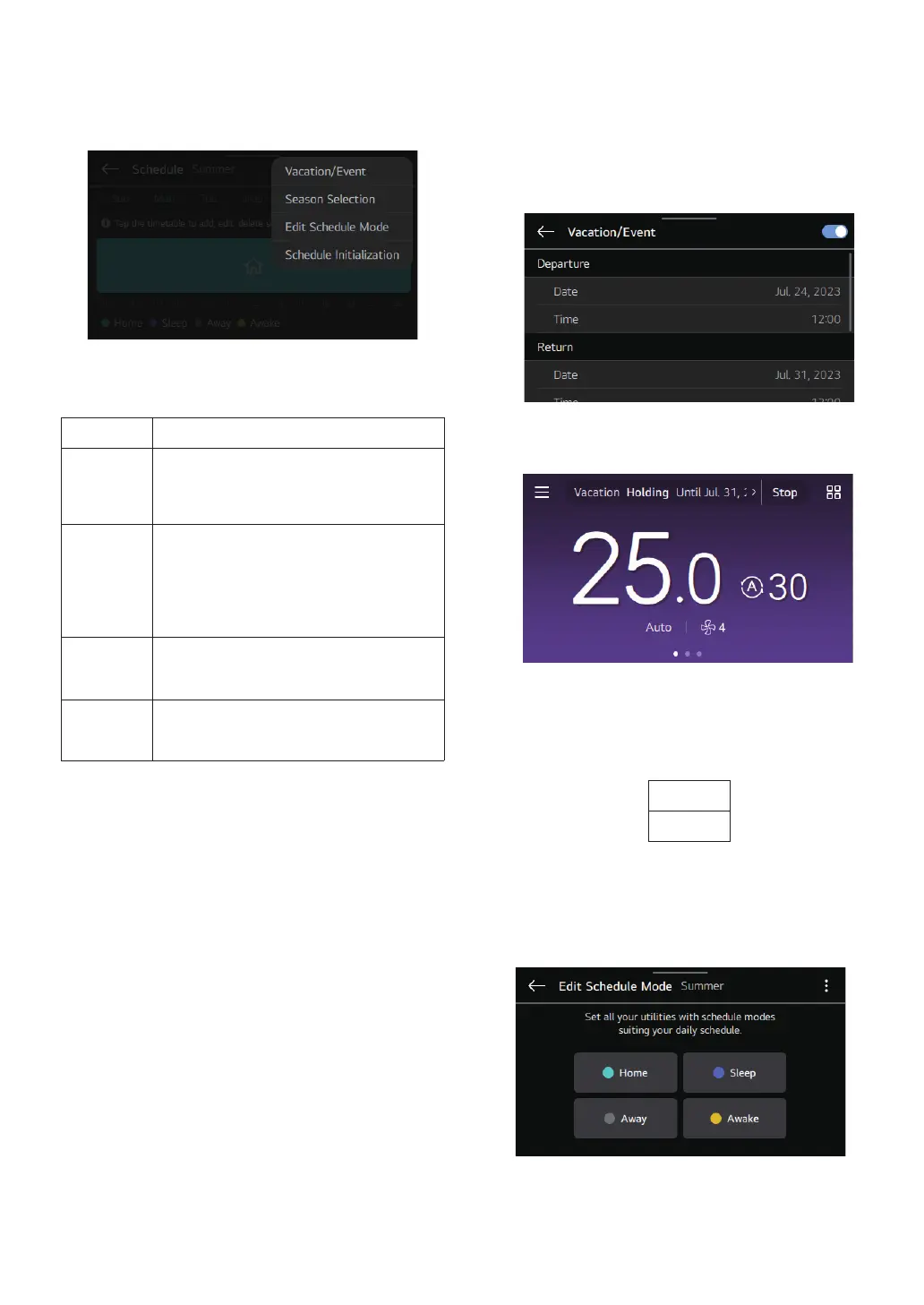
Select the settings icon to use the schedule more efciently
through the additional settings.
Mode Description
Vacation /
Event
You can hold the previously registered
schedule operation and temporarily
change the operation mode to be used.
Season
Selection
Create a comfortable indoor environment
suitable to the season with a simple
change.
– Use the schedule mode edit function first
to set the schedule operation mode.
Edit
Schedule
Mode
Register the details of the schedule mode
for each season.
Schedule
Initialization
All the schedule-related information will be
initialized.
1
Vacation / Event
① Date to be used in holiday mode. Set the time and
product operation criteria.
Select the Back button to nish setting.
② When the set date arrives, the setting information
is displayed at the top and the registered schedule
operation is hold.
2
Season Selection
① Use Select Season to change the season. Set a
different schedule for every season.
Season Selection
Summer
Winter
②
When the season changes, it operates under
the changed season’s schedule mode.
3
Edit Schedule Mode
① Select the operation to use in each schedule mode
and set the detailed operation information.
NOTE
Select the Back button to nish setting.



 To Next Page