Section 8. Maintenance
8-17
1 Prepare the LI-600.
Power on the instrument.
2 Open Instrument Calibration.
Connect the LI-600 to a computer via USB then open
the computer software. Click the drop-down menu
on the Toolbar then select Instrument Calibration.
3 Set the H
2
O input.
Select RH Span then click Begin RHSpan Cal-
ibration to view the RH Ref and RH Sample. Select
either Dew Point or Mole Fraction then enter the
desired H
2
O input.
4 Power off the pump.
Select Utility then click TURNPUMP OFF.
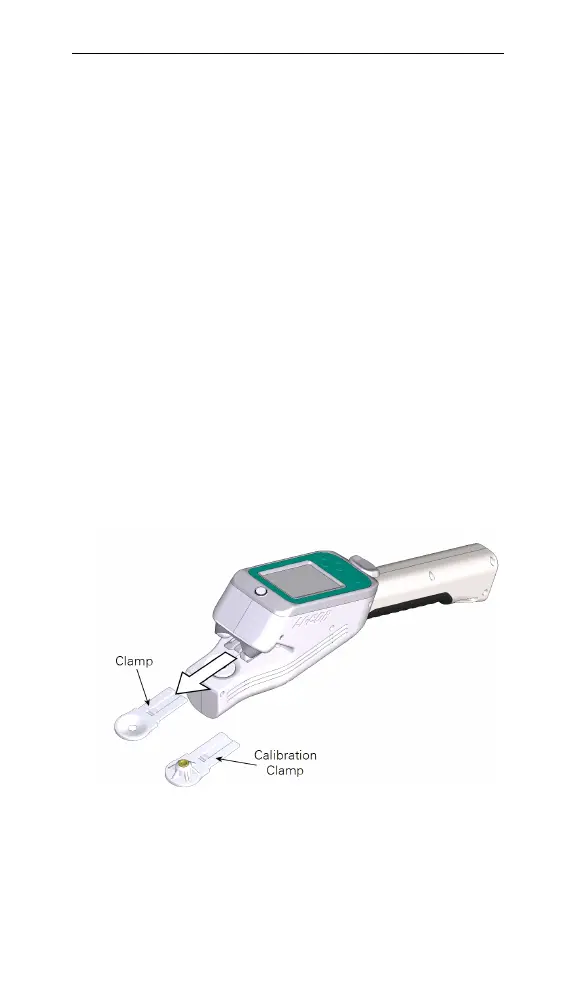
5 Remove the leaf clamp.
Gently but firmly pull on the leaf clamp to remove it
from the instrument.
Figure 8-16. Leaf clamps.
6 Attach the calibration clamp.



 To Next Page