Section 4. Using an SDI-12-to-USB translator
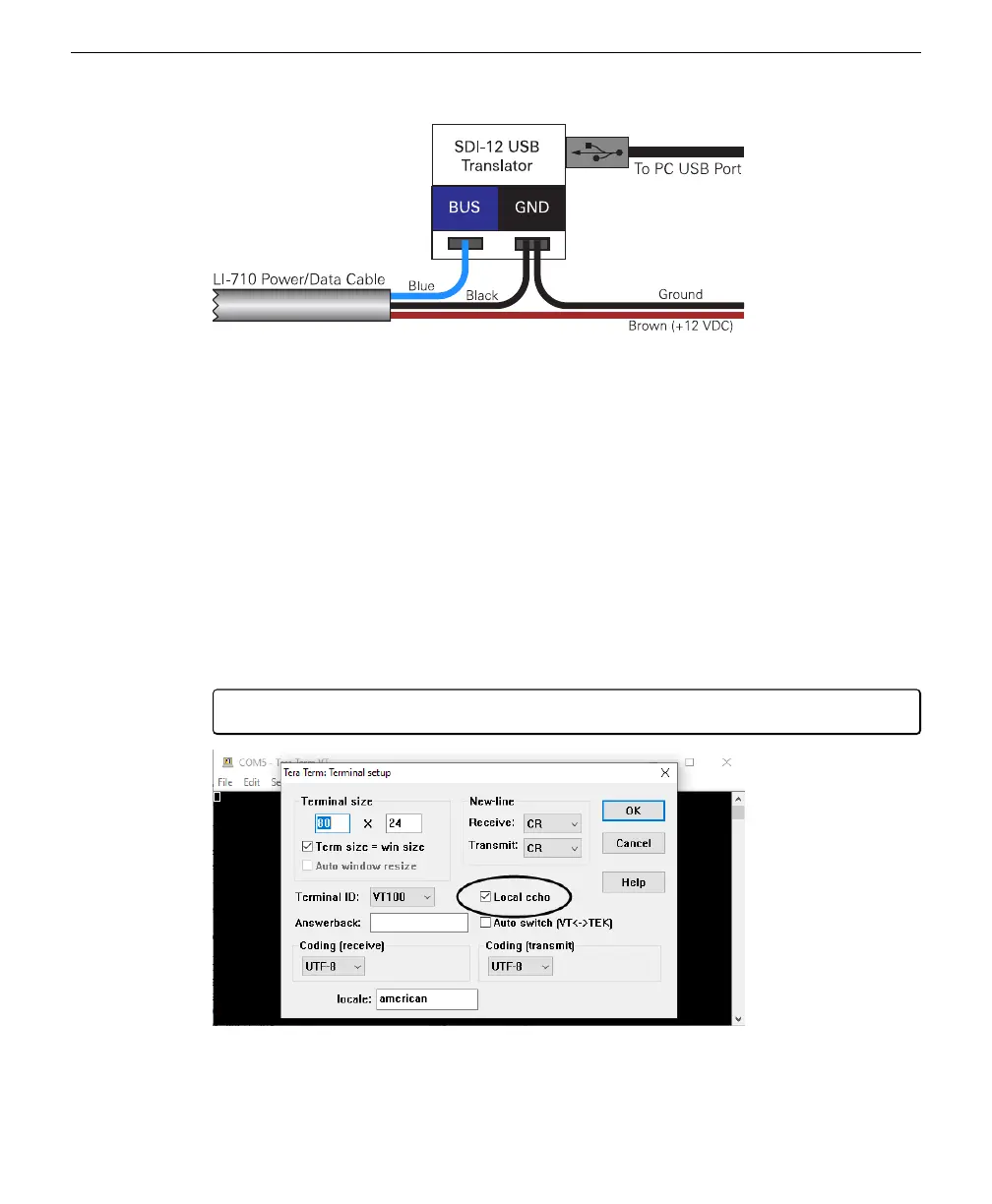
Figure 4-2. When connecting the LI-710 to an SDI-12-to-USB translator, connect the data
wire to the BUS terminal and the ground wire to both GND and power ground. Connect
the power and ground leads to a power supply (12 VDC).
To connect to the SDI-12 translator:
1
Launch a terminal program, such as Tera Term.
2
Select Serial as the connection type, select the port for the USB translator, and then click OK.
In the default configuration, Tera Term will pass your keystrokes directly to the
COM port - you will not see what you have typed. Change the setting under Setup >
Terminal, and check Local Echo and your keystrokes will appear in the terminal,
along with replies from the sensor. This is a matter of convenience - so you can see
what you are sending to the device.
Note: The New-line Receive and Transmit settings must be CR.
4-2 LI-710 Evapotranspiration Sensor Instruction Manual



 To Next Page