Section 5. Connecting to Campbell Scientific dataloggers
The PC400 terminal program
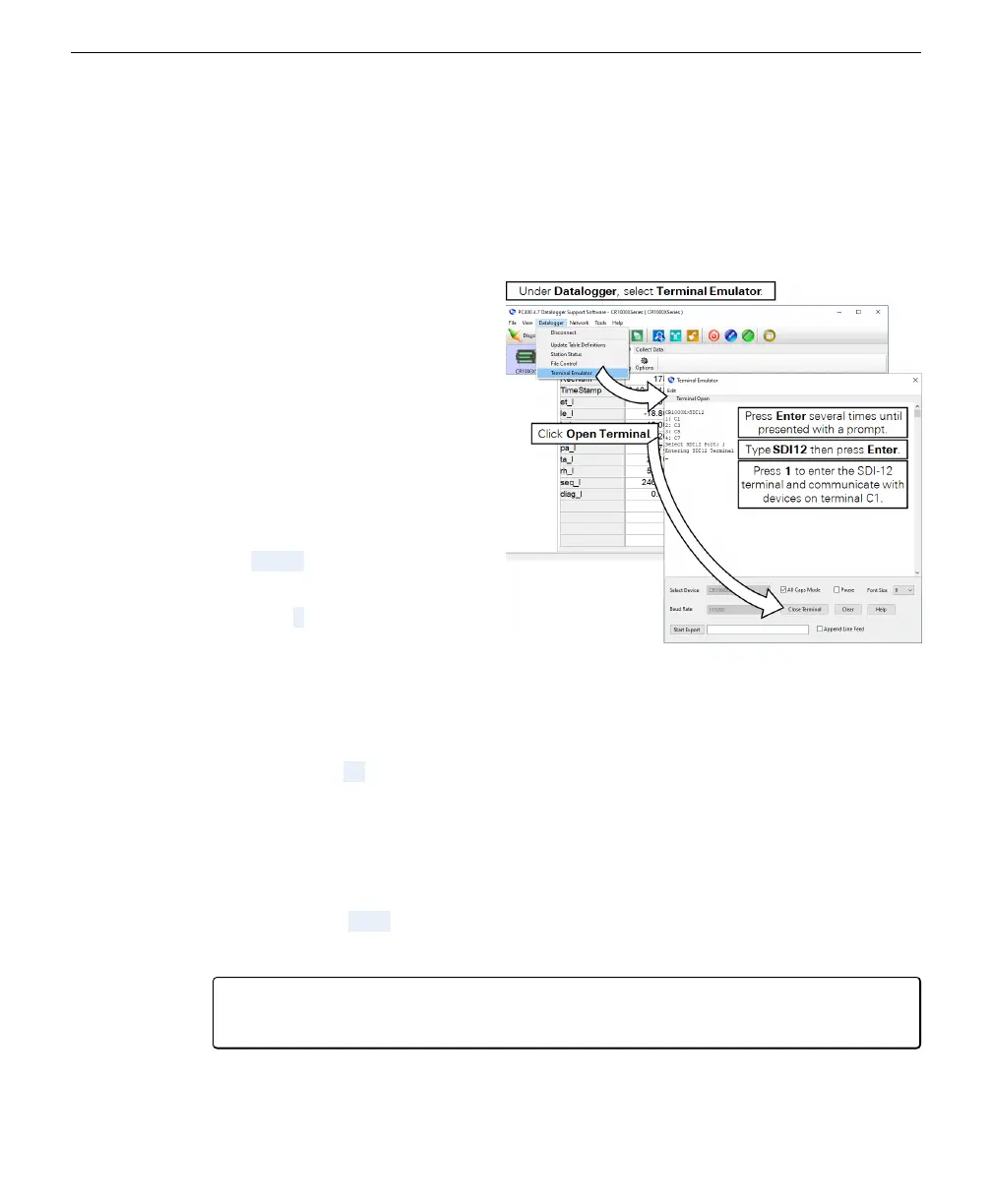
The PC400 has a built-in terminal emulator that you can use to communicate with
the LI-710. To use it, connect with the datalogger as described earlier and follow
these steps:
1
In PC400, click Datalogger > Ter-
minal Emulator.
2
In the new window, click the Open
Terminal button and then click in
the terminal to bring focus to that win-
dow.
3
Press Enter one or more times to get
a response from the datalogger.
The response will be something
like CR1000X>.
4
Type SDI12 and press Enter.
5
When presented the menu, select the
port (press 1 if your LI-710 is on ter-
minal C1).
6
Now you can query the LI-710 with
the following commands:
Get the address
l
Command ?!
l
Reply: 0 (or whatever the address is)
Set the address
To change the address from 0 to 1
l
Command: 0A1!
l
Reply: 1
Note: If you change the address, you must modify the address in the program to
match the sensor's address.
5-6 LI-710 Evapotranspiration Sensor Instruction Manual



 To Next Page