-78- v2.9
Data Access
6.3.7. License activation
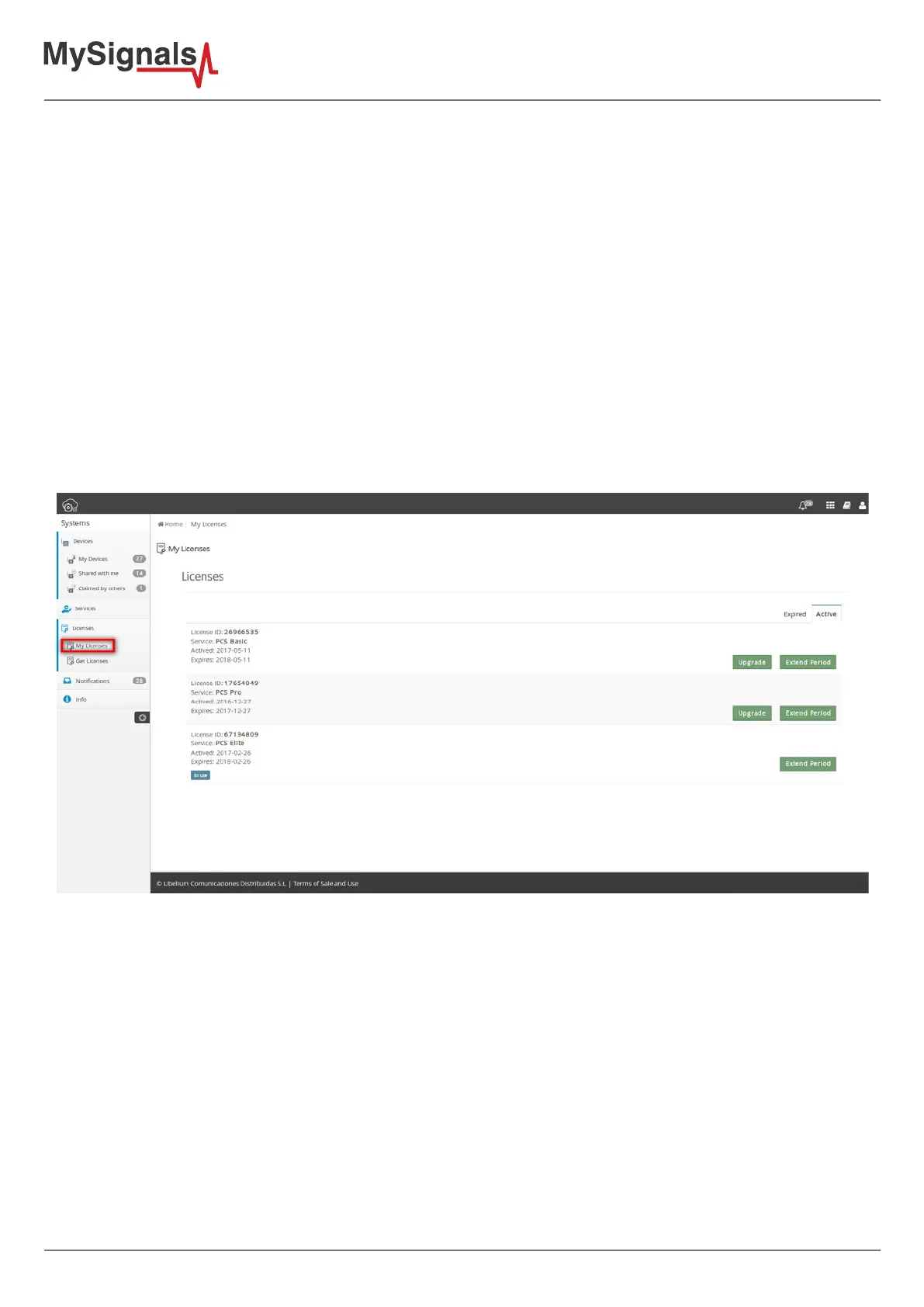
The “Licenses” section gives control of the licenses for the SCM. Licenses enable services for your devices. The “My
Licenses” panel lists the currently active licenses and the historic data of all the expired licenses. If you recently
purchased a License, go to the “Get Licenses” panel to enter its activation code.
License activation codes are unique and only one use is allowed (one license only applies to one user, to one
account). Despite the ownership of one device can be transferred (and one device can be managed by several
users), the ownership of a license cannot be transferred.
Any license has an expiration time associated to it. It is important to note that time starts running from the
moment the user activates it by entering its activation code (after entering the activation code of a license, it may
be required to activate it in the “Service” panel).
If the user has one active license and activates a new one, time keeps running for both the old and the new
licenses (in other words, time is never paused).
The “My Licenses” panel shows the licenses and the status of each one. The “Active” tab shows the list of the
licenses which are currently active, and the “Expired” tab shows the list of previously used licenses.
The information displayed is:
• License ID: Identication number
• Service: Service and type provided by the license
• Activated: Date of activation
• Expires: Date of expiration



 To Next Page