7-4 CHAPTER 7: OPERATION
QUICK LOAD SERVO III MI
2.1. Display
The liquid crystal display with touchscreen function provides the operator with all the necessary data, both
for handling the bar feed system and for maintenance.
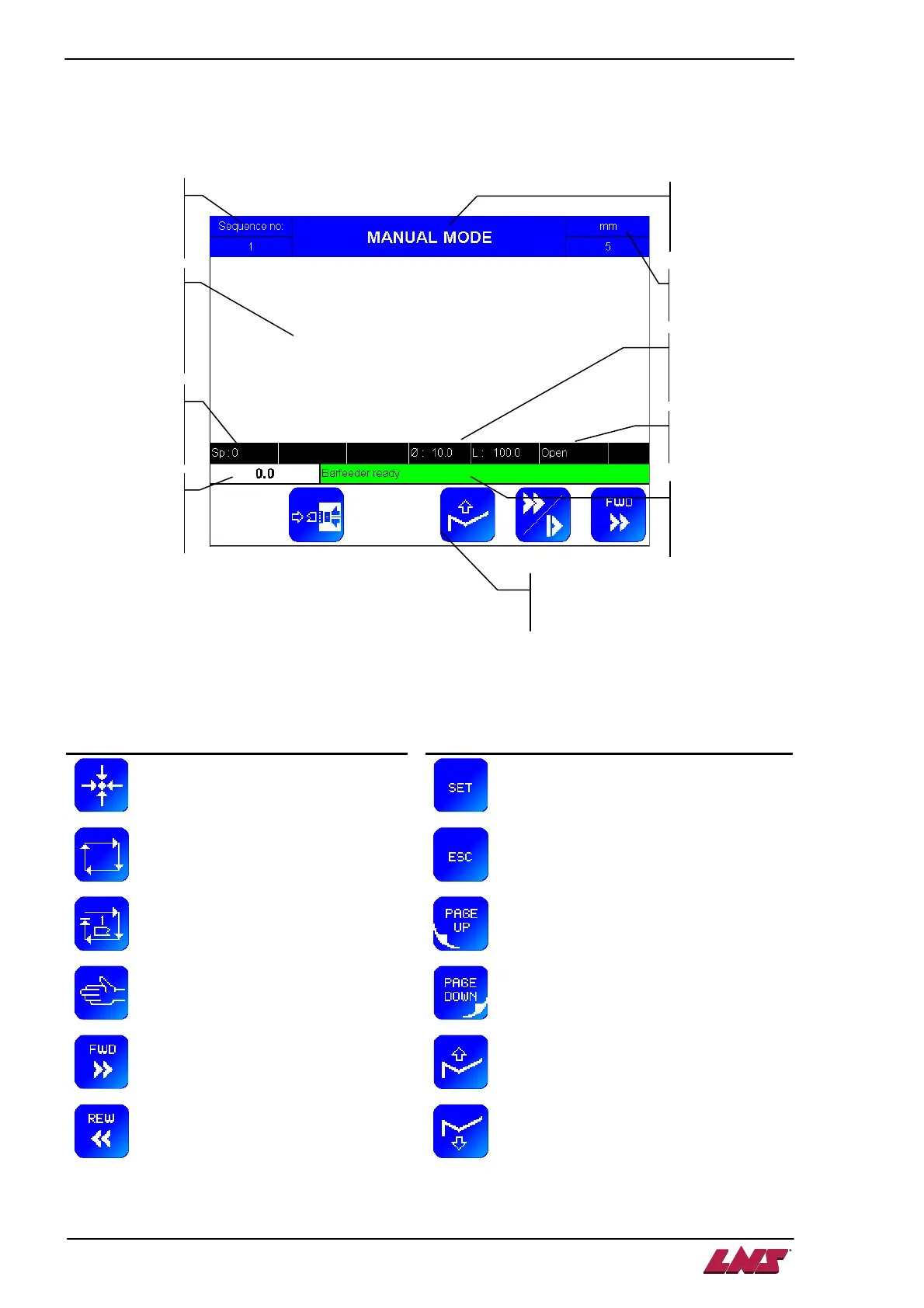
General aspect
The icons available are the following:
Icon Signification Icon Signification
Referencing position
Set a new value
Switch to automatic mode
Escape
Stop after machining one bar stock
Return to previous menu
Switch to manual mode
Jump to next menu
Pusher forward (picture may be
reversed)
Move the loading table up + load a new bar
into the loading table
Pusher reverse (picture may be
reversed)
Move the loading table down
Current
barfeed
sequence
Current status
or working
mode
Unit system
(mm or inch)
Clamping
device status
Bar diameter
and feedout
length
Information line
on current
action
Information
screen on
current
action or
mode
Current
torque
applied
Current
feeding axis
position
Available functions, depending on
the current situation













 To Next Page