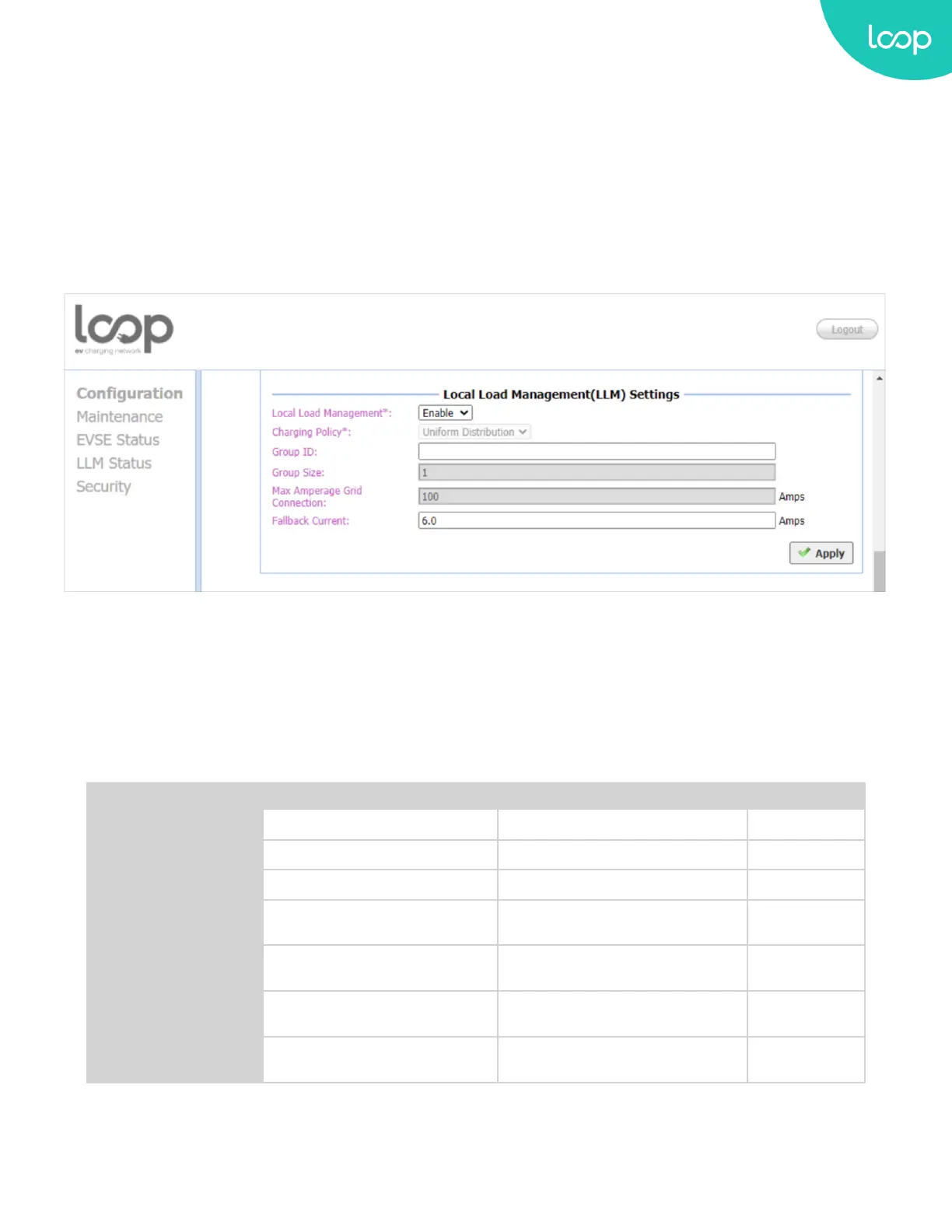
Local Load Management (LLM) Settings
Local Load Management is the process of balancing the supply of electricity on the network with the electrical load
by adjusting or controlling the load of each Loop EV-Flex EVSE in a local group which is based on Gateway/Client
architecture. The Gateway LOOP EV-Flex EVSE must be manually set to the maximum current limitations so that it
will dynamically adjust output current in each Client LOOP EV-Flex EVSE by charging policy.
When LLM function is on, all Loop EV-Flex EVSEs will request for charging to Gateway, and Gateway will calculate
the proper current limit and reply to each Client. Each Loop EV-Flex EVSE will only allow charging when received a
current limit from Gateway. If disconnection occurred between a Client and Gateway then the Client will use fallback
value as the limitation.
Local Load Management: Enable or disable Local Load Management function. This function can only be enabled in a
Gateway or Client Loop EV-Flex EVSE.
HINT: If user changes “Network Mode” setting, then related settings will also change automatically such as
“Connectivity”, “Local Load Management”.
The default value is as follow:
Direct Gateway Client
Gateway LAN IP Not Used Default Value, Not Changeable Not Used
Gateway LAN Port Not Used Default Value, Not Changeable Not Used
Max Group Number Not Used Default Value, Not Changeable Not Used
Group Use External
Gateway
Not Used Yes or No Yes or No
Gateway Serial
Number
Not Used Not Used Used
Connectivity Auto WiFi or Cellular
WiFi, Not
Changeable
Local Load
Management
Disable, Not Changeable Enable Enable
47
Loop EV-Flex
TM
EVSE
EVS-32A-L2-001 (R-Model)
v.20.9.4
www.evLoop.io


 To Next Page