
 Need help?
Do you have a question about the Luminex DMX8 MkII and is the answer not in the manual?
Details the warranty period and owner's responsibilities for product verification.
Instructions for packaging and marking returned product units or parts.
Specifies shipping responsibilities and costs for warranty returns.
Lists the included items for Ethernet-DMX8 MkII and Ethernet-DMX8/Truss MkII.
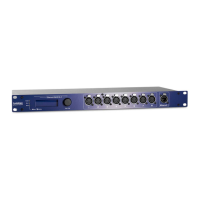
Overview of the Ethernet-DMX8 MkII, its protocols, and enclosure types.
Details the physical dimensions for both Ethernet-DMX8 MkII and Truss models.
Provides weight and details voltage, frequency, power, and fuse specifications.
Lists device connectors and specifies operating/storage temperature and humidity.
Diagram and description of rear panel connections, including Ethernet and DMX.
Information on power connection and purpose of punched holes.
Details the single Neutrik RJ45 Ethercon port for Ethernet link.
Details the PowerCon connector and 5-pin XLR DMX ports for the Truss model.
Details the LCD display, jog, Ethernet port, DMX outlets, and LEDs.
Specifies the front panel Ethernet port and 8 DMX output connectors.
Details the function of each pin for the 5-pin XLR DMX connectors.
Explains the function of LEDs for network link, activity, and power status.
Describes the rotating indication screens on the front panel display.
Shows the model, ID number, and firmware version of the node.
Displays virtual node network info and DMX port direction/mode.
Procedure to unlock the Web interface when password protected.
Steps to perform a factory reset using the front panel jog and power.
Guides on how to connect and access the device's web interface.
Details the information presented on the device's status page.
Instructions to configure individual node settings via the web interface.
Setup for DMX direction, protocol, universe, and mode for each outlet.
Configuration of IP address, Netmask, and Art-Net™ settings.
Setting short and long names for identifying the node on the network.
Settings for outlet direction, network protocol, and universe addressing.
Details available modes for Input and Output (Disabled, Normal, Merge, Zero).
Enabling/disabling RDM traffic and Adaptive Discovery for outlets.
Explains how to read the information displayed in the device status table.
Distinguishes between merging streams on a single device vs. across the network.
Descriptions of HTP, LTP, Backup, and Custom merging policies.
Setting up inputs for merging, including universe, offset, and policies.
Configuring backup time and auto-recover for input merging.
Detailed channel mapping and policy selection for custom input merging.
Setting channel offsets and ranges for merging policies.
Configuration for IP merging when outlets are set as inputs.
Configuration for IP merging when outlets are set as outputs.
Details HTP, LTP, and Custom policies for output IP merging.
Configuring IP sources, universes, and backup time for custom merging.
Detailed channel mapping and mode selection for custom output merging.
Remotely controlling merging policies via DMX trigger channels.
Configuring manual or auto recovery for backup modes.
Table mapping DMX values to recover actions for outputs and inputs.
Setting the IP address, Netmask, and Art-Net™ compliance.
Assigning short and long names to identify the node.
Setting device ID, enabling trigger universe, and recover channel.
Configuring DMX output timing parameters like frame rate and break time.
Setting how long output holds last DMX levels after no input.
Selecting message display and configuring front-end lock modes.
Configuring password protection for the front panel interface.
Storing, recalling, and deleting device configurations (profiles).
Capturing and managing lighting states for outlets.
Using Auto load, Capture, Execute, and Edit functions for snapshots.
Interface for editing static DMX values for snapshots.
Accessing the page to execute or recall saved snapshots.
Steps to download and extract firmware files from Luminex website.
Process of selecting and uploading firmware files via web browser.
Steps after upgrade: reboot, LED status, and version check.
Resolving issues with Power/OK LED blinking or link/activity LEDs.
Steps to resolve problems reaching the device's web interface.
Links to additional documentation available on the Luminex website.
Information on Art-Net™ trademark and copyright.
 General
| DMX Ports | 8 |
|---|---|
| Ethernet Ports | 1 |
| Power Supply | 100-240V AC, 50/60Hz |
| Weight | 3.2 kg |
| Protocols | DMX512 |
| Mounting | Rackmount |
| Operating Temperature | 0 to 40 °C |
| Storage Temperature | -20°C to 60°C (-4°F to 140°F) |
| Humidity | 0 to 95% non-condensing |

 To Next Page