Page 36 of 60
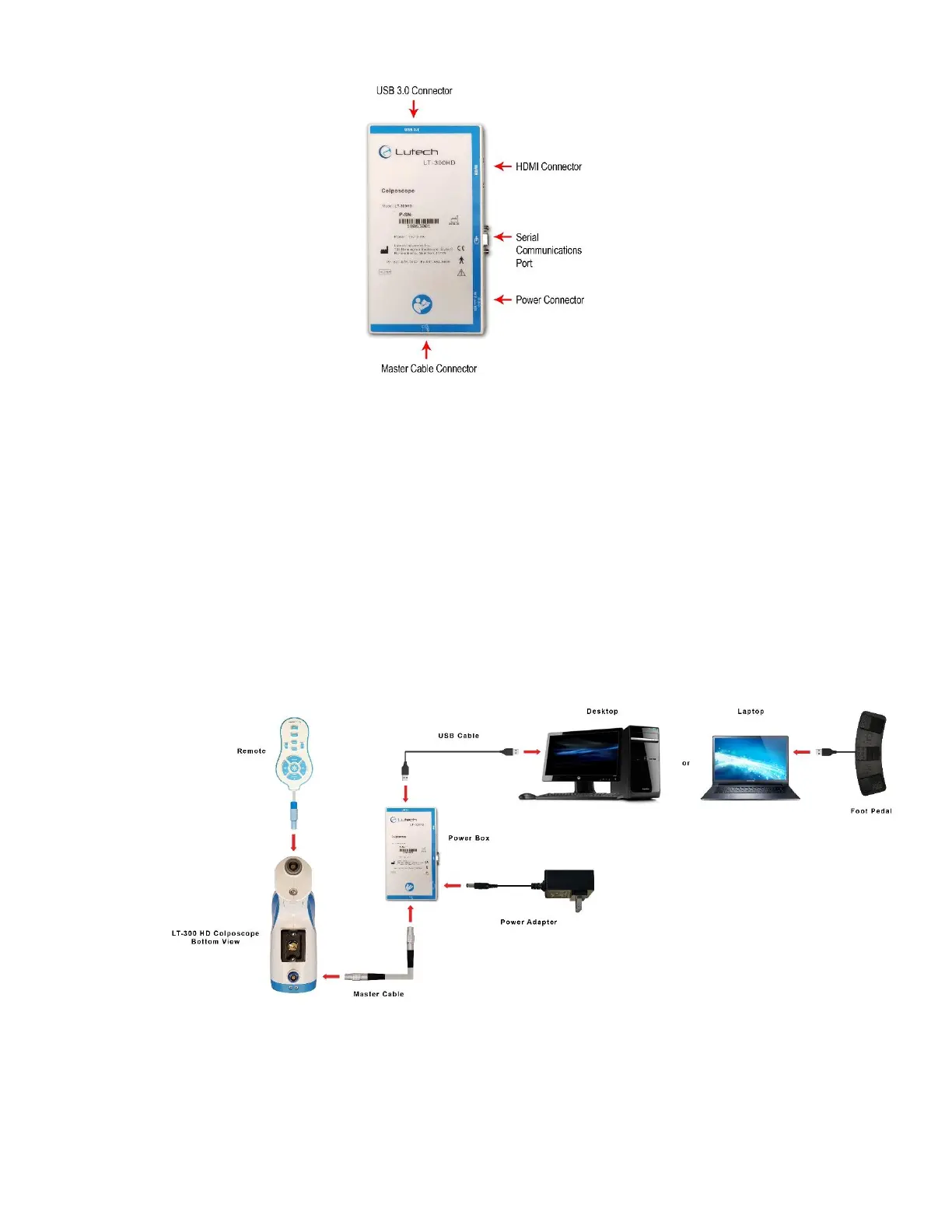
Diagram 4.2-1
To connect the LT-300 HD colposcope to a computer, follow the steps below.
1. Make sure the colposcope is turned off.
2. Depending on the workstation environment you have, you may or may not need to turn off the computer or
system. Please ask your EMR or Telemedicine representative for more information if you are unsure.
3. Connect the USB cable provided with the colposcope to the power box. Connect the other end to the
computer.
4. Connect the USB connector from the foot pedal to the computer.
5. Connect the colposcope’s power adapter to the power box and then plug the power adapter into a wall
socket.
6. Turn the colposcope on by pressing the power button located on top of the mini LCD screen.
The colposcope is now connected to the computer and is ready for use.
The following is a diagram of the connections:
Diagram 4.2-2
CAUTION:
• Do not disconnect from AC power without first turning the camera and the power box off or you may damage the
camera or power box components.
• Do not disconnect any cables without first turning the camera and the power box off or you may damage the
camera or power box components.



 To Next Page